
Pinssaver vs Shrinkpad
Side-by-side comparison to help you choose the right product.

Pinssaver
Pinssaver is a free tool that downloads Pinterest videos, images, and GIFs in high quality without watermarks.
Last updated: February 28, 2026

Shrinkpad
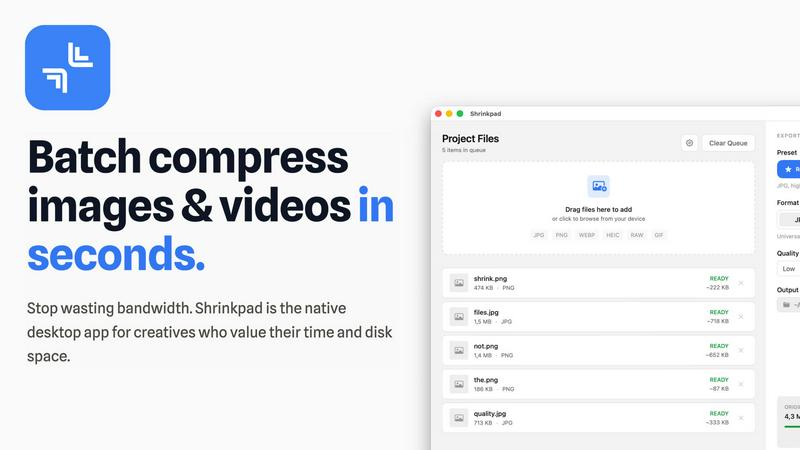
Effortlessly batch compress images and videos on your Mac to save time and optimize storage with Shrinkpad.
Last updated: February 28, 2026
Visual Comparison
Pinssaver

Shrinkpad
Feature Comparison
Pinssaver
Multi-Format Content Downloader
Pinssaver is not limited to a single media type; it is a comprehensive download solution capable of handling videos, static images, and animated GIFs from Pinterest. This versatility ensures that regardless of the format of the inspirational content—be it a step-by-step tutorial video, a high-resolution photograph, or a short looping animation—users can save it with equal ease. The system intelligently parses the provided Pinterest URL to identify and present all available media formats for download, providing a one-stop solution for all Pinterest content preservation needs.
High-Definition & 4K Resolution Support
A cornerstone feature of Pinssaver is its ability to extract and download content in the highest quality available from the source. For videos, this includes standard definition, HD (720p), Full HD (1080p), 2K, and even 4K Ultra HD resolutions, provided they are supported by the original pin. For images, the tool retrieves the maximum resolution version. This ensures that downloaded content retains its visual integrity and detail, which is critical for professional use cases like design reference, mood boarding, or offline presentation, where pixelation or compression artifacts are unacceptable.
Watermark-Free & Pristine Output
Unlike many online downloaders that impose intrusive watermarks, logos, or branding onto downloaded files, Pinssaver delivers clean, original content. The files saved to the user's device are exact digital replicas of the media hosted on Pinterest, with no alterations, additions, or quality degradation. This feature is particularly vital for creators who wish to study composition and technique without visual distractions or for individuals building personal collections where authenticity and clarity are paramount.
Cross-Platform & Browser Compatibility
Pinssaver operates entirely within a web browser, eliminating the need for platform-specific software downloads or installations. It is fully optimized and responsive, providing an identical, smooth experience across all major operating systems (Windows, macOS, Android, iOS) and web browsers (Chrome, Safari, Firefox, Edge). Whether accessing the service from a desktop computer, a tablet, or a smartphone, the interface adapts flawlessly, and the download functionality remains consistently reliable and fast.
About Shrinkpad
Automatic Compression Ratio Adjustment
Shrinkpad utilizes advanced algorithms to automatically analyze the visual complexity of images and videos, applying the optimal compression ratio without introducing artifacts. This feature ensures that users achieve high-quality results, making it ideal for preserving visual integrity while significantly reducing file sizes.
Unlimited Batching Capability
With Shrinkpad, users can process thousands of media files simultaneously without crashing or slowing down. Unlike online tools that may limit batch sizes, Shrinkpad's robust architecture allows for massive queues, enabling users to handle extensive projects efficiently and effectively.
Folder Mode for Convenience
The Folder Mode feature allows users to drag and drop entire folders onto Shrinkpad, where the application automatically detects and processes all supported media files within. This removes the hassle of manually selecting files one by one, streamlining the workflow and saving time for busy professionals.
Privacy-Focused Local Processing
Shrinkpad prioritizes user privacy by ensuring that all processing occurs locally on the user's machine. This means that sensitive assets remain on the device, eliminating any concerns about cloud uploads or data breaches, which is especially crucial for creative professionals handling proprietary content.
Use Cases
Pinssaver
Creative Research and Mood Board Curation
Professional designers, artists, and architects frequently use Pinterest to gather visual inspiration for projects. Pinssaver allows them to download high-quality images and videos to compile into offline mood boards, client presentations, or personal reference libraries. This enables deeper analysis of color palettes, textures, styles, and trends without being constrained by internet connectivity or the ephemeral nature of online pinboards, streamlining the creative development process.
Educational Content Archiving
Students, instructors, and DIY enthusiasts often find valuable tutorial videos, infographics, and instructional guides on Pinterest. Pinssaver empowers users to download these educational resources for offline viewing, enabling learning in environments without reliable internet access. This is ideal for saving cooking tutorials, craft instructions, academic concepts, or fitness routines to a personal device for repeated, convenient reference during hands-on practice or study sessions.
Content Creator Reference Library
Bloggers, social media influencers, and digital marketers use Pinterest for trend spotting and content ideation. Pinssaver facilitates the creation of a private, organized archive of competitor content, viral video formats, and design inspirations. By downloading these assets, creators can analyze successful content strategies, draw inspiration for their own productions, and maintain a repository of ideas without violating platform terms by directly re-uploading others' work.
Offline Entertainment and Personal Collection
Casual users who discover entertaining videos, beautiful photography, or humorous GIFs on Pinterest may wish to save them for personal enjoyment. Pinssaver provides a simple method to build a personalized media collection on a phone or computer for viewing during travel, commuting, or in areas with poor network coverage. This use case transforms Pinterest from a purely streaming platform into a source of personally curated, permanently accessible entertainment.
Shrinkpad
Optimizing Digital Asset Management
Photographers and designers can utilize Shrinkpad to optimize their digital asset management workflows by batch compressing images and videos for use in portfolios and websites. By reducing file sizes, they can enhance loading times and overall user experience on their platforms.
Streamlining Social Media Content Creation
Content creators can leverage Shrinkpad to prepare images and videos for social media by quickly compressing media files to meet platform requirements without sacrificing quality. This allows for faster uploads and better engagement with audiences, enhancing their social media presence.
Enhancing Website Performance
Web developers can benefit from using Shrinkpad to compress images and videos before uploading them to websites. By reducing file sizes, developers can significantly decrease loading times, leading to improved Core Web Vitals and overall site performance, which is crucial for SEO.
Facilitating Efficient Team Collaboration
For teams working on design projects, Shrinkpad provides a way to compress shared media files for collaborative use. By allowing team members to quickly process and optimize assets, it fosters smoother collaboration and ensures that all members are working with the most efficient file versions available.
Overview
About Pinssaver
Pinssaver is a sophisticated, web-based utility engineered to facilitate the seamless downloading of multimedia content from Pinterest. It functions as a dedicated Pinterest video, image, and GIF downloader, enabling users to archive and curate digital inspiration directly onto their personal devices. The tool is meticulously designed for a broad spectrum of users, ranging from casual Pinterest browsers and hobbyists to professional content creators, designers, marketers, and educators who utilize Pinterest as a source of visual reference and inspiration. Its core value proposition lies in its ability to bypass Pinterest's inherent limitation of online-only viewing, offering a permanent, high-fidelity copy of any pin. Pinssaver distinguishes itself through an uncompromising commitment to a frictionless user experience, characterized by a minimalist interface, rapid processing speeds, and the delivery of content in the highest available quality—including 1080p, 2K, and 4K resolutions—entirely free of watermarks or embedded branding. This combination of power, simplicity, and accessibility makes Pinssaver an indispensable tool for anyone looking to build a personal digital library of creative assets from one of the world's largest visual discovery platforms.
About Shrinkpad
Shrinkpad is a sophisticated batch compression tool meticulously crafted for macOS users who seek an efficient and reliable method to compress images and videos without sacrificing quality. Designed with photographers, designers, content creators, and everyday users in mind, Shrinkpad enables users to manage their media files more effectively by achieving file size reductions of up to 90%. The application processes files locally, guaranteeing user privacy by ensuring that no files are uploaded to the cloud. With a simple drag-and-drop interface, users can compress hundreds of files or entire folders in mere seconds. Shrinkpad supports over 50 file formats, making it a versatile solution for diverse media types, and its user-friendly interface includes both quick compression presets and detailed settings for advanced users. By utilizing Shrinkpad, users can reclaim valuable disk space, streamline their asset management processes, and improve their workflow efficiency, all while maintaining the highest standards of media quality.
Frequently Asked Questions
Pinssaver FAQ
Is Pinssaver completely free to use?
Yes, Pinssaver is entirely free to use. There are no hidden fees, subscription models, or premium tiers that limit functionality. Users can download an unlimited number of videos, images, and GIFs from Pinterest without any cost, and the service is committed to remaining free. The platform is supported without compromising on core features like high-quality downloads or the watermark-free guarantee.
How does Pinssaver ensure user privacy and safety?
Pinssaver is built with a strong privacy-first philosophy. The service does not require users to create an account, log in, or provide any personal information. It does not track user activity, store download histories, or retain the Pinterest links submitted after processing. Furthermore, it never asks for Pinterest login credentials. All processing is performed securely in real-time, and users maintain complete control over their data and downloads.
On which devices and browsers does Pinssaver work?
Pinssaver is a web-based tool with universal compatibility. It works seamlessly on all devices, including smartphones (iPhone, Android), tablets (iPad, Android tablets), and desktop computers (Windows PC, Mac). It is fully functional on all modern web browsers such as Google Chrome, Mozilla Firefox, Apple Safari, and Microsoft Edge. The responsive design ensures the interface is intuitive and easy to use regardless of screen size.
Are there any copyright restrictions I should be aware of?
Yes, it is crucial to understand that copyright for all content remains with the original creator or copyright holder. Pinssaver is a tool for personal, offline use and inspiration. Users must respect intellectual property laws and Pinterest's terms of service. Downloaded content should not be redistributed, claimed as your own, or used for commercial purposes without explicit permission from the copyright owner. The tool is intended for ethical archiving and reference.
Shrinkpad FAQ
Can I use Shrinkpad for free?
Yes, Shrinkpad offers a Free Starter plan that provides essential tools for casual users. This plan includes standard compression features with a limit of 10 files per batch, making it suitable for those who need basic functionality without a financial commitment.
What file formats does Shrinkpad support?
Shrinkpad supports over 50 file formats, including popular image formats such as JPG, PNG, WEBP, and AVIF, as well as video formats like MP4 and MOV. This extensive compatibility makes it a versatile tool for handling various media types.
Does Shrinkpad support video compression?
Absolutely, Shrinkpad includes robust video compression capabilities, allowing users to optimize video files alongside images. This feature ensures that both images and videos can be efficiently compressed, making it ideal for multimedia projects.
How many files can I process at once?
Shrinkpad's unlimited batching capability allows users to process thousands of files simultaneously. This feature is particularly advantageous for professionals who need to handle large volumes of media files without worrying about crashes or performance issues.
Alternatives
Pinssaver Alternatives
Pinssaver is a free online tool within the social media utility category, specifically designed for downloading videos, images, and GIFs from Pinterest. It enables users to save content in high resolutions for offline access, serving as a convenient resource for personal archiving and creative projects. Users often seek alternatives to tools like Pinssaver for various reasons. These can include the need for different feature sets, such as batch downloading or integration with other platforms, concerns about long-term pricing models if a free tool introduces fees, or a preference for downloadable software over a web-based service. Specific device compatibility or a desire for more advanced editing options post-download can also drive the search for other solutions. When evaluating an alternative, key considerations should include the tool's core functionality and supported content types, its pricing structure and any potential limitations, the quality and formats of downloads offered, and overall ease of use. Security and privacy practices are also paramount, as is reliable customer support and the tool's reputation within the user community.
Shrinkpad Alternatives
Shrinkpad is an advanced batch compression tool designed specifically for macOS users, enabling them to compress images and videos without sacrificing quality. It is particularly beneficial for photographers, designers, content creators, and everyday users who need an efficient way to manage large media files and optimize disk space. With its ability to reduce file sizes by up to 90%, Shrinkpad stands out in the image and video processing category. Users often seek alternatives to Shrinkpad for various reasons, including pricing, differing feature sets, or specific platform compatibility needs. Some may prefer options that cater to additional operating systems or offer unique functionalities that better fit their workflows. When choosing an alternative, users should consider factors such as batch processing capabilities, local versus cloud processing, supported file formats, and customization options to ensure they select a solution that meets their individual requirements.