
Shrinkpad vs Skene
Side-by-side comparison to help you choose the right product.

Shrinkpad
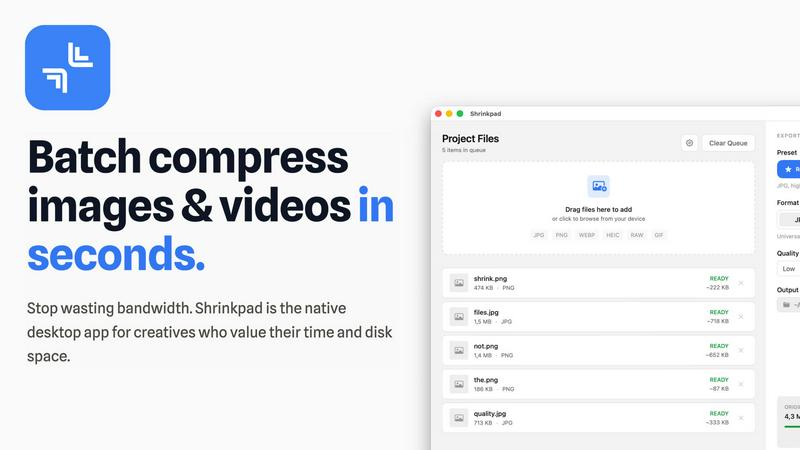
Effortlessly batch compress images and videos on your Mac to save time and optimize storage with Shrinkpad.
Last updated: February 28, 2026

Skene embeds product-led growth directly into your codebase, automating onboarding and retention.
Last updated: February 28, 2026
Visual Comparison
Shrinkpad
Skene

Feature Comparison
Shrinkpad
Automatic Compression Ratio Adjustment
Shrinkpad utilizes advanced algorithms to automatically analyze the visual complexity of images and videos, applying the optimal compression ratio without introducing artifacts. This feature ensures that users achieve high-quality results, making it ideal for preserving visual integrity while significantly reducing file sizes.
Unlimited Batching Capability
With Shrinkpad, users can process thousands of media files simultaneously without crashing or slowing down. Unlike online tools that may limit batch sizes, Shrinkpad's robust architecture allows for massive queues, enabling users to handle extensive projects efficiently and effectively.
Folder Mode for Convenience
The Folder Mode feature allows users to drag and drop entire folders onto Shrinkpad, where the application automatically detects and processes all supported media files within. This removes the hassle of manually selecting files one by one, streamlining the workflow and saving time for busy professionals.
Privacy-Focused Local Processing
Shrinkpad prioritizes user privacy by ensuring that all processing occurs locally on the user's machine. This means that sensitive assets remain on the device, eliminating any concerns about cloud uploads or data breaches, which is especially crucial for creative professionals handling proprietary content.
About Skene
Codebase-Derived Growth Signals
Skene performs a deep analysis of your application's source code to automatically identify and extract meaningful growth signals. Instead of relying on manually instrumented events or external analytics snippets, it scans the repository structure, framework, and code patterns to detect user interaction points, potential activation opportunities, and friction areas. This creates a foundational "growth manifest" that serves as a precise, always-up-to-date context layer, ensuring that all growth automation is built upon a real-time understanding of how the product actually works.
Prompt-Driven Growth Implementation
The platform enables a revolutionary workflow where growth loops and optimizations are designed and executed through natural language prompts within the developer's IDE, such as Cursor. Developers or their AI agents can instruct Skene to analyze bottlenecks, generate improved user flows, or implement specific onboarding steps. This shifts the paradigm from managing disparate SaaS dashboards and widgets to shipping growth iterations with the same agility and ownership as feature development, directly within the codebase.
Autonomous PLG Flow Generation & Testing
Skene functions as a self-learning growth engine. By continuously monitoring user interactions against the insights from the codebase, it can autonomously create, A/B test, and deploy optimized user journeys. It detects activation drop-offs and friction points, then experiments with improved configurations, measures their impact on key metrics like completion rates, and deploys the most effective versions. This automates the entire cycle of growth iteration without requiring manual intervention from a dedicated team.
Owned & Version-Controlled Growth Infrastructure
A fundamental differentiator of Skene is that it operates as owned infrastructure, not a third-party service. The growth logic, analytics, and automation become part of your codebase, fully version-controlled and integrated into your standard development lifecycle. This eliminates the risks of broken UI overlays after deploys, performance degradation from external scripts, and data silos. Growth logic updates seamlessly whenever you push code, and all data remains within your ecosystem.
Use Cases
Shrinkpad
Optimizing Digital Asset Management
Photographers and designers can utilize Shrinkpad to optimize their digital asset management workflows by batch compressing images and videos for use in portfolios and websites. By reducing file sizes, they can enhance loading times and overall user experience on their platforms.
Streamlining Social Media Content Creation
Content creators can leverage Shrinkpad to prepare images and videos for social media by quickly compressing media files to meet platform requirements without sacrificing quality. This allows for faster uploads and better engagement with audiences, enhancing their social media presence.
Enhancing Website Performance
Web developers can benefit from using Shrinkpad to compress images and videos before uploading them to websites. By reducing file sizes, developers can significantly decrease loading times, leading to improved Core Web Vitals and overall site performance, which is crucial for SEO.
Facilitating Efficient Team Collaboration
For teams working on design projects, Shrinkpad provides a way to compress shared media files for collaborative use. By allowing team members to quickly process and optimize assets, it fosters smoother collaboration and ensures that all members are working with the most efficient file versions available.
Skene
Automated Onboarding Optimization for Early-Stage Startups
Indie developers and startups with limited resources can use Skene to completely automate their user onboarding process. By connecting their repository, Skene analyzes the code to understand key activation milestones, then automatically generates and iterates on in-app guidance, tutorial flows, and welcome sequences. This ensures new users consistently find value without the startup needing to build or manually maintain a complex onboarding system.
AI-Agent Managed Growth Operations
Engineering teams can integrate Skene's context layer into their AI development workflows. An AI agent, equipped with the insights from Skene's codebase analysis, can be prompted to audit the user journey, identify the top friction point, and implement a fix—all autonomously. This use case allows for fully automated, continuous growth optimization where the AI handles routine iteration, freeing human developers for more complex tasks.
Replacing Legacy Growth & Analytics Stacks
Companies frustrated with a fragmented stack of analytics tools, survey widgets, and intercom-style messengers can use Skene as a unified replacement. It consolidates signal detection, analytics, and lifecycle automation into a single, code-native system. This eliminates the maintenance burden, data disjointedness, and performance overhead associated with managing multiple external SaaS tools and snippets.
Data-Driven Retention and Churn Prevention
Product teams can leverage Skene to strengthen user retention systematically. The platform continuously analyzes user behavior patterns against the codebase to identify signals of potential churn, such as failed feature adoption or support ticket patterns. It can then automatically trigger personalized in-app messages, re-engagement flows, or feature recommendation prompts to proactively address issues and increase customer lifetime value (LTV).
Overview
About Shrinkpad
Shrinkpad is a sophisticated batch compression tool meticulously crafted for macOS users who seek an efficient and reliable method to compress images and videos without sacrificing quality. Designed with photographers, designers, content creators, and everyday users in mind, Shrinkpad enables users to manage their media files more effectively by achieving file size reductions of up to 90%. The application processes files locally, guaranteeing user privacy by ensuring that no files are uploaded to the cloud. With a simple drag-and-drop interface, users can compress hundreds of files or entire folders in mere seconds. Shrinkpad supports over 50 file formats, making it a versatile solution for diverse media types, and its user-friendly interface includes both quick compression presets and detailed settings for advanced users. By utilizing Shrinkpad, users can reclaim valuable disk space, streamline their asset management processes, and improve their workflow efficiency, all while maintaining the highest standards of media quality.
About Skene
Skene is a revolutionary, AI-powered Product-Led Growth (PLG) infrastructure engineered to automate the growth iteration process for software products. It is specifically designed for indie developers, early-stage startups, and engineering teams who lack dedicated growth resources. Skene's core value proposition is transforming growth from a manual, tool-stack-dependent chore into an owned, code-first infrastructure. Unlike traditional third-party tools that operate as external "black boxes" with performance-impacting snippets and siloed data, Skene integrates directly with a product's codebase and IDE. It analyzes the source code to automatically derive growth signals, identify friction points in user journeys (like onboarding drop-offs), and generate context for AI agents to implement optimizations. This allows products to autonomously evolve their activation, onboarding, and retention flows. By treating growth as programmable infrastructure, Skene enables developers to offload growth-related tasks, ship data-driven improvements through simple prompts, and focus on core product development, all while maintaining full ownership, performance, and integration with their existing workflow.
Frequently Asked Questions
Shrinkpad FAQ
Can I use Shrinkpad for free?
Yes, Shrinkpad offers a Free Starter plan that provides essential tools for casual users. This plan includes standard compression features with a limit of 10 files per batch, making it suitable for those who need basic functionality without a financial commitment.
What file formats does Shrinkpad support?
Shrinkpad supports over 50 file formats, including popular image formats such as JPG, PNG, WEBP, and AVIF, as well as video formats like MP4 and MOV. This extensive compatibility makes it a versatile tool for handling various media types.
Does Shrinkpad support video compression?
Absolutely, Shrinkpad includes robust video compression capabilities, allowing users to optimize video files alongside images. This feature ensures that both images and videos can be efficiently compressed, making it ideal for multimedia projects.
How many files can I process at once?
Shrinkpad's unlimited batching capability allows users to process thousands of files simultaneously. This feature is particularly advantageous for professionals who need to handle large volumes of media files without worrying about crashes or performance issues.
Skene FAQ
What is PLG software?
Product-Led Growth (PLG) software is a category of tools designed to help users discover, adopt, and derive value from a product primarily through their direct interaction with the product itself, rather than through manual intervention from sales or customer success teams. It automates key aspects of the user journey, such as onboarding, feature adoption, and retention, using the product as the primary vehicle for growth, guidance, and user education.
How is Skene different from traditional customer experience software?
Traditional customer experience tools (like walkthrough builders or survey tools) are typically external services that require manual, rule-based configuration of UI overlays and tours. These are often brittle, breaking with every code deployment, and create data silos. Skene is fundamentally different: it reads your actual codebase to automatically understand your product and generate context-aware growth flows. It is an owned infrastructure that updates automatically with your code, is fully programmable, and operates without fragile external snippets.
How long does it take to set up?
Setup is designed to be exceptionally fast, taking less than 60 seconds. The primary step involves connecting your GitHub or GitLab repository with read-only access. Once connected, Skene automatically begins analyzing your codebase to generate the initial growth manifest and identify PLG opportunities. No initial code changes, API integrations, or complex configuration is required to get started.
Is my code secure?
Yes, security is a core principle. Skene only requires read-only access to your repository for analysis purposes. All code analysis is performed within a secure, isolated environment. Crucially, because Skene promotes an "owned infrastructure" model, the resulting growth logic and analytics are implemented within your own codebase and systems, meaning your user data and business logic never need to be sent to or stored on an external platform.
Alternatives
Shrinkpad Alternatives
Shrinkpad is an advanced batch compression tool designed specifically for macOS users, enabling them to compress images and videos without sacrificing quality. It is particularly beneficial for photographers, designers, content creators, and everyday users who need an efficient way to manage large media files and optimize disk space. With its ability to reduce file sizes by up to 90%, Shrinkpad stands out in the image and video processing category. Users often seek alternatives to Shrinkpad for various reasons, including pricing, differing feature sets, or specific platform compatibility needs. Some may prefer options that cater to additional operating systems or offer unique functionalities that better fit their workflows. When choosing an alternative, users should consider factors such as batch processing capabilities, local versus cloud processing, supported file formats, and customization options to ensure they select a solution that meets their individual requirements.
Skene Alternatives
Skene is an automated Product-Led Growth (PLG) iteration engine within the productivity and management software category. It is designed to autonomously optimize user onboarding, activation, and retention by analyzing codebase-driven insights and user interactions, making it a powerful tool for indie developers and resource-constrained startups. Users may explore alternatives to Skene for various reasons, including budgetary constraints, specific feature requirements not covered by its automated approach, or a need for platforms that integrate with a different set of existing tools. Some may seek solutions with more manual control or those that cater to larger, established teams with dedicated growth personnel. When evaluating an alternative, key considerations should include the platform's core methodology for driving growth, its integration depth with your development stack, the level of automation versus manual control offered, and the transparency and actionability of its analytics. The ideal solution should align with your team's technical capabilities and strategic growth objectives without compromising product performance.