
SureThing.io vs TinyFast
Side-by-side comparison to help you choose the right product.

SureThing.io
SureThing.io is a secure autonomous business management tool that learns your preferences and works efficiently while you sleep.
Last updated: March 19, 2026

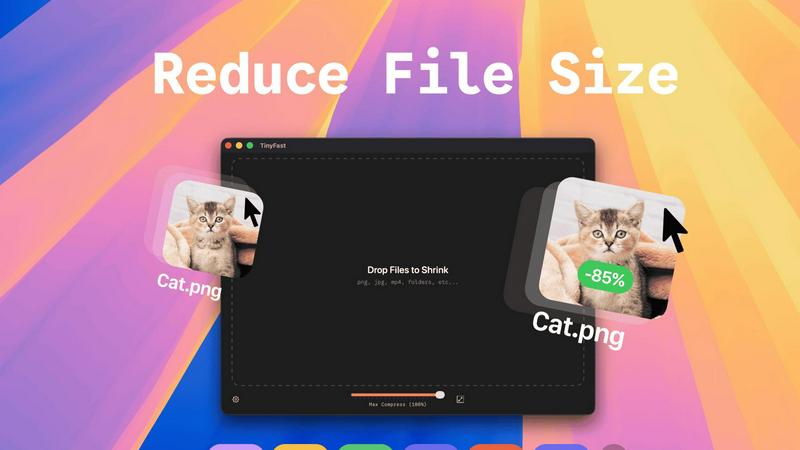
Compress images, videos, and PDFs effortlessly on your Mac with TinyFast for fast, local, and private optimization.
Last updated: February 28, 2026
Visual Comparison
SureThing.io

TinyFast
Feature Comparison
SureThing.io
Proactive Task Management
SureThing actively monitors your communications and responsibilities, preemptively acting on your behalf. It drafts responses, manages your calendar, and ensures that no task falls through the cracks, allowing you to focus on larger projects without distraction.
State-of-the-Art Agentic Memory
This feature enables SureThing to retain detailed information about your specific preferences, goals, and communication style over time. The longer you use it, the more personalized its responses become, minimizing the need for repetitive instructions and maximizing efficiency.
Secure and Compliant Operations
SureThing operates under stringent security protocols, being SOC 2 certified and Google CASA Tier 2 compliant. This assures users that their data is handled responsibly and securely, making it suitable for enterprise-level applications and sensitive information management.
Cross-Application Functionality
SureThing integrates seamlessly with various applications you already use, allowing it to execute tasks across platforms. This interconnectedness enhances its ability to streamline workflows, ensuring that actions taken in one app reflect in others, creating a cohesive operational environment.
About TinyFast
Batch & Drag-Drop Shrink
This feature allows users to compress entire folders of files simultaneously, streamlining the workflow significantly. With just a simple drag-and-drop action, users can quickly get optimized outputs in mere seconds, saving both time and effort.
Blazing-Fast Compression
TinyFast utilizes optimized native engines designed for speed, enabling users to shrink large files in seconds. This feature eliminates the waiting times typically associated with uploading and downloading files in online compression tools, providing users with instant results.
Resize Resolution
For image and video files, TinyFast offers an automatic resizing option that allows users to set preferred resolutions. This capability ensures that the output files are not just smaller, but also tailored to specific size requirements, enhancing usability across various platforms.
100% Local & Private
TinyFast is designed with user privacy as a top priority. All files remain on the user's device, ensuring that there are no uploads to cloud servers. This feature is particularly beneficial for professionals handling sensitive or confidential information, as it guarantees total privacy by design.
Use Cases
SureThing.io
Efficient Email Management
For busy professionals inundated with emails, SureThing can sift through messages, prioritize important communications, and draft replies in your voice. This saves time and reduces the cognitive load of constant email management.
Project Coordination for Teams
In team environments, SureThing can track ongoing projects, monitor deadlines, and remind team members of their responsibilities. Its ability to maintain context across conversations ensures that everyone remains aligned on project goals.
Solo Entrepreneurship
Solo founders can leverage SureThing to manage the entirety of their go-to-market strategy. By handling scheduling, communications, and task management, it empowers entrepreneurs to focus on strategic decision-making rather than day-to-day operations.
Continuous Learning and Adaptation
As SureThing learns from your interactions, it becomes increasingly adept at anticipating your needs. This makes it a powerful ally for anyone looking to enhance their productivity, as it evolves continuously to support your unique working style.
TinyFast
Graphic Design Projects
Graphic designers can use TinyFast to compress high-resolution images and vector files before including them in their projects. This ensures that the final artwork is optimized for faster loading times on websites without sacrificing quality.
Video Production
For video editors, TinyFast provides an efficient way to compress large video files for easier sharing and uploading. By quickly resizing and optimizing these files, editors can streamline their workflow and enhance collaboration with team members.
Document Preparation
TinyFast is an excellent tool for professionals who frequently work with large PDF or document files. By compressing these documents, users can ensure that email attachments remain manageable in size and accessible for recipients without losing important content.
Web Development
Web developers can benefit from TinyFast by compressing images and other assets before deploying them to websites. This practice optimizes the performance of web pages, contributing to faster loading times and a better user experience.
Overview
About SureThing.io
SureThing.io is an innovative autonomous AI agent designed to enhance productivity by operating continuously on your behalf, 24/7. Unlike traditional AI chatbots that require user prompts to initiate actions, SureThing takes a proactive approach, seamlessly managing tasks such as monitoring your inbox, drafting responses in your unique voice, organizing your schedule, and tracking ongoing projects. This ensures that you can concentrate on higher-level strategies while SureThing handles routine tasks. Its standout feature is its persistent memory capability, which allows it to remember your preferences, communication style, and goals over time. This depth of memory means that the longer you use SureThing, the less you need to reiterate your needs, as it continuously adapts to your workflow. Designed for reliability and security, SureThing is SOC 2 certified and Google CASA Tier 2 compliant, making it a trustworthy option for professionals who require a dependable virtual assistant for serious work. Early adopters, including seasoned tech professionals and solo entrepreneurs, have praised its effectiveness, likening it to "the Mac of AI agents," reflecting its user-friendly design and robust functionality.
About TinyFast
TinyFast is a cutting-edge macOS application designed for users who need to efficiently compress various file types including images, videos, and documents. This innovative tool is tailored for developers, designers, and content creators who value speed, privacy, and ease of use. Unlike online compression tools that require users to upload their files to external servers, TinyFast operates entirely on local machines, ensuring that sensitive data remains secure. The application's intuitive drag-and-drop interface allows users to quickly compress files; simply drag a file into the app to start the process and drag it out to retrieve the optimized version. With support for over 500 file types, TinyFast stands out in the market for its ability to deliver high-quality results in a fraction of the time typically required by traditional methods. By prioritizing user privacy and efficiency, TinyFast provides an essential solution for anyone working with large files on a regular basis.
Frequently Asked Questions
SureThing.io FAQ
How does SureThing.io remember my preferences?
SureThing utilizes advanced memory algorithms to store and recall your preferences, communication style, and goals. This allows it to provide personalized assistance, adapting over time to better suit your needs.
Is SureThing secure for sensitive business information?
Yes, SureThing is SOC 2 certified and compliant with Google CASA Tier 2 standards, ensuring that your data is handled with the highest level of security and compliance.
Can SureThing integrate with other applications I use?
Absolutely. SureThing is designed to work across various platforms and applications, allowing for seamless task execution and information sharing, which enhances overall productivity.
What types of users can benefit from SureThing?
SureThing is ideal for a wide range of users, including busy professionals, team leaders, solo entrepreneurs, and anyone seeking to streamline their workload. Its capabilities are particularly beneficial for those who require reliable assistance in managing complex tasks.
TinyFast FAQ
What types of files can I compress with TinyFast?
TinyFast supports a wide range of file types, including images (PNG, JPEG, GIF), videos (MP4, MOV), documents (PDF, DOCX), audio (MP3), and even code files (JS, CSS, JSON). This versatility makes it suitable for various professional needs.
Is TinyFast really free?
TinyFast offers a free plan that allows users to compress up to 5 files per day. This plan provides access to all features, making it a great option for casual users or those who need occasional file compression.
How does TinyFast ensure privacy?
TinyFast operates entirely on the user's local machine, meaning that files never leave the device. There are no uploads to external servers, which significantly reduces the risk of data breaches and ensures that confidential files remain secure.
Can I resize images and videos automatically?
Yes, TinyFast includes a resolution resizing feature that allows users to set preferred sizes for images and videos. This feature is particularly useful for optimizing media for specific platforms or applications where file dimensions matter.
Alternatives
SureThing.io Alternatives
SureThing.io is a fully autonomous business management tool designed to operate on behalf of its users. As an AI agent, it proactively manages tasks such as email responses, scheduling, project tracking, and app integration, providing a seamless workflow experience. Users often seek alternatives to SureThing due to various reasons, including pricing concerns, the need for specific features, or compatibility with different platforms. When exploring alternatives, it is essential to consider factors such as user-friendliness, the level of automation provided, integration capabilities, and the overall reliability of the service. Choosing the right alternative can significantly impact productivity and efficiency. It is crucial to evaluate how well the alternative aligns with your unique work style and requirements. Features like persistent memory, adaptability, and security certifications are important aspects to consider, as they can enhance the effectiveness of an AI business management agent. A thorough comparison of available options can help users find a solution that meets their needs without compromising on trust and functionality.
TinyFast Alternatives
TinyFast is an advanced macOS application that falls into the category of file compression tools. It specializes in efficiently compressing a variety of file types, including images, videos, and documents, directly on users' local machines. This ability to keep operations local ensures that sensitive files remain secure and private, making TinyFast a favored choice among developers, designers, and content creators. Users often seek alternatives to TinyFast for various reasons, including pricing, specific feature needs, or compatibility with different operating systems. When considering alternatives, it's essential to evaluate the features offered, ease of use, speed of compression, and privacy policies. Understanding your unique requirements will help in selecting the most suitable file optimization tool.