
Playwriter vs The SaaS Ads Studio
Side-by-side comparison to help you choose the right product.

Playwriter
Playwriter empowers agents to control your existing Chrome browser seamlessly via CLI, ensuring full access to sessions, extensions, and cookies.
Last updated: March 18, 2026

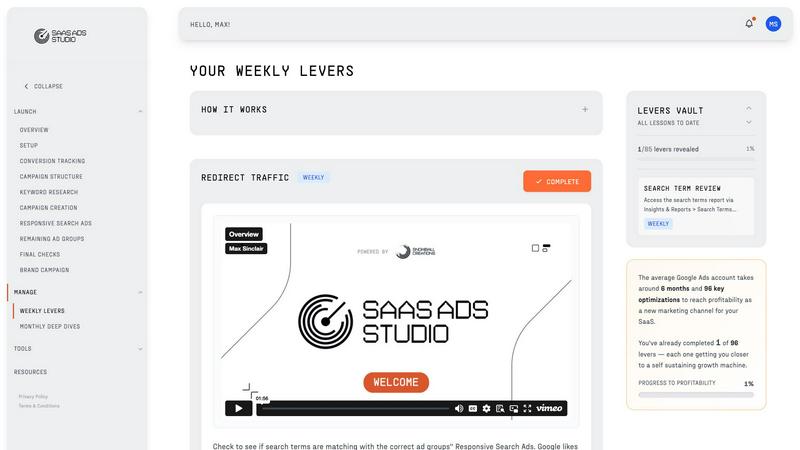
The SaaS Ads Studio
Effortlessly launch and optimize profitable Google and Facebook Ads for your B2B SaaS with guided, self-serve tools.
Last updated: February 28, 2026
Visual Comparison
Playwriter

The SaaS Ads Studio
Feature Comparison
Playwriter
Real Browser Integration
Playwriter allows agents to operate within your actual Chrome browser session, preserving logins, extensions, and cookies. This real-browser integration eliminates the issues associated with headless browsing, such as immediate bot detection and the need for additional memory, ensuring a smooth and consistent user experience.
Full Playwright API Access
With Playwriter, agents have access to the complete Playwright API through a single execute tool. This means users can run any Playwright code without dealing with wrappers or excessive schema definitions. The tool's design promotes low context usage, making it efficient and easy to use for developers.
Collaborative Browsing Experience
Playwriter fosters a collaborative environment where users can see everything their agents do in real time. When the agent encounters obstacles, such as captchas or consent walls, users can step in to resolve issues quickly, ensuring a seamless workflow and reducing the need for repetitive manual tasks.
Enhanced Debugging and Snapshot Capabilities
The platform includes a sophisticated debugger with breakpoints, live code editing, and network interception features. Additionally, Playwriter provides accessibility snapshots that are significantly smaller in size compared to traditional screenshots, enabling faster loading times and efficient debugging.
About The SaaS Ads Studio
Guided Google + Facebook Ads Builder
This feature provides a comprehensive framework for building effective Google and Facebook ad campaigns. Users receive step-by-step guidance, ensuring that their accounts are structured correctly from the onset. This eliminates the common pitfalls of messy campaign setups and promotes a streamlined approach to advertising.
AI-Powered Brand DNA Analysis
The Studio utilizes AI to analyze your brand's unique elements, including messaging, audience, and positioning. This analysis generates a complete Brand Profile that powers various tools within the platform, enabling personalized outputs and enhancing campaign effectiveness.
Weekly Optimization Tasks
Every week, users receive bite-sized, proven optimization tasks designed to improve campaign performance systematically. This feature takes the guesswork out of managing ads, allowing users to execute tasks quickly while tracking their impact on results.
Data-Driven Keyword Generation
Leveraging a robust dataset from past ad spends, the platform generates high-intent keyword clusters tailored to B2B SaaS. This ensures that advertising efforts target genuine buyers rather than merely browsing traffic, maximizing the efficiency of ad spend.
Use Cases
Playwriter
Automated Testing and Quality Assurance
Playwriter can be utilized in automated testing scenarios, allowing QA teams to simulate user interactions with web applications. By leveraging the full browser capabilities, teams can ensure thorough testing coverage while identifying issues in a more realistic environment.
Web Scraping and Data Extraction
Data analysts and developers can use Playwriter for web scraping tasks, easily navigating through complex web pages. With access to actual sessions, the tool can bypass common anti-scraping measures, making data extraction more efficient and reliable.
Real-Time Collaboration on Web Tasks
Team members can collaboratively work on web tasks by using Playwriter. Whether it's debugging a web application or solving a captcha that an AI agent encounters, real-time sharing of the browser allows for enhanced teamwork and productivity.
Educational Purposes and Learning
Playwriter serves as an excellent resource for educational institutions and individuals who want to learn web automation and browser interactions. By providing hands-on experience with a real browser environment, learners can better understand web technologies and automated processes.
The SaaS Ads Studio
Quick Campaign Launch
SaaS founders can launch their first Google or Facebook campaign within a weekend using the Studio's guided approach. This rapid setup allows businesses to start gaining visibility and attracting potential customers without lengthy delays.
Ongoing Campaign Management
Marketing teams can utilize the weekly optimization tasks feature to improve their campaign performance continuously. This structured approach helps avoid wasting budget and time while ensuring that campaigns evolve based on real data insights.
Targeted Audience Development
The AI-driven tools help teams create precise audience segments for both Google and Facebook ads, enhancing the likelihood of conversion. This targeted approach reduces guesswork and leads to more effective marketing efforts.
Performance Tracking and Insights
The dashboard provides users with actionable insights and a to-do list, making it easy to track performance metrics. This feature empowers teams to make informed decisions about budget allocation and campaign adjustments based on real-time data.
Overview
About Playwriter
Playwriter is an advanced tool designed for enhancing the capabilities of AI agents by providing them with direct control over actual browser sessions. Unlike traditional AI agents that operate within isolated or headless environments, Playwriter leverages a Chrome extension and a command-line interface (CLI) to grant agents access to your existing browser setup, complete with logged-in accounts, active extensions, and stored cookies. This seamless integration significantly mitigates challenges such as bot detection and session management, which are common in conventional setups. With Playwriter, users can automate web interactions while maintaining real-time visibility and control over the process, making it an invaluable asset for developers, testers, and anyone looking to streamline web browsing tasks. The tool is open-source and MIT licensed, fostering a collaborative and innovative environment for users.
About The SaaS Ads Studio
The SaaS Ads Studio is an innovative platform specifically crafted for B2B SaaS businesses seeking to streamline their advertising campaigns on Google and Facebook. Unlike conventional advertising agencies that often impose significant fees, this self-service tool enables users to launch effective campaigns within a weekend. It serves as a comprehensive solution for SaaS founders, marketing teams, and growth leads who desire a straightforward, efficient method for managing their ads. The platform merges educational video content with advanced AI tools, providing users with a structured approach to campaign management. This empowers them to master Google Ads intricacies, leading to enhanced performance and profitability. By simplifying the ad creation process and offering a systematic framework, The SaaS Ads Studio ensures users can build and optimize campaigns without the usual complexities.
Frequently Asked Questions
Playwriter FAQ
How does Playwriter improve browser automation?
Playwriter enhances browser automation by providing agents with direct access to your actual browser session, eliminating the challenges of headless browsing and allowing for seamless user interactions.
Is Playwriter suitable for all types of web applications?
Yes, Playwriter is versatile enough to work with various web applications, including those with complex user interfaces, authentication requirements, and dynamic content.
What programming languages does Playwriter support?
Playwriter is primarily designed to work with JavaScript and the Playwright API, making it ideal for developers familiar with these technologies. The CLI can be easily integrated into existing JavaScript projects.
How does the debugging feature work in Playwriter?
The debugging feature allows users to set breakpoints, perform live code editing, and intercept network requests. This functionality enables developers to troubleshoot issues effectively within their actual browser context, enhancing the overall debugging process.
The SaaS Ads Studio FAQ
How quickly can I launch my first campaign with The SaaS Ads Studio?
You can launch your first campaign within a weekend. The platform offers step-by-step guidance, making the process straightforward and efficient.
What makes The SaaS Ads Studio different from traditional agencies?
The SaaS Ads Studio provides a self-service solution that eliminates agency fees, allowing users to manage and optimize their campaigns independently while benefiting from structured guidance and AI tools.
Can I use The SaaS Ads Studio for both Google and Facebook ads?
Yes, The SaaS Ads Studio is designed to support campaigns on both Google and Facebook, allowing users to manage their advertising efforts across multiple platforms seamlessly.
Is there any training provided within the platform?
Absolutely. The platform includes educational video content that guides users through the intricacies of Google Ads and Facebook advertising, ensuring they understand the process and can manage their campaigns effectively.
Alternatives
Playwriter Alternatives
Playwriter is a powerful automation tool designed to enhance the capabilities of Chrome browsers through the use of AI via Command Line Interface (CLI) or Multi-Channel Protocol (MCP). By providing AI agents with access to a user's actual browser session, Playwriter addresses common challenges faced in web automation, such as bot detection and lack of saved sessions. Users often seek alternatives to Playwriter due to various factors, including pricing, specific feature sets, compatibility with different platforms, and personal preferences for user interfaces. When searching for an alternative to Playwriter, it is essential to consider several key aspects. Users should evaluate the range of features offered, such as automation capabilities, ease of use, and integration with existing tools. Additionally, assessing the pricing structure, support options, and community or developer engagement can significantly impact the overall experience. The right alternative will effectively meet individual needs while providing a seamless browsing and automation experience.
The SaaS Ads Studio Alternatives
The SaaS Ads Studio is a comprehensive self-service platform designed to help B2B SaaS businesses easily create, manage, and optimize their Google Ads campaigns. As a tool that simplifies the complexities of digital advertising, it empowers users to launch profitable campaigns quickly, making it particularly appealing to SaaS founders, marketing teams, and growth leads. Users often seek alternatives to The SaaS Ads Studio due to various reasons, including pricing considerations, the desire for different features, or specific platform requirements that may not align with their business needs. When evaluating alternatives, it is crucial to consider factors such as ease of use, the comprehensiveness of features, support options, and whether the platform can effectively cater to the unique demands of B2B SaaS marketing.