
Nabbed vs TinyFast
Side-by-side comparison to help you choose the right product.

Nabbed is a career CRM that helps sales professionals manage their job search like a revenue pipeline with AI tools and tracking.
Last updated: April 13, 2026

Compress images, videos, and PDFs effortlessly on your Mac with TinyFast for fast, local, and private optimization.
Last updated: February 28, 2026
Visual Comparison
Nabbed

TinyFast
Feature Comparison
Nabbed
Dual Sales Pipelines
Nabbed features two distinct, interactive Kanban boards mirroring sales CRM tools like HubSpot: one for tracking job applications and another for managing networking contacts. Users can drag-and-drop opportunities through customizable stages such as "Applied," "Interview," and "Offer," while the networking pipeline tracks relationships from "Initial Contact" to "Advocate." This provides clear visibility into momentum, stage velocity, and overall pipeline health, enabling a strategic approach to the entire job search ecosystem.
AI Career Suite
This integrated suite contains four powerful AI tools designed to accelerate key tasks. It generates tailored cover letters and optimizes resumes to match specific job descriptions, provides personalized interview coaching with potential questions, and crafts outreach emails that mimic the user's writing style. These tools eliminate hours of manual work, ensuring every application and communication is polished, relevant, and effective, all within seconds.
Chrome Extension with ATS Autofill & Tracking
The free browser extension is the operational engine of Nabbed. It allows users to save job listings from any site with one click, then autofills application forms on over 60 ATS platforms like Greenhouse and Lever using a saved profile. Crucially, it includes email tracking pixels for Gmail, notifying users when their emails are opened—a competitive intelligence feature unmatched by other job search tools. It also enables contact capture from LinkedIn and stealth application mode.
Target Account & Company Intelligence Dashboard
Users can name and track their dream companies in a dedicated dashboard. Each saved company is automatically enriched with real-time intelligence including funding status, employee headcount, Glassdoor ratings, tech stack, and open positions. The system also monitors for "hiring triggers," such as news of company growth or funding rounds, alerting the user to prime opportunities for outreach, much like sales trigger alerts for target accounts.
About TinyFast
Batch & Drag-Drop Shrink
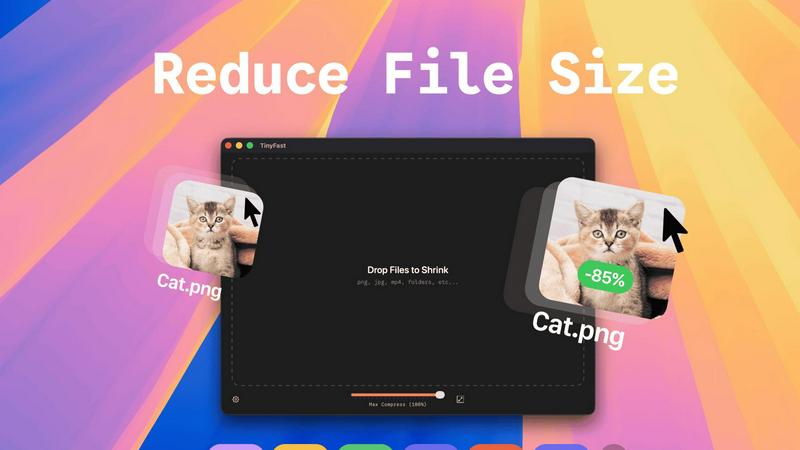
This feature allows users to compress entire folders of files simultaneously, streamlining the workflow significantly. With just a simple drag-and-drop action, users can quickly get optimized outputs in mere seconds, saving both time and effort.
Blazing-Fast Compression
TinyFast utilizes optimized native engines designed for speed, enabling users to shrink large files in seconds. This feature eliminates the waiting times typically associated with uploading and downloading files in online compression tools, providing users with instant results.
Resize Resolution
For image and video files, TinyFast offers an automatic resizing option that allows users to set preferred resolutions. This capability ensures that the output files are not just smaller, but also tailored to specific size requirements, enhancing usability across various platforms.
100% Local & Private
TinyFast is designed with user privacy as a top priority. All files remain on the user's device, ensuring that there are no uploads to cloud servers. This feature is particularly beneficial for professionals handling sensitive or confidential information, as it guarantees total privacy by design.
Use Cases
Nabbed
Strategic Career Transition for Sales Leaders
A Vice President of Sales planning a move to a larger company or new industry can use Nabbed to systematically identify and research 50 target "accounts." The platform's company intelligence provides critical data for due diligence, while the pipeline tools help manage parallel interview processes with multiple firms. AI tools prepare them for executive-level interviews, and email tracking provides insight into recruiter engagement.
Active Job Search for Account Executives
An Account Executive seeking a new role can consolidate job searches from LinkedIn, Indeed, and Google Jobs into one Nabbed dashboard. The Chrome extension streamlines applying to dozens of positions weekly with autofill, while the contact CRM helps track referrals and follow-ups with recruiters and hiring managers. The Job Fit Score helps prioritize applications with the highest match probability.
Passive Career Management and Networking
A professional not actively applying but open to opportunities can use Nabbed to maintain a "always-on" network. They can save interesting companies to a watchlist, receive alerts when those companies are hiring, and use the networking pipeline to periodically nurture key contacts. This builds a ready-made warm introduction path for when they decide to initiate a search.
Offer Negotiation and Salary Benchmarking
Upon receiving a job offer, a user can leverage Nabbed's salary benchmarking and offer analysis tools. By comparing the offer against market data for the role, location, and company stage, the professional can enter negotiations with concrete, data-backed justification for their desired compensation package, turning the final offer stage into a confident close.
TinyFast
Graphic Design Projects
Graphic designers can use TinyFast to compress high-resolution images and vector files before including them in their projects. This ensures that the final artwork is optimized for faster loading times on websites without sacrificing quality.
Video Production
For video editors, TinyFast provides an efficient way to compress large video files for easier sharing and uploading. By quickly resizing and optimizing these files, editors can streamline their workflow and enhance collaboration with team members.
Document Preparation
TinyFast is an excellent tool for professionals who frequently work with large PDF or document files. By compressing these documents, users can ensure that email attachments remain manageable in size and accessible for recipients without losing important content.
Web Development
Web developers can benefit from TinyFast by compressing images and other assets before deploying them to websites. This practice optimizes the performance of web pages, contributing to faster loading times and a better user experience.
Overview
About Nabbed
Nabbed is the first and only Customer Relationship Management (CRM) platform engineered explicitly for sales, revenue, and go-to-market professionals actively managing their careers. It transforms the chaotic, often reactive process of a job search into a strategic, data-driven sales campaign. The core value proposition is applying the proven methodologies of B2B sales—territory planning, pipeline management, trigger-based outreach, and relationship tracking—to the pursuit of a new role. Nabbed provides a unified system to track job applications in a visual Kanban pipeline, build a comprehensive contact CRM with warm path mapping, and gain AI-powered company intelligence on target firms. Its powerful Chrome extension automates the application process across 60+ Applicant Tracking System (ATS) platforms and enables email open tracking, a feature uniquely offered by Nabbed. By integrating search across 11 major job boards, providing AI tools for resume tailoring and interview prep, and delivering hiring signal alerts, Nabbed empowers revenue professionals to "close" their next career opportunity with the same precision and efficiency they use to close business deals.
About TinyFast
TinyFast is a cutting-edge macOS application designed for users who need to efficiently compress various file types including images, videos, and documents. This innovative tool is tailored for developers, designers, and content creators who value speed, privacy, and ease of use. Unlike online compression tools that require users to upload their files to external servers, TinyFast operates entirely on local machines, ensuring that sensitive data remains secure. The application's intuitive drag-and-drop interface allows users to quickly compress files; simply drag a file into the app to start the process and drag it out to retrieve the optimized version. With support for over 500 file types, TinyFast stands out in the market for its ability to deliver high-quality results in a fraction of the time typically required by traditional methods. By prioritizing user privacy and efficiency, TinyFast provides an essential solution for anyone working with large files on a regular basis.
Frequently Asked Questions
Nabbed FAQ
How does Nabbed's email tracking work?
Nabbed's Chrome extension integrates with Gmail to insert a nearly invisible tracking pixel into the emails you send through the browser. When the recipient opens the email, the pixel loads, and Nabbed instantly notifies you within your dashboard. This provides real-time engagement data without the recipient's knowledge, offering a significant advantage in timing follow-ups.
What makes Nabbed different from other job search trackers like Teal or Huntr?
Nabbed is fundamentally built as a CRM for revenue professionals, whereas others are generalized job trackers. Key differentiators include its dual pipeline for jobs and networking, advanced email open tracking (which competitors lack), deep company intelligence with hiring signals, and a feature set modeled directly on sales workflows. It is designed by a Chief Revenue Officer for the specific tactics of high-stakes career moves.
Is my data safe and private with Nabbed?
Yes. Nabbed employs enterprise-grade security measures to protect user data. The company has a clear Privacy Policy and Cookie Policy detailing data handling practices. Sensitive information like resumes and contact details are encrypted. Users maintain full control over their data and can delete it at any time.
Can I use Nabbed for free?
Yes, Nabbed offers a free tier that includes core functionality like the Chrome extension for job capture, basic ATS autofill, and access to search across multiple job boards. To unlock advanced features like full email tracking, the AI Career Suite, LinkedIn contact capture, and outreach sequences, you would need to upgrade to the Core plan.
TinyFast FAQ
What types of files can I compress with TinyFast?
TinyFast supports a wide range of file types, including images (PNG, JPEG, GIF), videos (MP4, MOV), documents (PDF, DOCX), audio (MP3), and even code files (JS, CSS, JSON). This versatility makes it suitable for various professional needs.
Is TinyFast really free?
TinyFast offers a free plan that allows users to compress up to 5 files per day. This plan provides access to all features, making it a great option for casual users or those who need occasional file compression.
How does TinyFast ensure privacy?
TinyFast operates entirely on the user's local machine, meaning that files never leave the device. There are no uploads to external servers, which significantly reduces the risk of data breaches and ensures that confidential files remain secure.
Can I resize images and videos automatically?
Yes, TinyFast includes a resolution resizing feature that allows users to set preferred sizes for images and videos. This feature is particularly useful for optimizing media for specific platforms or applications where file dimensions matter.
Alternatives
Nabbed Alternatives
Nabbed is a specialized productivity and management tool designed as a CRM for job seekers and career-focused sales professionals. It uniquely combines job application tracking, contact management, and AI-powered intelligence into a single platform to streamline the modern job search. Users often explore alternatives to find a solution that better aligns with their specific budget, desired feature set, or preferred platform ecosystem. When evaluating alternatives, key considerations include the depth of application tracking, the sophistication of contact and relationship management features, and the availability of integrated market intelligence. The ability to automate repetitive tasks like application form filling and the scope of job board aggregations are also critical differentiators. Ultimately, the best choice depends on an individual's need for automation, data insights, and workflow integration. A thorough assessment should weigh the core functionality against cost, noting whether a tool offers a robust free tier or trial period. Security and data privacy are paramount, as these platforms handle sensitive career and personal information. The ideal alternative will not only manage the logistics of a job search but also provide strategic advantages through data and automation.
TinyFast Alternatives
TinyFast is an advanced macOS application that falls into the category of file compression tools. It specializes in efficiently compressing a variety of file types, including images, videos, and documents, directly on users' local machines. This ability to keep operations local ensures that sensitive files remain secure and private, making TinyFast a favored choice among developers, designers, and content creators. Users often seek alternatives to TinyFast for various reasons, including pricing, specific feature needs, or compatibility with different operating systems. When considering alternatives, it's essential to evaluate the features offered, ease of use, speed of compression, and privacy policies. Understanding your unique requirements will help in selecting the most suitable file optimization tool.