
Hush Touch | Voice-to-Text for MacOS vs Ultra Face Swap
Side-by-side comparison to help you choose the right product.

Hush Touch | Voice-to-Text for MacOS
Hush Touch is an offline voice-to-text app for Mac that learns your vocabulary and ensures accurate transcription.
Last updated: February 26, 2026

Ultra Face Swap
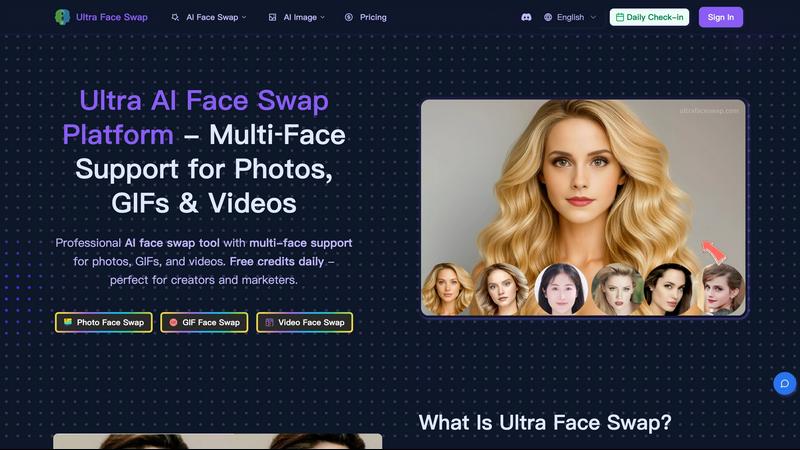
Ultra Face Swap is an AI tool that realistically swaps multiple faces in photos, GIFs, and videos.
Last updated: February 28, 2026
Visual Comparison
Hush Touch | Voice-to-Text for MacOS

Ultra Face Swap
Feature Comparison
Hush Touch | Voice-to-Text for MacOS
Dual-Engine Recognition
Hush Touch employs a dual-engine recognition system that combines the capabilities of DictationTranscriber and SFSpeechRecognizer. This powerful blend ensures natural flow and accurate punctuation while boosting your custom vocabulary. The final text output benefits from an additional pass by Apple Intelligence, enhancing overall transcription accuracy.
Smart Text Processing
This feature allows Hush Touch to process your speech intelligently, removing filler words and correcting common mistakes in real time. The app can detect recurring phrases and format lists automatically, making dictation smoother and output more polished without requiring extensive manual editing.
Custom Vocabulary Learning
Hush Touch supports a custom vocabulary of up to 500 terms, which can learn from your corrections over time. This feature is especially beneficial for users who frequently utilize specialized terminology, including medical terms, technical jargon, or brand names, ensuring that the app recognizes your unique language.
Context Modes & Hands-Free Dictation
With four distinct context modes—General, Email, Code, and Notes—Hush Touch provides tailored dictation experiences for various writing tasks. It also supports hands-free operation, allowing users to initiate dictation using Siri or a hotkey, with automatic text insertion after a brief pause, enhancing convenience and workflow efficiency.
Ultra Face Swap
Unified Multi-Scenario Processing Pipeline
Ultra Face Swap operates on a singular, highly optimized AI pipeline capable of handling three distinct media types: photos, GIFs, and videos. This unified architecture ensures consistent output quality and a familiar user experience regardless of the chosen format. Users can process single or multiple faces within any of these media through an identical, streamlined workflow, eliminating the need to learn separate tools for different content types and significantly accelerating the creative process from upload to final download.
Stable Multi-Face Detection and Tracking
The platform employs advanced deep learning algorithms that intelligently detect, isolate, and track multiple faces within a single frame or across video sequences. This system maintains consistent lock-on to each target face, ensuring that swapped faces align perfectly with the original subjects' movements, expressions, and perspectives. This prevents common artifacts such as facial drift, jitter, or misalignment, which is especially critical for complex group photos or dynamic video scenes with several individuals.
High-Fidelity Natural Blending Engine
Beyond simple face replacement, Ultra Face Swap's AI meticulously analyzes and replicates the environmental context of the target media. It seamlessly blends the lighting conditions, skin tones, textures, and subtle facial details of the source face into the new environment. This sophisticated fusion minimizes visual discrepancies like harsh edges, color halos, and unnatural shadows, producing results that are remarkably realistic and production-ready for professional or social media use.
Accessible Freemium Model with Daily Credits
To lower the barrier to entry, Ultra Face Swap implements a user-friendly freemium access model. New and registered users receive free daily credits that allow them to experience the core face swapping functionality without initial financial commitment. This model encourages experimentation and regular use, while the option for premium plans caters to power users needing higher volume. Crucially, all outputs, including those generated with free credits, are delivered without any proprietary watermarks.
Use Cases
Hush Touch | Voice-to-Text for MacOS
Drafting Emails
Hush Touch is ideal for busy professionals who need to draft emails quickly. By dictating their messages, users can maintain productivity and focus on their thoughts without the distraction of typing, all while enjoying the app's intelligent text processing features.
Creating Notes
Students and professionals can leverage Hush Touch to take notes during lectures or meetings. The app captures spoken information accurately, allowing users to concentrate on the content rather than the mechanics of writing, ultimately improving retention and understanding.
Writing Documents
Writers and content creators can use Hush Touch to compose articles, reports, or other lengthy documents. The adaptive learning and custom vocabulary features ensure that the output aligns with their unique style and terminology, making writing more efficient and enjoyable.
Transcribing Meetings
Hush Touch is an excellent tool for transcribing meetings or interviews. Users can simply dictate the conversation as it unfolds, with the app capturing key points, action items, and follow-up tasks accurately, thus streamlining communication and documentation processes.
Ultra Face Swap
Viral Social Media and Content Creation
Content creators leverage Ultra Face Swap to rapidly produce engaging, shareable content for platforms like TikTok, Instagram Reels, and YouTube Shorts. By swapping faces into popular meme templates, celebrity interviews, or trending video formats, creators can generate humorous, surprising, or relatable content that drives high engagement and viewership. The tool's speed and quality enable creators to capitalize on trends in real-time, a key factor for viral growth.
Professional and Personal Photo Enhancement
Individuals and professionals use the tool for practical photo correction and enhancement. This includes fixing group photos where someone has their eyes closed or an unflattering expression by swapping in a better face from another shot. Furthermore, users can generate professional-grade headshots for LinkedIn or corporate profiles by swapping their face onto a high-quality portrait background, saving the cost and time of a professional photoshoot.
Entertainment and Creative Exploration
The platform serves as a source of entertainment and creative expression for casual users. People can experiment with identity transformation, such as visualizing themselves with different hairstyles, as a different gender, or at a different age. It also allows for playful scenarios, like "meeting" a celebrity crush by swapping faces into a picture with them, providing a fun and imaginative use of AI technology.
Marketing and Advertising Asset Production
Marketers and advertising professionals utilize Ultra Face Swap to efficiently create multiple variations of campaign imagery. For instance, they can generate localized ad visuals featuring different models or create personalized marketing materials by swapping a client's face into a template. This use case significantly reduces the time and resources required for photo shoots and model licensing, enabling agile and cost-effective campaign production.
Overview
About Hush Touch | Voice-to-Text for MacOS
Hush Touch is an innovative voice-to-text application designed specifically for macOS users, offering a seamless and private dictation experience. This app distinguishes itself by operating entirely on-device, ensuring that your voice data remains secure and confidential. With a lightweight installation package of just 5.5 MB, Hush Touch integrates effortlessly into everyday writing workflows, whether you're drafting emails, creating notes, or composing documents. The application harnesses the power of two Apple transcription engines, enhancing accuracy and fluency in real-time transcription. Hush Touch is ideal for professionals, students, and anyone who values efficiency and privacy in their dictation processes. By learning your vocabulary and preferences over time, it delivers polished text output while eliminating filler words and improving punctuation. With a one-time purchase of $20 for a lifetime license, Hush Touch is an economically sensible choice for users seeking reliable voice dictation without recurring subscription costs.
About Ultra Face Swap
Ultra Face Swap is a sophisticated, cloud-based artificial intelligence platform engineered for high-fidelity facial replacement across multiple media formats. It represents a significant advancement in accessible AI technology, enabling users to perform realistic face swaps in static photos, animated GIFs, and full-motion videos with professional-grade results. The tool is designed for a broad spectrum of users, from viral content creators on platforms like TikTok and Instagram to digital marketers requiring rapid asset variations, and even individuals seeking entertainment or practical photo enhancements. Its core value proposition lies in delivering a seamless, unified workflow that combines studio-quality output—characterized by stable multi-face tracking and natural blending of lighting and expressions—with an intuitive, web-based interface. By offering free daily credits and watermark-free outputs, Ultra Face Swap democratizes advanced AI capabilities, making high-end face swapping technology available to both casual users and professional creators without the need for complex software or hardware.
Frequently Asked Questions
Hush Touch | Voice-to-Text for MacOS FAQ
Is Hush Touch really a one-time purchase?
Yes, Hush Touch is available for a one-time fee of $20, which grants users a lifetime license. There are no hidden fees or subscription costs, making it a cost-effective choice for voice dictation software.
How does Hush Touch ensure my privacy?
Hush Touch processes all voice data entirely on your Mac, meaning there is no cloud dependency or data collection involved. This on-device processing ensures your dictation remains private and secure.
Can I customize the vocabulary in Hush Touch?
Absolutely! Hush Touch allows users to create a custom vocabulary of up to 500 terms and learns from corrections made during dictation. This feature is particularly useful for professionals who use specialized language.
What are the system requirements for Hush Touch?
Hush Touch is specifically designed for macOS, ensuring compatibility with the latest Apple hardware and software updates. Users should have a Mac capable of running the latest version of macOS to ensure optimal performance.
Ultra Face Swap FAQ
What types of files does Ultra Face Swap support?
Ultra Face Swap supports a wide range of media formats for input. You can upload common image files (like JPG and PNG) for photo face swaps, GIF files for animated graphics, and standard video file formats (such as MP4 and MOV) for video face swaps. The platform is designed to process these within a unified workflow, though processing times will vary, with videos typically taking longer than static images.
How does the multi-face swap feature work?
The multi-face swap functionality is automated and intelligent. When you upload a source photo, GIF, or video containing multiple people, the AI automatically detects and isolates each face. You then upload one or more target face images. The system will map the target faces to the detected faces in the source media, allowing you to replace several faces in a single operation. You can control which target face corresponds to which source face during the upload and review stage.
Is there a watermark on the output files?
No, Ultra Face Swap does not apply any watermarks to the generated output files. Whether you are using free daily credits or a paid subscription, the final swapped photos, GIFs, or videos you download are completely clean and can be used directly for personal projects, social media posting, or even commercial purposes according to the platform's terms of service.
How long does it take to generate a face swap?
Generation time depends on the complexity and length of the source media. A standard photo face swap typically processes within 20 to 40 seconds. GIFs and short videos may take a few minutes, while longer, high-resolution videos will require more processing time. The platform is optimized for speed, leveraging cloud-based AI processing to deliver results much faster than traditional desktop editing software.
Alternatives
Hush Touch | Voice-to-Text for MacOS Alternatives
Hush Touch | Voice-to-Text for MacOS is a sophisticated voice-to-text application designed specifically for the macOS platform. It belongs to the AI Assistants category, providing users with a seamless dictation experience that prioritizes privacy by operating entirely offline. Users often seek alternatives to Hush Touch due to varying needs such as pricing, feature sets, platform compatibility, or specific functionalities that may better suit their unique workflows. When searching for alternatives, it is essential to consider factors such as the application’s ease of use, accuracy of transcription, and whether it operates offline or requires cloud connectivity. Additionally, users may want to evaluate the pricing model, including whether a one-time purchase or subscription service is more advantageous for their dictation needs. Understanding these aspects will aid in selecting the most suitable voice-to-text solution.
Ultra Face Swap Alternatives
Ultra Face Swap is a prominent AI-powered face swapping platform within the category of AI assistants and creative tools. It enables users to perform realistic, multi-face replacements in photos, GIFs, and videos directly through an online interface, leveraging advanced deep learning for high-quality, fast results. Users may seek alternatives for various practical reasons. These can include budget constraints, as pricing models and free tier allowances differ. Some may require specific features not offered, such as different output formats or more granular editing controls. Others might prioritize offline software for privacy, seek platforms with different user interfaces, or simply desire to compare the capabilities of similar tools in a competitive market. When evaluating an alternative, key considerations should include the quality and realism of the output, particularly in blending lighting and expressions. The supported file formats, processing speed, and the number of faces that can be swapped simultaneously are crucial functional metrics. Finally, assess the cost structure, privacy policy, and overall ease of use to find a solution that aligns with your specific creative or professional needs.