
AI Photo Template vs DigitalMagicWand
Side-by-side comparison to help you choose the right product.

AI Photo Template
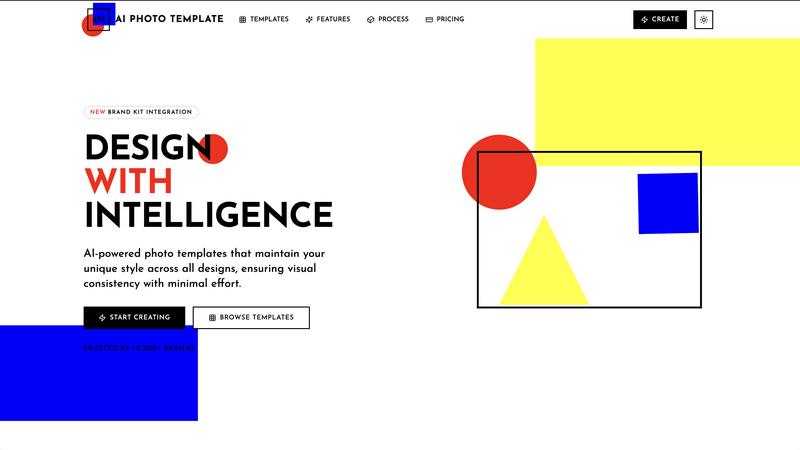
AI Photo Template generates brand-consistent photo designs instantly using artificial intelligence.
Last updated: February 28, 2026

DigitalMagicWand
DigitalMagicWand is a comprehensive AI suite for creating and analyzing images, audio, video, and text with professional-grade tools.
Last updated: March 18, 2026
Visual Comparison
AI Photo Template
DigitalMagicWand

Feature Comparison
AI Photo Template
AI Style Analysis & Replication
This foundational feature involves a sophisticated AI engine that meticulously studies uploaded sample images, brand colors, and existing visual content. It deconstructs elements like color palettes, compositional styles, typography preferences, and mood to learn a user's unique aesthetic. The system then applies this learned intelligence to generate new templates that are not generic but are intrinsically aligned with the user's established visual identity, ensuring every creation feels authentically "on-brand" from the outset.
Brand Kit Integration
AI Photo Template offers a centralized Brand Kit storage system, allowing users to upload and permanently store key brand assets such as logos in various formats, official color hex codes, and approved font families. Once configured, these elements can be applied instantaneously to any template with a single click. This eliminates manual entry errors, accelerates the design workflow, and is crucial for maintaining absolute consistency, especially when multiple team members are creating content for the same organization.
Smart Layout Engine
Going beyond simple drag-and-drop, the platform incorporates a Smart Layout Engine built upon professional design principles, including the golden ratio and rule of thirds. When a user adds images or text blocks, the AI automatically suggests and arranges elements in a visually balanced and aesthetically pleasing manner. This ensures that every template maintains a professional composition, making high-quality design accessible to users regardless of their formal design training or innate artistic skill.
Team Collaboration Tools
Specifically tailored for organizational use, this feature enables seamless real-time collaboration. Team members can be invited to shared workspaces, where they can co-edit templates, leave feedback via comments, and manage a unified asset library. This streamlines the review and approval process, maintains version control, and ensures all team-generated content adheres to the same brand standards, which is vital for marketing departments and agencies managing multiple clients.
About DigitalMagicWand
Multi-Modal AI Tool Suite
DigitalMagicWand distinguishes itself by offering a unified platform housing distinct, powerful applications for different content types. This includes dedicated tools for AI text analysis and humanization, professional audio stem separation and MIDI conversion, advanced image generation and editing, and intelligent background removal. This integrated approach allows users to manage diverse creative and analytical workflows without switching between disparate services, ensuring a cohesive toolset for comprehensive digital content projects.
Advanced AI Detection and Humanization
The platform provides a sophisticated two-pronged solution for text content. Its AI Detector delivers rapid, accurate analysis with clear confidence scores to identify machine-generated text from models like ChatGPT and Gemini. Conversely, its proprietary AI Humanizer utilizes advanced linguistic algorithms to meticulously rewrite AI-generated text, eliminating statistical patterns that trigger detectors while preserving the original meaning, resulting in text indistinguishable from human writing for academic, professional, or creative use.
Professional-Grade Audio Processing
DigitalMagicWand incorporates industry-respected audio technologies like Digital Ear™ and UnMixIt™. Digital Ear™ offers highly accurate, expressive MIDI transcription specifically engineered for the nuance of solo piano. UnMixIt™ Pro provides studio-quality stem separation to isolate vocals, drums, bass, and instruments for music production, while the standard UnMixIt™ tool enables easy vocal removal for karaoke or vocal isolation for practice, catering to both professional musicians and hobbyists.
Text-to-Image and Intelligent Image Editing
The platform features powerful generative and manipulative AI for visuals. Users can generate high-quality images or scalable vector (.svg) artwork from simple text descriptions. Furthermore, its AI Image Editor allows for complex photo manipulations through text commands, enabling tasks like background swaps, object removal, and product placement without manual editing skills. This is complemented by a dedicated, precision tool for instant background removal.
Use Cases
AI Photo Template
Social Media Content Management
Social media managers and influencers can utilize AI Photo Template to establish and maintain a cohesive visual identity across platforms like Instagram, Facebook, and LinkedIn. By creating a set of master templates for posts, stories, and cover photos that reflect their brand aesthetic, they can produce a high volume of visually consistent content rapidly. This consistency strengthens brand recognition, enhances feed aesthetics, and engages followers more effectively, all while drastically reducing the daily time investment required for content creation.
Small Business Marketing Material Creation
Small businesses and startups often lack the budget for a full-time designer or frequent agency work. AI Photo Template empowers them to independently produce professional marketing materials, including product photography frames, promotional flyers, email headers, and presentation slides. By ensuring these materials are visually consistent and polished, the tool helps small businesses project a credible, established, and trustworthy image to potential customers, competing effectively with larger counterparts.
Client-Facing Portfolio & Gallery Delivery
Professional photographers, videographers, and design freelancers can leverage the platform to create stunning, branded presentation templates for client deliverables. Instead of sending disjointed image sets, they can present work within a consistent, elegant template that includes their logo, color scheme, and typography. This elevates the perceived value of their service, provides a superior client experience, and reinforces their professional brand with every project delivery.
Marketing Agency Client Brand Management
Marketing and advertising agencies managing multiple client accounts can use AI Photo Template to build and store separate Brand Kits for each client. This allows teams to swiftly generate on-brand social media assets, ad creatives, and report templates tailored to each client's specific visual guidelines. It streamlines internal workflows, ensures flawless brand execution across all client work, and enables agencies to scale their services efficiently without compromising on quality or consistency.
DigitalMagicWand
Content Authenticity Verification and Creation
Educators, publishers, and hiring managers can use the AI Detector to verify the originality of submitted essays, articles, or application materials. Simultaneously, content creators, marketers, and students can use the AI Humanizer to ethically refine AI-assisted drafts into natural-sounding text for blogs, reports, and assignments, ensuring both productivity and authenticity in their written work.
Music Production and Audio Restoration
Music producers and DJs can utilize UnMixIt™ Pro to extract clean stems from songs for remixing, sampling, or creating mashups. Musicians and composers can transcribe piano recordings into editable MIDI files with Digital Ear™ for notation, arrangement, or further digital manipulation. Audio archivists can also use these tools to isolate and restore specific elements from old recordings.
Graphic Design and Marketing Material Production
Graphic designers and marketers can rapidly generate unique stock imagery, logo concepts, or illustrations as scalable vector art using text prompts, bypassing lengthy manual design processes. E-commerce managers and photographers can use the AI Image Editor and background remover to create professional product shots, composite images, and clean cutouts for advertisements and websites without a photoshoot.
Creative Content Enhancement for Individuals
Hobbyists and social media content creators can easily create custom karaoke tracks for entertainment, remove unwanted objects or photobombers from personal photos, restore old pictures, or generate imaginative art for personal projects. This empowers individuals to execute creative visions that were previously limited by technical skill or software cost.
Overview
About AI Photo Template
AI Photo Template (APT) is an advanced, AI-driven design platform engineered to automate and elevate the creation of professional-grade photo templates. At its core, the platform utilizes sophisticated artificial intelligence to analyze a user's existing visual assets and brand identity, subsequently generating fully customizable templates that faithfully replicate their unique aesthetic style. This process ensures visual consistency across all marketing materials, social media content, and client deliverables with minimal manual effort. The tool is meticulously designed for a diverse user base, including marketing teams requiring cohesive campaign assets, small to medium-sized businesses seeking agency-quality design without the associated costs, social media managers aiming for a harmonious and recognizable feed, and professional photographers needing consistent gallery presentations for clients. Its primary value proposition is a significant reduction in design time and resource expenditure while guaranteeing a high standard of visual coherence and professional polish across all digital and print platforms, effectively democratizing professional design through intelligent automation.
About DigitalMagicWand
DigitalMagicWand is a comprehensive, multi-modal AI platform designed to empower creators, professionals, and businesses by simplifying and enhancing digital content creation and manipulation. It functions as an all-in-one suite of specialized applications that leverage cutting-edge artificial intelligence to process and generate images, audio, video, and text. The platform's core value proposition lies in its ability to democratize advanced creative and analytical tasks, eliminating the need for extensive technical expertise or expensive, specialized software. Whether a musician needs to transcribe a piano piece into MIDI, a marketer requires undetectable AI-generated text, a designer seeks to create vector art from a description, or a content creator wants to edit photos with simple text prompts, DigitalMagicWand provides a powerful, accessible solution. It consolidates a wide array of professional-grade tools into a single ecosystem, saving users significant time and resources while unlocking new levels of creative potential and analytical confidence across various digital mediums.
Frequently Asked Questions
AI Photo Template FAQ
How does the AI understand my brand's visual style?
The AI Style Analysis feature requires you to upload a selection of your existing images, graphics, or marketing materials that you believe best represent your brand's look and feel. The AI engine performs a deep analysis of these samples, identifying patterns in color usage, compositional style, contrast, spacing, and overall mood. It creates a unique "style profile" based on this data, which it then references to generate new templates that align with your established aesthetic, ensuring consistency.
Can I edit the AI-generated templates?
Absolutely. While the AI provides a professionally composed starting point, all templates are fully customizable. The platform offers intuitive controls that allow you to adjust every element, including text (font, size, color), image placement and cropping, background colors, and layer positioning. This flexibility ensures you can make specific tweaks for different campaigns or messages while the underlying template structure maintains design integrity and brand consistency.
What file formats can I export my designs in?
Export options vary by subscription plan. The Basic plan typically supports standard web formats like JPG and PNG. The Professional and Business plans offer a wider range, including high-resolution PNGs, print-ready PDFs, and layered PSD (Photoshop) files for advanced editing in external software. The Business plan also includes batch export capabilities, allowing you to download multiple template variations or sizes simultaneously for efficiency.
Is AI Photo Template suitable for complete beginners with no design experience?
Yes, it is explicitly designed for users of all skill levels. The AI handles the complex aspects of design theory and composition, providing a strong, professional foundation. The interface is built to be intuitive, with drag-and-drop functionality and clear editing tools. Furthermore, the adherence to built-in design principles means that even users with no formal training can produce work that looks expert-level, making it an ideal tool for entrepreneurs, content creators, and small business owners.
DigitalMagicWand FAQ
What types of content can DigitalMagicWand process?
DigitalMagicWand is a multi-modal platform capable of processing and generating four primary types of digital content: text, audio, images, and video. Specifically, it handles text analysis and rewriting, audio file transcription to MIDI and stem separation, image generation from text and advanced photo editing, and video processing through its suite of AI tools that can be applied to video frames.
How accurate is the AI Detector for text?
The AI Detector is designed for high accuracy, providing clear confidence scores to indicate the likelihood that a given text was AI-generated. It is trained to detect outputs from modern large language models like ChatGPT, Claude, and Gemini. The confidence score helps eliminate guesswork, though users are advised to use it as a reliable tool within a broader context of evaluation, not as an absolute verdict.
What is the difference between UnMixIt™ and UnMixIt™ Pro?
UnMixIt™ is designed for simpler, consumer-level tasks such as creating karaoke tracks by removing vocals or isolating a singer's voice for practice. UnMixIt™ Pro is a professional-grade tool offering studio-quality precision for isolating multiple specific stems (vocals, drums, bass, other instruments) simultaneously, making it suitable for music production, remixing, and professional audio restoration.
Can I edit images without any design experience?
Yes, a core feature of the AI Image Editor is its accessibility. Users can perform complex edits by simply typing a text description of the desired change (e.g., "replace the background with a beach," "remove the red car," "swap this face"). The AI interprets the command and executes the edit, requiring no manual skills in software like Photoshop, thus democratizing advanced image manipulation.
Alternatives
AI Photo Template Alternatives
AI Photo Template is a specialized AI assistant within the design software category, focused on generating consistent, brand-aligned photo templates. It uses artificial intelligence to analyze a user's visual style and automate the creation of professional templates, saving significant time and effort for content creators and businesses. Users may seek alternatives for various reasons, including budget constraints, specific feature requirements not met by the core offering, or a need for integration with different software ecosystems. Some may prefer a platform with a broader design scope beyond photo templates, or one with a different pricing model such as a one-time purchase versus a subscription. When evaluating alternatives, key considerations should include the depth of AI customization for brand consistency, the flexibility and quality of the template output, and the overall value relative to cost. The ideal tool should effectively balance automated intelligence with user control, ensuring the final designs meet both aesthetic standards and practical marketing needs.
DigitalMagicWand Alternatives
DigitalMagicWand is a comprehensive AI assistant platform specializing in the processing and creation of digital media. It operates within the broad category of AI-powered content creation tools, offering users an integrated suite for manipulating images, audio, video, and text through artificial intelligence. This all-in-one approach aims to streamline workflows for creators, marketers, and businesses. Users often seek alternatives to such platforms for various practical reasons. Common motivations include budget constraints, as pricing models and subscription tiers vary widely across the market. Others may require a tool with a more specialized focus, deeper functionality in one specific area like video generation or text writing, or a different user experience tailored to their technical skill level. Platform compatibility and specific integration needs also drive the search for different solutions. When evaluating an alternative, it is crucial to assess your primary content creation needs and workflow. Consider the core media types you work with most frequently and the specific tasks you need to accomplish, such as enhancement, generation, or transformation. Scrutinize the pricing structure, output quality, ease of use, and any limitations on usage or exports. A thorough comparison ensures the selected tool aligns with both your creative objectives and operational requirements.