
AI Photo Template vs NanoBanana 2
Side-by-side comparison to help you choose the right product.

AI Photo Template
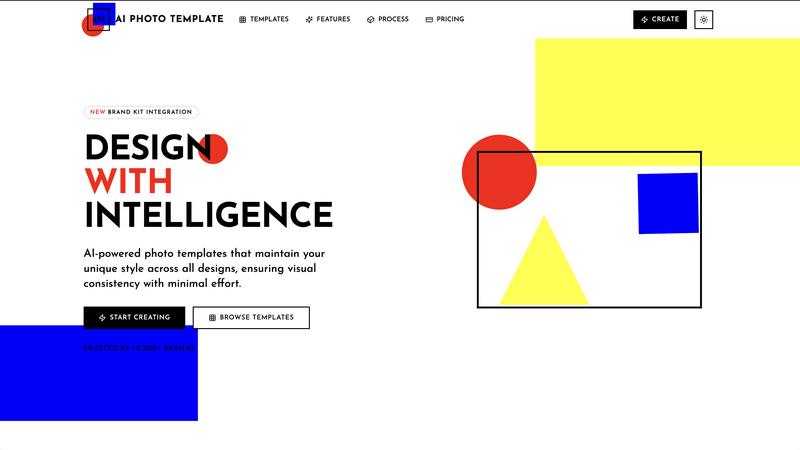
AI Photo Template generates brand-consistent photo designs instantly using artificial intelligence.
Last updated: February 28, 2026

NanoBanana 2
NanoBanana 2 is an advanced AI photo editing tool that enhances images with professional quality and intelligent retouching features.
Last updated: March 18, 2026
Visual Comparison
AI Photo Template
NanoBanana 2

Feature Comparison
AI Photo Template
AI Style Analysis & Replication
This foundational feature involves a sophisticated AI engine that meticulously studies uploaded sample images, brand colors, and existing visual content. It deconstructs elements like color palettes, compositional styles, typography preferences, and mood to learn a user's unique aesthetic. The system then applies this learned intelligence to generate new templates that are not generic but are intrinsically aligned with the user's established visual identity, ensuring every creation feels authentically "on-brand" from the outset.
Brand Kit Integration
AI Photo Template offers a centralized Brand Kit storage system, allowing users to upload and permanently store key brand assets such as logos in various formats, official color hex codes, and approved font families. Once configured, these elements can be applied instantaneously to any template with a single click. This eliminates manual entry errors, accelerates the design workflow, and is crucial for maintaining absolute consistency, especially when multiple team members are creating content for the same organization.
Smart Layout Engine
Going beyond simple drag-and-drop, the platform incorporates a Smart Layout Engine built upon professional design principles, including the golden ratio and rule of thirds. When a user adds images or text blocks, the AI automatically suggests and arranges elements in a visually balanced and aesthetically pleasing manner. This ensures that every template maintains a professional composition, making high-quality design accessible to users regardless of their formal design training or innate artistic skill.
Team Collaboration Tools
Specifically tailored for organizational use, this feature enables seamless real-time collaboration. Team members can be invited to shared workspaces, where they can co-edit templates, leave feedback via comments, and manage a unified asset library. This streamlines the review and approval process, maintains version control, and ensures all team-generated content adheres to the same brand standards, which is vital for marketing departments and agencies managing multiple clients.
About NanoBanana 2
AI-Powered Enhancement
NanoBanana 2 employs advanced machine learning algorithms that automatically enhance images, providing results that meet professional standards. The AI analyzes various aspects of each photo, adjusting brightness, contrast, and saturation to create visually stunning outcomes without requiring manual intervention.
Intelligent Retouching
This feature uses AI to understand the context of images, applying intelligent retouching that preserves natural details. Whether it's correcting skin tones or enhancing facial features, NanoBanana 2 ensures that edits look seamless and realistic, making it ideal for portrait photography.
One-Click Processing
With an optimized processing pipeline, NanoBanana 2 allows users to transform their images instantly. The one-click processing feature simplifies the editing workflow, enabling creators to achieve impressive results quickly and efficiently, which is essential for time-sensitive projects.
Advanced Color Correction
The tool's advanced color correction capabilities are powered by deep learning algorithms that provide professional-grade color grading. Users can achieve stunning color accuracy and vibrancy, enhancing the overall aesthetic of their images while ensuring that the colors remain true to life.
Use Cases
AI Photo Template
Social Media Content Management
Social media managers and influencers can utilize AI Photo Template to establish and maintain a cohesive visual identity across platforms like Instagram, Facebook, and LinkedIn. By creating a set of master templates for posts, stories, and cover photos that reflect their brand aesthetic, they can produce a high volume of visually consistent content rapidly. This consistency strengthens brand recognition, enhances feed aesthetics, and engages followers more effectively, all while drastically reducing the daily time investment required for content creation.
Small Business Marketing Material Creation
Small businesses and startups often lack the budget for a full-time designer or frequent agency work. AI Photo Template empowers them to independently produce professional marketing materials, including product photography frames, promotional flyers, email headers, and presentation slides. By ensuring these materials are visually consistent and polished, the tool helps small businesses project a credible, established, and trustworthy image to potential customers, competing effectively with larger counterparts.
Client-Facing Portfolio & Gallery Delivery
Professional photographers, videographers, and design freelancers can leverage the platform to create stunning, branded presentation templates for client deliverables. Instead of sending disjointed image sets, they can present work within a consistent, elegant template that includes their logo, color scheme, and typography. This elevates the perceived value of their service, provides a superior client experience, and reinforces their professional brand with every project delivery.
Marketing Agency Client Brand Management
Marketing and advertising agencies managing multiple client accounts can use AI Photo Template to build and store separate Brand Kits for each client. This allows teams to swiftly generate on-brand social media assets, ad creatives, and report templates tailored to each client's specific visual guidelines. It streamlines internal workflows, ensures flawless brand execution across all client work, and enables agencies to scale their services efficiently without compromising on quality or consistency.
NanoBanana 2
Professional Photography
Photographers can utilize NanoBanana 2 to quickly enhance their images post-shoot, allowing for efficient workflows. The AI-powered features enable them to achieve stunning results without the time-consuming manual editing typically associated with high-quality photography.
Social Media Content Creation
Content creators on platforms like Instagram and TikTok can benefit from NanoBanana 2's batch processing capabilities. By editing multiple images simultaneously, they can maintain a consistent aesthetic across their feeds, saving time while enhancing their visual content.
E-commerce Product Photography
E-commerce businesses can leverage NanoBanana 2 to enhance product images, ensuring that they are visually appealing and accurately represent the item. The intelligent retouching and color correction features help create product photos that attract customers and increase sales.
Graphic Design
Graphic designers can use NanoBanana 2 to streamline their image editing process, integrating enhanced photos into their projects more efficiently. The tool's advanced features allow for high-quality image manipulation that complements their creative designs.
Overview
About AI Photo Template
AI Photo Template (APT) is an advanced, AI-driven design platform engineered to automate and elevate the creation of professional-grade photo templates. At its core, the platform utilizes sophisticated artificial intelligence to analyze a user's existing visual assets and brand identity, subsequently generating fully customizable templates that faithfully replicate their unique aesthetic style. This process ensures visual consistency across all marketing materials, social media content, and client deliverables with minimal manual effort. The tool is meticulously designed for a diverse user base, including marketing teams requiring cohesive campaign assets, small to medium-sized businesses seeking agency-quality design without the associated costs, social media managers aiming for a harmonious and recognizable feed, and professional photographers needing consistent gallery presentations for clients. Its primary value proposition is a significant reduction in design time and resource expenditure while guaranteeing a high standard of visual coherence and professional polish across all digital and print platforms, effectively democratizing professional design through intelligent automation.
About NanoBanana 2
NanoBanana 2 is an advanced AI image editing tool that elevates photo enhancement to new heights. Building on the foundation of its predecessor, NanoBanana, this next-generation model combines sophisticated machine learning algorithms to deliver unparalleled image editing capabilities. Whether you are a photographer, designer, or content creator, NanoBanana 2 provides a powerful platform for intelligent photo manipulation. The tool is designed to automatically enhance images, ensuring professional quality results with minimal effort. Its intuitive interface allows users to quickly upload images, select enhancement modes, and receive instant feedback. With features like intelligent retouching and one-click processing, NanoBanana 2 stands out as a premier choice for serious image work, trusted by over 10,000 creators worldwide.
Frequently Asked Questions
AI Photo Template FAQ
How does the AI understand my brand's visual style?
The AI Style Analysis feature requires you to upload a selection of your existing images, graphics, or marketing materials that you believe best represent your brand's look and feel. The AI engine performs a deep analysis of these samples, identifying patterns in color usage, compositional style, contrast, spacing, and overall mood. It creates a unique "style profile" based on this data, which it then references to generate new templates that align with your established aesthetic, ensuring consistency.
Can I edit the AI-generated templates?
Absolutely. While the AI provides a professionally composed starting point, all templates are fully customizable. The platform offers intuitive controls that allow you to adjust every element, including text (font, size, color), image placement and cropping, background colors, and layer positioning. This flexibility ensures you can make specific tweaks for different campaigns or messages while the underlying template structure maintains design integrity and brand consistency.
What file formats can I export my designs in?
Export options vary by subscription plan. The Basic plan typically supports standard web formats like JPG and PNG. The Professional and Business plans offer a wider range, including high-resolution PNGs, print-ready PDFs, and layered PSD (Photoshop) files for advanced editing in external software. The Business plan also includes batch export capabilities, allowing you to download multiple template variations or sizes simultaneously for efficiency.
Is AI Photo Template suitable for complete beginners with no design experience?
Yes, it is explicitly designed for users of all skill levels. The AI handles the complex aspects of design theory and composition, providing a strong, professional foundation. The interface is built to be intuitive, with drag-and-drop functionality and clear editing tools. Furthermore, the adherence to built-in design principles means that even users with no formal training can produce work that looks expert-level, making it an ideal tool for entrepreneurs, content creators, and small business owners.
NanoBanana 2 FAQ
What image formats does NanoBanana 2 support?
NanoBanana 2 supports all major image formats, including JPEG, PNG, and WEBP, making it versatile for different types of image files.
Is there a free version of NanoBanana 2?
Yes, NanoBanana 2 offers a free version known as NanoBanana Lite, allowing users to explore its basic features before committing to the paid model.
Can I batch process images using NanoBanana 2?
Absolutely. NanoBanana 2 includes batch processing capabilities, enabling users to edit multiple images at once, which is particularly useful for large projects.
How does NanoBanana 2 ensure professional-quality results?
The tool's advanced AI algorithms perform intelligent auto-enhancements and retouching, ensuring that the final images meet high professional standards, suitable for various creative needs.
Alternatives
AI Photo Template Alternatives
AI Photo Template is a specialized AI assistant within the design software category, focused on generating consistent, brand-aligned photo templates. It uses artificial intelligence to analyze a user's visual style and automate the creation of professional templates, saving significant time and effort for content creators and businesses. Users may seek alternatives for various reasons, including budget constraints, specific feature requirements not met by the core offering, or a need for integration with different software ecosystems. Some may prefer a platform with a broader design scope beyond photo templates, or one with a different pricing model such as a one-time purchase versus a subscription. When evaluating alternatives, key considerations should include the depth of AI customization for brand consistency, the flexibility and quality of the template output, and the overall value relative to cost. The ideal tool should effectively balance automated intelligence with user control, ensuring the final designs meet both aesthetic standards and practical marketing needs.
NanoBanana 2 Alternatives
NanoBanana 2 is a cutting-edge AI image editing solution that enhances photo editing capabilities through advanced artificial intelligence. As an evolution of its predecessor, NanoBanana, this software falls within the AI Assistants category, making it an appealing choice for anyone looking to elevate their photo editing experience. Users often seek alternatives to NanoBanana 2 for a variety of reasons, including budget constraints, specific feature requirements, or compatibility with certain platforms. When exploring alternatives, it is essential to consider factors such as pricing models, the range of features offered, user-friendliness, and the level of support provided. Additionally, understanding the specific needs of your photo editing projects can help guide your decision, ensuring that the chosen alternative aligns with your expectations and workflow.