
AllForms vs documentorium
Side-by-side comparison to help you choose the right product.

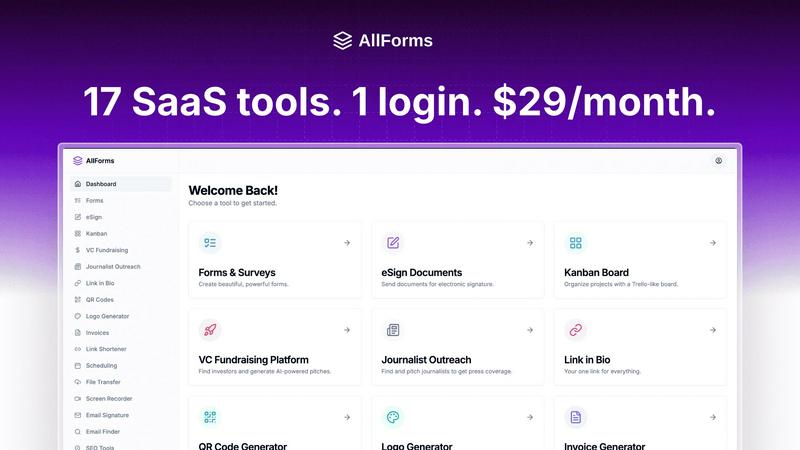
AllForms consolidates seventeen essential business tools into one affordable platform, saving thousands annually.
Last updated: March 1, 2026

documentorium
Documentorium is a specialized platform that generates professional contractor documents and PDFs through guided, trade-specific forms.
Last updated: March 26, 2026
Visual Comparison
AllForms
documentorium

Feature Comparison
AllForms
AI-Powered Chat Assistant
This feature provides a robust alternative to standalone AI chatbots, offering intelligent assistance for customer support, content generation, and business process automation directly within the platform. It enables users to draft communications, generate ideas, and automate responses without needing a separate subscription, seamlessly integrating AI capabilities into daily workflows for enhanced efficiency and creativity.
Unified Form & E-Signature Suite
AllForms combines a powerful drag-and-drop form builder with a legally binding electronic signature solution. Users can create unlimited, custom-designed forms for surveys, applications, or lead generation and then seamlessly route them for secure digital signing. This integration eliminates the need to manage data between separate form and signature tools, ensuring a smooth, closed-loop process from data collection to contract execution.
Integrated SEO & Marketing Toolkit
This comprehensive suite offers tools for domain analysis, keyword research, and backlink checking, serving as a capable alternative to dedicated SEO platforms. Users can evaluate URL metrics, assess keyword difficulty and search volume, and track competitive insights, all within the same environment where they manage their other business operations, fostering a more holistic approach to online visibility.
Professional Business Utilities
AllForms consolidates numerous essential business utilities, including a logo designer, email signature generator, QR code creator, and large-file transfer system. This feature set allows businesses to handle branding, professional communication, marketing asset creation, and file sharing without subscribing to multiple niche services, ensuring consistency and reducing administrative overhead.
About documentorium
Trade-Specific Template Library
Documentorium's foundation is its extensive catalog of over 200 pre-built document templates, meticulously organized across 26 trade categories. Unlike generic form builders, each template—whether for a plumbing invoice, an electrical service report, or a roofing proposal—contains fields, sections, and language specifically tailored to the practices, materials, and regulatory considerations of that particular trade. This specificity ensures that professionals capture all necessary information correctly the first time, reducing errors and omissions that can occur with blank-slate or off-the-shelf document creation.
Guided Form Interface
The platform utilizes an intuitive, step-by-step guided form interface for every document. This structured approach breaks down complex documents into manageable sections, prompting the user for specific information such as client details, scope of work, materials, labor rates, terms, and conditions. This guidance is invaluable for ensuring completeness and professionalism, effectively holding the user's hand through the creation process to produce a comprehensive document without the cognitive load of designing the layout or remembering every required field.
Instant PDF Generation and Professional Formatting
Upon completing a guided form, Documentorium automatically compiles the entered data into a clean, professionally formatted, and print-ready PDF document within seconds. This feature completely removes the burden of manual formatting, font selection, alignment, and layout design. The resulting PDFs are polished and branded, ready to be emailed directly to clients, printed for on-site use, or archived. This instant transformation from data entry to final product is a core time-saving benefit.
Document History and Prefill Capabilities
Every document created is saved within the user's account, creating a complete, searchable history of all business interactions. This archive is crucial for record-keeping, reference, and audit purposes. Furthermore, the system intelligently uses this history to prefill information in new documents. For repeat clients or similar projects, details like client name, address, and standard service descriptions can auto-populate, dramatically speeding up the creation of subsequent quotes, invoices, or work orders.
Use Cases
AllForms
Startup Founders & Solopreneurs
For individuals bootstrapping a business, AllForms is an invaluable resource that provides a full suite of professional tools at a fraction of the cost. A founder can use it to create a logo, build a landing page with forms, schedule investor meetings, send contracts for e-signature, and conduct initial SEO research—all from one platform, enabling rapid, professional launch and operation without capital-intensive software subscriptions.
Sales & Business Development Teams
Sales professionals can leverage AllForms to streamline their entire pipeline. They can find lead contact information, create and share personalized demo videos, use branded short links for tracking, let prospects book meetings directly into their calendar, and send follow-up proposals with integrated e-signature capabilities. This consolidation removes friction from the sales process and provides a unified view of prospect interactions.
Marketing Agencies & Consultants
Marketing agencies can utilize AllForms to manage multiple client projects efficiently. The platform allows for creating client intake forms, conducting SEO audits, generating reports, sharing large media files, and maintaining communication through AI-assisted drafting. This centralization improves project delivery speed, reduces tool-switching context loss, and significantly lowers the agency's operational software costs.
Freelancers & Independent Contractors
Freelancers can professionalize their operations using AllForms to generate invoices, create contracts, secure electronic signatures, build a personal bio-link page for their portfolio, and schedule client calls. It replaces the need for a patchwork of free and paid tools, presenting a unified and professional front to clients while simplifying the freelancer's administrative tasks.
documentorium
Creating Detailed Service Proposals and Bids
For contractors and installers, such as solar panel companies or roofing contractors, winning new projects often hinges on a professional, detailed proposal. Documentorium allows these professionals to quickly generate comprehensive bids that itemize materials, labor, timelines, and terms. Using a trade-specific proposal template ensures all technical and cost components are clearly presented, enhancing credibility and improving the chances of client acceptance compared to a handwritten quote or a poorly formatted Word document.
Streamlining Daily Work Orders and Service Reports
HVAC technicians, electricians, and plumbers on service calls can use Documentorium to generate precise work orders and service reports on the spot, either from a mobile device or back at the office. The guided forms ensure all diagnostic findings, parts used, labor performed, and recommendations are recorded accurately. The instant PDF can then be presented to the customer for signature upon job completion, providing immediate documentation and facilitating faster invoicing.
Managing Project Changes with Change Orders
During construction or renovation projects, changes to the original scope are common. Documentorium's change order templates provide a formal, clear mechanism for contractors to document any alterations, associated costs, and revised timelines. This formalizes client approval, protects the business from disputes about additional charges, and maintains a clear paper trail for the project's evolution, which is essential for contract management and financial clarity.
Issuing Professional Invoices and Warranties
After job completion, professionals need to issue clear invoices for payment and provide warranty documentation for their work. Documentorium automates this process, pulling data from the original quote or work order to quickly generate an accurate invoice with line-item details. Similarly, generating a standardized warranty document ensures clients receive consistent, legally-sound coverage information, reinforcing the professionalism and reliability of the service business.
Pricing Comparison
AllForms
AllForms operates on a straightforward, single-tier pricing model designed for maximum value and simplicity. The platform is available for a flat rate of $29 per month. This single plan includes access to all 17+ integrated tools and features, with no per-user fees or hidden costs for the core functionalities. This pricing stands in direct contrast to the cumulative cost of the individual tools it replaces, which the company estimates can exceed $1,200+ per month for businesses. AllForms also offers a 7-day free trial and supports its subscriptions with a 30-day money-back guarantee, 24/7 customer support, and the flexibility to cancel anytime.
documentorium
Documentorium employs a straightforward, all-inclusive annual subscription model. The pricing is simple: full access to the entire library of over 200 documents and forms across all 26 trade categories is available for $99 per year. There is only one plan, which includes every feature: the template catalog, guided forms, instant PDF generation, and complete document history. The company offers a 1-month free trial to new users, which requires no credit card to start, allowing service professionals to fully evaluate the platform's fit for their business before committing to the annual subscription.
Overview
About AllForms
AllForms is a comprehensive, all-in-one Software as a Service (SaaS) platform engineered to consolidate and streamline a wide array of essential business operations. It functions as a unified digital workspace, integrating the core functionalities of over 17 disparate tools into a single, cohesive system. The platform's primary value proposition is twofold: significant cost reduction and dramatic workflow simplification. By replacing a fragmented stack of expensive, single-purpose subscriptions—such as DocuSign for e-signatures, Calendly for scheduling, Semrush for SEO, and ChatGPT for AI assistance—with one affordable solution, AllForms directly addresses the financial and operational inefficiencies plaguing modern businesses. It is meticulously designed for small to medium-sized enterprises, startups, and entrepreneurs who seek enterprise-grade capabilities without the associated complexity and cost. With features like legally binding e-signatures, unlimited form creation, AI-driven chat, SEO tools, and a built-in CRM, AllForms empowers organizations to enhance productivity, maintain brand consistency, and accelerate growth from a single, user-friendly dashboard.
About documentorium
Documentorium is a specialized, no-nonsense document generation engine meticulously crafted for the unique demands of skilled trades and service professionals. It serves as a comprehensive solution for electricians, plumbers, general contractors, HVAC technicians, roofers, solar installers, and a wide array of other field service experts who require professional, accurate, and legally sound business documentation. The platform's core value proposition is the elimination of time-consuming document creation from scratch or the use of generic, ill-fitting templates. Instead, Documentorium provides a vast, trade-specific library of over 200 guided templates across 26 distinct categories. This includes essential documents such as quotes, estimates, invoices, work orders, bids, contracts, service reports, inspection reports, proposals, warranties, and change orders. Each template is engineered with fields and terminology specific to the user's trade, ensuring relevance and professionalism. The process is streamlined: a user fills out a structured, guided form, and the system instantly generates a clean, print-ready PDF document. This approach not only saves significant administrative time but also enhances a business's credibility with clients through consistent, high-quality documentation, all managed within a single, centralized platform.
Frequently Asked Questions
AllForms FAQ
What tools does AllForms specifically replace?
AllForms is designed to replace a comprehensive suite of 17+ popular business tools. This includes, but is not limited to, DocuSign (e-signatures), TypeForm (forms), Calendly (scheduling), ChatGPT (AI chat), Semrush (SEO), Hunter.io (email finding), Looka (logo design), WeTransfer (file sharing), Bitly (link shortening), Pipedrive (CRM), OpenVC (investor database), and Cision (media contacts). The platform consolidates these functionalities into one integrated system.
Is there a free trial or a money-back guarantee?
Yes, AllForms offers a 7-day free trial that allows users to explore all features of the platform without any initial commitment. Furthermore, they back their service with a 30-day money-back guarantee. This means if you are not satisfied with the platform within the first month of a paid subscription, you can request a full refund, providing a risk-free opportunity to evaluate its fit for your business.
How does AllForms manage to offer so many tools for one low price?
AllForms achieves this by building a unified, multi-tenant SaaS architecture where the core infrastructure and development costs are shared across all its feature modules, rather than maintaining 17 separate applications. This efficiency, combined with a direct-to-consumer model that avoids complex enterprise sales cycles, allows them to pass on massive cost savings to the customer while maintaining a high-quality, integrated user experience.
Can I use AllForms for legally binding e-signatures?
Absolutely. The e-signature feature within AllForms is designed to provide legally binding electronic signatures compliant with major global regulations such as the ESIGN Act in the U.S. and eIDAS in the EU. It includes essential security and audit trail features like signer authentication, detailed activity logs, and tamper-evident completion certificates, making it suitable for contracts, agreements, and other formal documents.
documentorium FAQ
Can I cancel my subscription anytime?
Yes, you can cancel your Documentorium subscription at any time directly from your account settings. There are no long-term contracts or penalties for cancellation. Your access to the platform's features will remain active until the end of your current billing period, after which your account will revert to a free state. This policy ensures there is no vendor lock-in, providing complete flexibility for the user.
What happens to my documents when the free trial ends?
When your one-month free trial concludes, all documents you created during the trial period are preserved and remain accessible in your account history. You can view and download these existing PDFs at any time. To continue creating new documents or editing templates, you will need to activate a paid subscription. No user data or document history is deleted upon trial expiration.
Do I lose access to my old documents if I don't subscribe?
No, you do not lose access to your previously created documents. Even without an active subscription, you retain the ability to log into your account to view, download, and print all documents you generated while your subscription was active or during your trial period. The subscription is required for creating and editing new documents, but your historical data remains your property and is always accessible.
Does Documentorium provide legal advice for contracts?
No, Documentorium does not provide legal advice. The platform is a document generation tool that provides templates and forms designed for common trade-specific business scenarios. While these templates are professionally crafted, users are responsible for ensuring that any document, especially contracts, warranties, and agreements, meets their specific legal requirements and complies with local, state, and federal regulations. Consulting with a legal professional for critical documents is recommended.
Alternatives
AllForms Alternatives
AllForms is a comprehensive productivity and management platform that consolidates numerous essential business tools into a single SaaS solution. This all-in-one approach is designed to streamline operations and reduce the cost and complexity of managing multiple software subscriptions. Users may explore alternatives to AllForms for various reasons, including specific budgetary constraints, the need for a different feature set not covered by the platform, or a preference for more specialized, best-in-class tools over a consolidated suite. Platform compatibility, unique workflow requirements, and the scale of business operations are also common factors driving the search for other options. When evaluating an alternative, it is crucial to conduct a thorough assessment of your core business needs. Key considerations should include the total cost of ownership, the depth and integration of the required features, the platform's scalability, and the quality of user support. The goal is to find a solution that offers the right balance of functionality, ease of use, and value for your specific context.
documentorium Alternatives
documentorium is a specialized document generation platform within the broader contractor management and productivity software category. It focuses on providing trade-specific templates for creating professional PDF documents like quotes, invoices, and work orders. Users may explore alternatives for various reasons, such as seeking different pricing models, requiring more extensive business management features like scheduling or CRM, needing mobile-specific functionality, or preferring a different user interface. The decision often hinges on the specific needs and scale of a contracting business. When evaluating alternatives, key considerations include the depth and relevance of trade-specific templates, the efficiency of the document creation workflow, output quality, integration capabilities with other tools, overall cost, and the platform's focus on mobile versus desktop use. The ideal solution should streamline paperwork without adding complexity.