
ChartFromText vs Nabbed
Side-by-side comparison to help you choose the right product.

ChartFromText
ChartFromText instantly converts your text data into clear, professional pie charts for effortless visualization.
Last updated: February 28, 2026

Nabbed is a career CRM that helps sales professionals manage their job search like a revenue pipeline with AI tools and tracking.
Last updated: April 13, 2026
Visual Comparison
ChartFromText
Nabbed

Feature Comparison
ChartFromText
Instant Text-to-Chart Conversion Engine
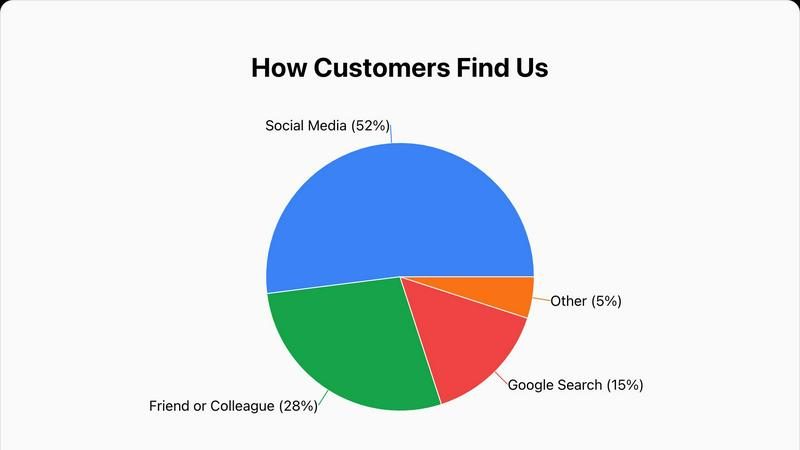
At the heart of ChartFromText is its sophisticated parsing engine that accepts data in simple, plain-text formats. Users can copy information directly from a CSV file, a spreadsheet cell range, or a text document and paste it into the tool's input field. The engine automatically recognizes patterns like "Label, Value" on new lines, eliminating the need for manual data entry into complex table systems. This direct conversion from text to a structured visual is the defining feature, enabling the creation of a pie chart, bar graph, or line graph in a matter of seconds, which represents a significant efficiency gain over traditional methods.
Comprehensive and Intuitive Customization Suite
Beyond basic generation, ChartFromText provides a robust set of customization options to ensure the final chart meets specific aesthetic and communicative needs. Users have full control over the chart's title, which can be tailored for context. The background color can be adjusted to align with brand guidelines or presentation themes. Most notably, the tool offers multiple display modes for data labels: values can be placed inside chart segments for direct association, shown with connecting lines for detailed breakdowns, or consolidated into a separate legend for a clean, minimalist visual. This flexibility allows for professional-grade tailoring without complexity.
Truly Free and No-Account-Access Model
ChartFromText operates on a completely free and accessible model. There are no tiered pricing plans, feature limitations, or watermarks applied to downloaded charts. Every customization option is available from the outset without any paywalls. Furthermore, the tool respects user privacy and convenience by requiring no account creation, login, or submission of personal information. Users can generate and download an unlimited number of charts anonymously, making it an exceptionally low-barrier tool for one-time use or repeated, high-volume chart creation needs.
High-Resolution PNG Export and Multi-Chart Support
The utility of a generated chart is fully realized in its application. ChartFromText ensures professional output by allowing users to download their creations as high-resolution PNG image files. This format guarantees that visuals remain crisp and clear when embedded in digital documents, presentation slides, printed reports, or websites. Additionally, while prominently featuring a pie and donut chart maker, the platform supports the generation of other fundamental chart types like bar and line graphs, making it a versatile toolkit for various data storytelling requirements beyond part-to-whole analysis.
About Nabbed
Dual Sales Pipelines
Nabbed features two distinct, interactive Kanban boards mirroring sales CRM tools like HubSpot: one for tracking job applications and another for managing networking contacts. Users can drag-and-drop opportunities through customizable stages such as "Applied," "Interview," and "Offer," while the networking pipeline tracks relationships from "Initial Contact" to "Advocate." This provides clear visibility into momentum, stage velocity, and overall pipeline health, enabling a strategic approach to the entire job search ecosystem.
AI Career Suite
This integrated suite contains four powerful AI tools designed to accelerate key tasks. It generates tailored cover letters and optimizes resumes to match specific job descriptions, provides personalized interview coaching with potential questions, and crafts outreach emails that mimic the user's writing style. These tools eliminate hours of manual work, ensuring every application and communication is polished, relevant, and effective, all within seconds.
Chrome Extension with ATS Autofill & Tracking
The free browser extension is the operational engine of Nabbed. It allows users to save job listings from any site with one click, then autofills application forms on over 60 ATS platforms like Greenhouse and Lever using a saved profile. Crucially, it includes email tracking pixels for Gmail, notifying users when their emails are opened—a competitive intelligence feature unmatched by other job search tools. It also enables contact capture from LinkedIn and stealth application mode.
Target Account & Company Intelligence Dashboard
Users can name and track their dream companies in a dedicated dashboard. Each saved company is automatically enriched with real-time intelligence including funding status, employee headcount, Glassdoor ratings, tech stack, and open positions. The system also monitors for "hiring triggers," such as news of company growth or funding rounds, alerting the user to prime opportunities for outreach, much like sales trigger alerts for target accounts.
Use Cases
ChartFromText
Academic and Educational Material Development
Educators and students can leverage ChartFromText to rapidly create visual aids for essays, research papers, science fair projects, and classroom presentations. A teacher can quickly illustrate survey results from a class poll, while a student can visualize historical population data or scientific experiment results. The tool's simplicity allows users to focus on data interpretation rather than software mechanics, making it an ideal companion for enhancing learning materials and improving the comprehension of statistical concepts across all educational levels.
Business Reporting and Presentation Enhancement
Business professionals across departments such as marketing, finance, and operations can use ChartFromText to generate instant visuals for internal reports, client presentations, and stakeholder updates. For example, a marketing manager can paste quarterly advertising spend across channels to create a budget allocation pie chart for a review meeting. The ability to quickly produce a clear, professional chart from raw data in emails or spreadsheets facilitates faster decision-making and more impactful communication of key business metrics without relying on dedicated design resources.
Content Creation for Digital Media
Bloggers, journalists, and social media managers can utilize ChartFromText to enrich their online content with engaging, data-driven graphics. When writing an article about industry trends, a blogger can easily convert a few key statistics into a bar graph to break up text and illustrate a point. The high-resolution download ensures the image is web-ready, and the no-account feature streamlines the workflow for creators who need a quick, reliable tool without committing to a subscription for occasional use.
Personal Finance and Project Budget Tracking
Individuals and small team leads can apply ChartFromText to visualize personal or project-based financial data. Someone managing a household budget can input monthly expense categories and amounts to see a clear pie chart of spending distribution. Similarly, a freelancer or project manager can illustrate how a project's total budget is allocated across different workstreams like development, design, and administration. This visual breakdown makes it easier to identify areas for adjustment and communicate financial plans simply and effectively.
Nabbed
Strategic Career Transition for Sales Leaders
A Vice President of Sales planning a move to a larger company or new industry can use Nabbed to systematically identify and research 50 target "accounts." The platform's company intelligence provides critical data for due diligence, while the pipeline tools help manage parallel interview processes with multiple firms. AI tools prepare them for executive-level interviews, and email tracking provides insight into recruiter engagement.
Active Job Search for Account Executives
An Account Executive seeking a new role can consolidate job searches from LinkedIn, Indeed, and Google Jobs into one Nabbed dashboard. The Chrome extension streamlines applying to dozens of positions weekly with autofill, while the contact CRM helps track referrals and follow-ups with recruiters and hiring managers. The Job Fit Score helps prioritize applications with the highest match probability.
Passive Career Management and Networking
A professional not actively applying but open to opportunities can use Nabbed to maintain a "always-on" network. They can save interesting companies to a watchlist, receive alerts when those companies are hiring, and use the networking pipeline to periodically nurture key contacts. This builds a ready-made warm introduction path for when they decide to initiate a search.
Offer Negotiation and Salary Benchmarking
Upon receiving a job offer, a user can leverage Nabbed's salary benchmarking and offer analysis tools. By comparing the offer against market data for the role, location, and company stage, the professional can enter negotiations with concrete, data-backed justification for their desired compensation package, turning the final offer stage into a confident close.
Overview
About ChartFromText
ChartFromText is a specialized, web-based data visualization platform engineered to transform raw, unstructured text data into professional-grade charts with unparalleled speed and simplicity. Its core functionality revolves around an intelligent text parser that interprets plain text inputs, such as "Marketing, 22000" on separate lines, and instantly converts them into visual formats including pie charts, bar graphs, and line graphs. The tool is meticulously designed for a broad spectrum of users who require immediate, hassle-free chart creation without the steep learning curve of traditional software like Excel or complex design tools. This includes students compiling data for projects, educators creating instructional materials, content creators enhancing blogs and social media, and business professionals needing quick visuals for reports and presentations.
The primary value proposition of ChartFromText is its elimination of procedural friction in data visualization. By removing the need for manual table creation, software installation, account registration, or any form of payment, it democratizes access to effective charting. Users can focus entirely on their data's narrative, pasting it directly from sources like spreadsheets, documents, or notes. The platform then handles the rendering, offering customization options for titles, colors, and label display, culminating in a downloadable, high-resolution image. In essence, ChartFromText serves as an immediate bridge between raw data and actionable insight, making complex information accessible, understandable, and presentation-ready within seconds.
About Nabbed
Nabbed is the first and only Customer Relationship Management (CRM) platform engineered explicitly for sales, revenue, and go-to-market professionals actively managing their careers. It transforms the chaotic, often reactive process of a job search into a strategic, data-driven sales campaign. The core value proposition is applying the proven methodologies of B2B sales—territory planning, pipeline management, trigger-based outreach, and relationship tracking—to the pursuit of a new role. Nabbed provides a unified system to track job applications in a visual Kanban pipeline, build a comprehensive contact CRM with warm path mapping, and gain AI-powered company intelligence on target firms. Its powerful Chrome extension automates the application process across 60+ Applicant Tracking System (ATS) platforms and enables email open tracking, a feature uniquely offered by Nabbed. By integrating search across 11 major job boards, providing AI tools for resume tailoring and interview prep, and delivering hiring signal alerts, Nabbed empowers revenue professionals to "close" their next career opportunity with the same precision and efficiency they use to close business deals.
Frequently Asked Questions
ChartFromText FAQ
What data format does ChartFromText accept for input?
ChartFromText is designed to accept simple, plain-text formats for effortless data entry. The most common and recommended format is to enter each data point on a new line, with the label and value separated by a comma, like this: "Label, Value". For example: "Development, 45000". The tool's intelligent parser is built to recognize this structure automatically. You can typically copy this directly from a two-column spreadsheet selection or type it manually, making the process highly flexible and user-friendly.
Is ChartFromText really free, and are there any watermarks?
Yes, ChartFromText is completely free to use with no hidden costs or subscription requirements. There are no watermarks placed on any of the charts you generate and download. All features, including full customization options and high-resolution PNG downloads, are available without any limitations. The service operates without requiring user accounts, ensuring both cost-free and privacy-respecting access to all its functionalities.
Can I create charts other than pie charts with this tool?
Absolutely. While the platform prominently features its pie and donut chart generator due to their specific use case, ChartFromText is capable of creating other fundamental chart types. This includes bar graphs, which are ideal for comparing quantities across different categories, and line graphs, which are perfect for illustrating trends over time. The same simple text-input principle applies, making it a versatile tool for various data visualization needs beyond part-to-whole analysis.
How do I download and use the chart I create?
Once you have pasted your data and customized your chart using the options for title, colors, and label display, you click the "Generate Chart" button. A preview of your chart will appear on the page. After verifying the chart meets your needs, simply click the "Download as PNG" button. This will save a high-resolution PNG image file directly to your device. You can then insert this image into presentation software like PowerPoint, word processors like Microsoft Word, website builders, or any other digital or print medium.
Nabbed FAQ
How does Nabbed's email tracking work?
Nabbed's Chrome extension integrates with Gmail to insert a nearly invisible tracking pixel into the emails you send through the browser. When the recipient opens the email, the pixel loads, and Nabbed instantly notifies you within your dashboard. This provides real-time engagement data without the recipient's knowledge, offering a significant advantage in timing follow-ups.
What makes Nabbed different from other job search trackers like Teal or Huntr?
Nabbed is fundamentally built as a CRM for revenue professionals, whereas others are generalized job trackers. Key differentiators include its dual pipeline for jobs and networking, advanced email open tracking (which competitors lack), deep company intelligence with hiring signals, and a feature set modeled directly on sales workflows. It is designed by a Chief Revenue Officer for the specific tactics of high-stakes career moves.
Is my data safe and private with Nabbed?
Yes. Nabbed employs enterprise-grade security measures to protect user data. The company has a clear Privacy Policy and Cookie Policy detailing data handling practices. Sensitive information like resumes and contact details are encrypted. Users maintain full control over their data and can delete it at any time.
Can I use Nabbed for free?
Yes, Nabbed offers a free tier that includes core functionality like the Chrome extension for job capture, basic ATS autofill, and access to search across multiple job boards. To unlock advanced features like full email tracking, the AI Career Suite, LinkedIn contact capture, and outreach sequences, you would need to upgrade to the Core plan.
Alternatives
ChartFromText Alternatives
ChartFromText is a specialized productivity tool within the data visualization category. It streamlines the process of creating charts by allowing users to input plain text, which is then instantly converted into visual formats like pie, bar, and line graphs. This approach is designed for simplicity and speed, making it accessible to a broad audience. Users may seek alternatives to ChartFromText for various reasons. Common motivations include the need for more advanced chart types, deeper customization and analytical capabilities, integration with other software platforms, or different pricing models. Some users require offline functionality or enterprise-level features that a basic online tool may not provide. When evaluating an alternative, key considerations should include the range of supported chart types, the depth of customization and data manipulation tools, export quality and format options, and overall ease of use. The ideal choice balances the tool's power with the user's specific technical skill level and project requirements, ensuring it enhances rather than complicates the workflow.
Nabbed Alternatives
Nabbed is a specialized productivity and management tool designed as a CRM for job seekers and career-focused sales professionals. It uniquely combines job application tracking, contact management, and AI-powered intelligence into a single platform to streamline the modern job search. Users often explore alternatives to find a solution that better aligns with their specific budget, desired feature set, or preferred platform ecosystem. When evaluating alternatives, key considerations include the depth of application tracking, the sophistication of contact and relationship management features, and the availability of integrated market intelligence. The ability to automate repetitive tasks like application form filling and the scope of job board aggregations are also critical differentiators. Ultimately, the best choice depends on an individual's need for automation, data insights, and workflow integration. A thorough assessment should weigh the core functionality against cost, noting whether a tool offers a robust free tier or trial period. Security and data privacy are paramount, as these platforms handle sensitive career and personal information. The ideal alternative will not only manage the logistics of a job search but also provide strategic advantages through data and automation.