
Cosy vs HeyVid
Side-by-side comparison to help you choose the right product.

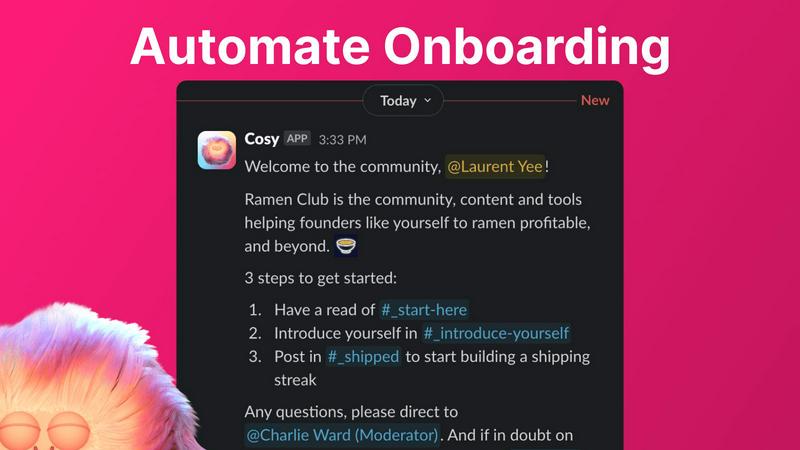
Cosy automates Slack member onboarding and introductions to save community managers time.
Last updated: February 28, 2026

HeyVid is an all-in-one AI tool that effortlessly generates high-quality videos and images from text or images, streamlining your creative process.
Last updated: April 4, 2026
Visual Comparison
Cosy
HeyVid

Feature Comparison
Cosy
Automated Onboarding Sequences
Cosy automates the initial welcome and integration process for new community members through fully customizable Direct Message (DM) sequences. Community managers can create up to ten distinct onboarding flows, which can be triggered immediately upon a member joining or on a configurable delay. Messages can be personalized with the member's name, include links and emojis, and are sent from either a human team member's account or the Cosy bot. This ensures every new member receives a consistent, warm welcome at any hour, significantly reducing the manual burden on community leaders and preventing any newcomer from being overlooked.
Automated Member Introductions
To foster connections and serendipitous networking, Cosy automatically introduces opted-in community members to each other via DMs on a regular, customizable schedule. Introductions occur in a three-person DM involving the two members and the Cosy bot, with a template message that can be tailored by the admin. The system intelligently pairs members randomly while avoiding recent matches, similar to platforms like Donut. Administrators control the frequency (every 1-4 weeks) and the specific weekday and time (in UTC) for these introductions, systematically driving engagement and relationship-building on autopilot.
Searchable Member Directory
Cosy provides a fully integrated, searchable member directory that operates entirely within Slack, requiring no external apps or logins. Admins can create custom profile fields (up to ten), including text entry and multiple-choice options. Members can be prompted to fill out their profiles via a one-click notification, and new joiners automatically receive a prompt 24 hours after entering the workspace. Members can then search this directory by keyword or filter for completed profiles using a slash command (/member-directory), making it easy to find relevant peers and expertise without leaving the Slack interface.
Content Highlights & Moderation Tools
This feature empowers community managers to surface valuable content and monitor conversations efficiently. Using slash commands, admins can instantly retrieve the top 10 most engaged posts within a specific channel (/most-engaged-messages) or across all public channels (/most-engaged-messages-all). Additionally, the tool can list public messages that have received no replies (/unreplied-messages), helping to identify discussions that may need a boost. Cosy also includes instant flagging for abusive or spam messages, providing essential moderation capabilities to maintain a healthy and respectful community environment.
About HeyVid
Text to Video
The Text to Video feature allows users to convert written content into engaging video formats seamlessly. By integrating AI technology, HeyVid simplifies the video creation process, enabling users to input text and receive a polished video that captures their message effectively. This feature is particularly useful for content creators looking to enhance their storytelling capabilities.
Image to Video
With the Image to Video functionality, users can transform static images into dynamic video presentations. This feature utilizes advanced animation techniques to bring still visuals to life, making it perfect for marketers and educators who want to create compelling visual narratives from existing imagery.
AI Image Refinement
The AI Image to Image Refiner & Stylizer feature allows users to enhance and stylize their images using various AI models. This capability ensures that visuals can be tailored to match specific aesthetics or brand guidelines, making it ideal for businesses seeking to maintain a consistent visual identity across all platforms.
AI Music Integration
HeyVid's AI Music feature enables users to add custom soundtracks to their videos effortlessly. Users can select from an array of music options or even generate original compositions, ensuring that their videos not only look great but also sound professional, enhancing the overall viewing experience.
Use Cases
Cosy
Scaling Professional Networks and Alumni Groups
For professional networks or alumni associations hosted on Slack, Cosy automates the critical "first touch" and continuous networking that defines their value. Automated onboarding ensures new members feel immediately welcomed and informed. The automated introductions feature continuously fosters new professional connections among members, mimicking the serendipity of in-person events. The searchable member directory allows members to easily find colleagues by skills, industry, or location, turning the Slack community into a powerful, always-active networking hub without constant manual facilitation from organizers.
Managing Customer Success and Support Communities
Companies that host customer communities on Slack can use Cosy to enhance customer experience and product engagement. Automated onboarding DMs can guide new users to key resources, support channels, and best practices. The content highlights feature allows community managers to quickly identify and amplify successful case studies or helpful support answers posted by other customers. Furthermore, the ability to flag spam or abusive messages instantly helps maintain a professional and helpful environment, crucial for customer-facing spaces.
Running Membership-Based Organizations and Clubs
Membership organizations, such as paid clubs or subscription-based communities, require high engagement to justify their value. Cosy helps maintain this by ensuring no member joins unnoticed through its automated welcome sequences. The member directory builds a sense of belonging and helps members connect based on shared interests defined in custom profile fields. Regularly scheduled introductions keep the community dynamic and encourage ongoing dialogue, directly contributing to higher retention rates and perceived member value.
Facilitating Large-Scale Event or Cohort Engagement
For organizations running cohorts, bootcamps, or large virtual events, Cosy streamlines participant integration. Onboarding sequences can deliver crucial logistical information, schedules, and cohort-specific details to all participants simultaneously. As the event progresses, automated introductions can help break the ice among attendees, fostering peer learning and networking. After the event, the member directory serves as a lasting roster, allowing connections made during the event to continue and deepen, thereby extending the lifecycle and impact of the gathering.
HeyVid
Marketing Campaigns
HeyVid can be leveraged to create compelling marketing videos that engage audiences and drive conversions. By utilizing the platform's video generation capabilities, marketers can quickly produce promotional content tailored to specific campaigns, enhancing their outreach efforts.
Educational Content
Educators can utilize HeyVid to develop dynamic lesson materials, tutorials, and presentations. The platform's ability to generate both videos and images allows for the creation of engaging educational content that can capture the attention of students and facilitate better learning experiences.
Social Media Content Creation
Content creators can use HeyVid to produce eye-catching videos and images for social media platforms. With the ease of generating high-quality visuals, users can maintain a consistent posting schedule and enhance their online presence, making their profiles more attractive to followers.
Business Presentations
HeyVid is an excellent tool for professionals needing to create impactful business presentations. Users can generate pitch videos, product launch materials, and client presentations that effectively communicate their ideas, helping them to stand out in competitive environments.
Overview
About Cosy
Cosy is a sophisticated, Slack-native application engineered to transform standard Slack workspaces into dynamic, self-sustaining communities. It is specifically designed for community managers, leaders, and organizations that host their communities on Slack and seek to elevate member engagement without proportional increases in manual administrative effort. The core value proposition of Cosy lies in its automation of critical yet repetitive community management tasks, such as member onboarding, facilitating introductions, and content curation, thereby freeing leaders to focus on strategic relationship-building and fostering a collaborative culture. By operating seamlessly within the Slack environment, it eliminates the need for members to navigate external platforms, ensuring a smooth and integrated user experience. Cosy is particularly beneficial for professional networks, alumni groups, customer communities, and any organization that prioritizes creating a supportive, interconnected, and vibrant member ecosystem. Its comprehensive toolset addresses the full lifecycle of community interaction, from a new member's first welcome to ongoing engagement and content discovery, making it an indispensable platform for scaling community efforts efficiently.
About HeyVid
HeyVid is an innovative all-in-one AI video and image generation platform designed to empower users with the ability to create high-quality multimedia content effortlessly. The platform is ideal for a diverse range of users, including entrepreneurs, marketers, educators, and content creators, enabling them to transform ideas into dynamic visuals with just a few clicks. With HeyVid, users can generate professional-grade videos and images through advanced AI models, making it a valuable tool for anyone looking to enhance their digital presence. The main value proposition of HeyVid lies in its simplicity and speed, allowing users to produce stunning videos and images without needing extensive editing skills or prior experience, thus streamlining the creative workflow from concept to execution.
Frequently Asked Questions
Cosy FAQ
How does the automated onboarding work?
When a new member joins your Slack workspace, Cosy triggers a pre-configured sequence of welcome DMs. You can create up to 10 unique sequences with fully customizable messages that can include the member's name, links, and emojis. These messages can be sent immediately or on a delay (minutes, hours, or even months later) and can appear to come from your account, a team member's account, or the Cosy bot. This ensures every new member is properly welcomed and onboarded without any manual effort, even outside of business hours.
Can members reply to automated messages?
Yes, but it depends on the sender configuration. If the onboarding or introduction messages are sent from a human team member's Slack account, recipients can reply directly as they would in a normal DM conversation. However, if the messages are configured to be sent from the Cosy bot, the bot is currently designed not to respond to replies. This allows for human-like interaction when desired while maintaining clarity when communication is purely automated.
How does the member directory get populated?
Community managers can notify all existing members to create their profiles with a single click, sending a DM prompt via the Cosy bot. Additionally, Cosy automatically sends a profile-editing prompt to every new member 24 hours after they join the Slack workspace. Members simply click 'Edit Profile' in the DM to fill out the custom fields you have set up, which can include text, single-select, or multi-select options. This dual-trigger system ensures high directory participation with minimal administrative effort.
Is there a free plan available?
Yes, Cosy offers a free plan that supports communities with up to 250 members. This allows smaller groups or teams to access core features and evaluate the tool's impact. For communities requiring unlimited members, Cosy provides a 30-day free trial of its paid plans, allowing full access to all features before any commitment is required. This tiered approach makes it accessible for communities of all sizes to begin enhancing their Slack engagement.
HeyVid FAQ
What types of content can I create with HeyVid?
HeyVid allows users to create a wide range of content, including videos from text and images, as well as stylized images. Users can also add custom music to enhance their videos, making it a versatile tool for various multimedia needs.
Is HeyVid suitable for beginners?
Yes, HeyVid is designed with user-friendliness in mind, making it accessible to beginners and professionals alike. The intuitive interface and straightforward processes allow anyone to create high-quality content without extensive technical skills.
Can I customize the videos and images I create with HeyVid?
Absolutely. HeyVid offers various customization options, including different AI models for video and image generation, as well as the ability to refine and stylize images to align with your unique brand identity.
What industries can benefit from using HeyVid?
HeyVid is beneficial across multiple industries, including marketing, education, entertainment, and corporate sectors. It serves a variety of users, from entrepreneurs and marketers to educators and content creators, enhancing their creative capabilities.
Alternatives
Cosy Alternatives
Cosy is a specialized productivity and community management tool designed for Slack workspaces. It automates key administrative tasks like onboarding new members and facilitating introductions, aiming to enhance engagement and save time for community managers and team leaders. Users may explore alternatives to Cosy for various reasons, including budget constraints, the need for different feature sets, or a requirement for a platform that integrates with tools beyond Slack. Some may seek more advanced analytics, different automation capabilities, or a solution that serves a multi-platform community strategy. When evaluating an alternative, key considerations include the depth of automation for onboarding and engagement, the quality and scope of member directory features, and the flexibility of integration with your existing tech stack. It is also crucial to assess the tool's ability to scale with your community's growth and the overall value relative to its cost.
HeyVid Alternatives
HeyVid is an all-in-one AI video and image generator designed to streamline the creation of high-quality visual content. It belongs to the productivity and management category, appealing to users who require efficient and professional tools for multimedia generation. However, users often seek alternatives due to various reasons such as pricing structures, feature sets that may not align with their specific needs, or compatibility issues with different platforms. When searching for an alternative, it is essential to consider factors such as ease of use, the range of features offered, the quality of output, customer support, and pricing plans. A well-rounded alternative should meet the specific requirements of the user while providing a seamless experience across various devices and platforms.