
documentorium vs Phishly
Side-by-side comparison to help you choose the right product.

documentorium
Documentorium is a specialized platform that generates professional contractor documents and PDFs through guided, trade-specific forms.
Last updated: March 26, 2026

Phishly
Phishly uses AI to detect phishing emails instantly via a Chrome extension for Gmail and a web tool for enhanced secu...
Visual Comparison
documentorium

Phishly
Feature Comparison
documentorium
Trade-Specific Template Library
Documentorium's foundation is its extensive catalog of over 200 pre-built document templates, meticulously organized across 26 trade categories. Unlike generic form builders, each template—whether for a plumbing invoice, an electrical service report, or a roofing proposal—contains fields, sections, and language specifically tailored to the practices, materials, and regulatory considerations of that particular trade. This specificity ensures that professionals capture all necessary information correctly the first time, reducing errors and omissions that can occur with blank-slate or off-the-shelf document creation.
Guided Form Interface
The platform utilizes an intuitive, step-by-step guided form interface for every document. This structured approach breaks down complex documents into manageable sections, prompting the user for specific information such as client details, scope of work, materials, labor rates, terms, and conditions. This guidance is invaluable for ensuring completeness and professionalism, effectively holding the user's hand through the creation process to produce a comprehensive document without the cognitive load of designing the layout or remembering every required field.
Instant PDF Generation and Professional Formatting
Upon completing a guided form, Documentorium automatically compiles the entered data into a clean, professionally formatted, and print-ready PDF document within seconds. This feature completely removes the burden of manual formatting, font selection, alignment, and layout design. The resulting PDFs are polished and branded, ready to be emailed directly to clients, printed for on-site use, or archived. This instant transformation from data entry to final product is a core time-saving benefit.
Document History and Prefill Capabilities
Every document created is saved within the user's account, creating a complete, searchable history of all business interactions. This archive is crucial for record-keeping, reference, and audit purposes. Furthermore, the system intelligently uses this history to prefill information in new documents. For repeat clients or similar projects, details like client name, address, and standard service descriptions can auto-populate, dramatically speeding up the creation of subsequent quotes, invoices, or work orders.
About Phishly
AI-Powered Detection
Phishly utilizes cutting-edge artificial intelligence to analyze email content for common phishing indicators. This feature allows users to gain insights into potentially malicious emails quickly and accurately, increasing their ability to identify threats.
Risk Assessment Categories
After scanning an email, Phishly assigns a risk level of Safe, Medium Risk, or High Risk, providing users with a straightforward understanding of the email's safety. This feature helps users make informed decisions about whether to engage with the email content.
Detailed Explanations
Phishly goes beyond simple risk scoring by offering detailed explanations for each assessment. Users receive insights into why an email was categorized a certain way, equipping them with knowledge to recognize potential threats in the future.
User Privacy Protection
Phishly prioritizes user privacy by only analyzing emails that users explicitly choose to scan. This feature ensures that personal and sensitive information remains secure while still benefiting from the platform's powerful detection capabilities.
Use Cases
documentorium
Creating Detailed Service Proposals and Bids
For contractors and installers, such as solar panel companies or roofing contractors, winning new projects often hinges on a professional, detailed proposal. Documentorium allows these professionals to quickly generate comprehensive bids that itemize materials, labor, timelines, and terms. Using a trade-specific proposal template ensures all technical and cost components are clearly presented, enhancing credibility and improving the chances of client acceptance compared to a handwritten quote or a poorly formatted Word document.
Streamlining Daily Work Orders and Service Reports
HVAC technicians, electricians, and plumbers on service calls can use Documentorium to generate precise work orders and service reports on the spot, either from a mobile device or back at the office. The guided forms ensure all diagnostic findings, parts used, labor performed, and recommendations are recorded accurately. The instant PDF can then be presented to the customer for signature upon job completion, providing immediate documentation and facilitating faster invoicing.
Managing Project Changes with Change Orders
During construction or renovation projects, changes to the original scope are common. Documentorium's change order templates provide a formal, clear mechanism for contractors to document any alterations, associated costs, and revised timelines. This formalizes client approval, protects the business from disputes about additional charges, and maintains a clear paper trail for the project's evolution, which is essential for contract management and financial clarity.
Issuing Professional Invoices and Warranties
After job completion, professionals need to issue clear invoices for payment and provide warranty documentation for their work. Documentorium automates this process, pulling data from the original quote or work order to quickly generate an accurate invoice with line-item details. Similarly, generating a standardized warranty document ensures clients receive consistent, legally-sound coverage information, reinforcing the professionalism and reliability of the service business.
Phishly
Individual Email Verification
Individuals can use Phishly to verify the legitimacy of emails received from unknown senders or those that appear suspicious. This ensures that users can protect themselves against phishing attacks and identity theft.
Small Business Email Security
Small businesses can implement Phishly to safeguard their employees from phishing threats. By providing a simple scanning tool, businesses can enhance their email security protocols without the need for complex solutions.
Education and Training
Phishly can be used as an educational tool for training employees about phishing threats. By regularly scanning emails and reviewing risk assessments, users can improve their awareness and understanding of phishing tactics.
Quick Threat Analysis
For users who frequently encounter suspicious emails, Phishly offers a quick method for threat analysis. The instant feedback allows users to act promptly, whether that means deleting a potentially harmful email or reporting it to IT.
Overview
About documentorium
Documentorium is a specialized, no-nonsense document generation engine meticulously crafted for the unique demands of skilled trades and service professionals. It serves as a comprehensive solution for electricians, plumbers, general contractors, HVAC technicians, roofers, solar installers, and a wide array of other field service experts who require professional, accurate, and legally sound business documentation. The platform's core value proposition is the elimination of time-consuming document creation from scratch or the use of generic, ill-fitting templates. Instead, Documentorium provides a vast, trade-specific library of over 200 guided templates across 26 distinct categories. This includes essential documents such as quotes, estimates, invoices, work orders, bids, contracts, service reports, inspection reports, proposals, warranties, and change orders. Each template is engineered with fields and terminology specific to the user's trade, ensuring relevance and professionalism. The process is streamlined: a user fills out a structured, guided form, and the system instantly generates a clean, print-ready PDF document. This approach not only saves significant administrative time but also enhances a business's credibility with clients through consistent, high-quality documentation, all managed within a single, centralized platform.
About Phishly
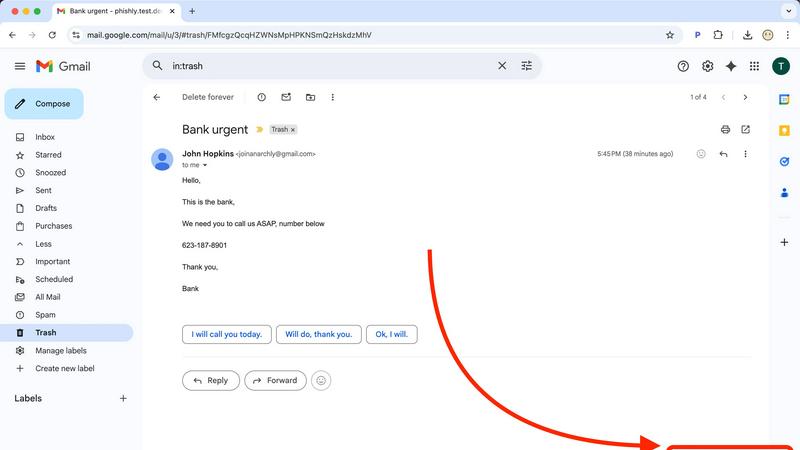
Phishly is an innovative AI-powered phishing detection platform designed to enhance email security for both individuals and small businesses. Available as a Chrome extension for Gmail and a user-friendly web tool, Phishly simplifies the process of identifying phishing threats. Users can easily analyze any email by clicking "Scan with Phishly" within Gmail or by pasting suspicious emails on the Phishly website for immediate assessment. The platform leverages advanced AI algorithms to detect key phishing indicators such as suspicious domains, urgent language, spoofed sender identities, and common social engineering tactics. Each analysis results in a clear risk assessment categorized as Safe, Medium Risk, or High Risk, accompanied by detailed explanations to help users understand the potential threats they face. Phishly is particularly valuable for users who seek straightforward phishing protection without the complexities often associated with enterprise solutions. The platform is designed with user privacy in mind, as it only analyzes emails that users explicitly choose to scan. With no technical expertise required, Phishly offers a free and accessible solution for anyone who needs to verify the legitimacy of their emails.
Frequently Asked Questions
documentorium FAQ
Can I cancel my subscription anytime?
Yes, you can cancel your Documentorium subscription at any time directly from your account settings. There are no long-term contracts or penalties for cancellation. Your access to the platform's features will remain active until the end of your current billing period, after which your account will revert to a free state. This policy ensures there is no vendor lock-in, providing complete flexibility for the user.
What happens to my documents when the free trial ends?
When your one-month free trial concludes, all documents you created during the trial period are preserved and remain accessible in your account history. You can view and download these existing PDFs at any time. To continue creating new documents or editing templates, you will need to activate a paid subscription. No user data or document history is deleted upon trial expiration.
Do I lose access to my old documents if I don't subscribe?
No, you do not lose access to your previously created documents. Even without an active subscription, you retain the ability to log into your account to view, download, and print all documents you generated while your subscription was active or during your trial period. The subscription is required for creating and editing new documents, but your historical data remains your property and is always accessible.
Does Documentorium provide legal advice for contracts?
No, Documentorium does not provide legal advice. The platform is a document generation tool that provides templates and forms designed for common trade-specific business scenarios. While these templates are professionally crafted, users are responsible for ensuring that any document, especially contracts, warranties, and agreements, meets their specific legal requirements and complies with local, state, and federal regulations. Consulting with a legal professional for critical documents is recommended.
Phishly FAQ
How does Phishly work?
Phishly works by analyzing the content of emails for specific indicators of phishing, such as suspicious domains and urgent language. Users can scan emails directly in Gmail or through the website for instant analysis.
Is Phishly free to use?
Yes, Phishly is free to use, making it accessible for individuals and small businesses seeking to improve their email security without incurring costs.
Do I need technical knowledge to use Phishly?
No, Phishly is designed to be user-friendly and requires no technical knowledge. Users can easily scan emails and understand the results without needing prior expertise in cybersecurity.
How does Phishly protect my privacy?
Phishly protects user privacy by only analyzing emails that users explicitly choose to scan. This ensures that personal information contained in other emails remains confidential and secure.