
HeyVid vs TinyFast
Side-by-side comparison to help you choose the right product.

HeyVid is an all-in-one AI tool that effortlessly generates high-quality videos and images from text or images, streamlining your creative process.
Last updated: April 4, 2026

Compress images, videos, and PDFs effortlessly on your Mac with TinyFast for fast, local, and private optimization.
Last updated: February 28, 2026
Visual Comparison
HeyVid

TinyFast
Feature Comparison
HeyVid
Text to Video
The Text to Video feature allows users to convert written content into engaging video formats seamlessly. By integrating AI technology, HeyVid simplifies the video creation process, enabling users to input text and receive a polished video that captures their message effectively. This feature is particularly useful for content creators looking to enhance their storytelling capabilities.
Image to Video
With the Image to Video functionality, users can transform static images into dynamic video presentations. This feature utilizes advanced animation techniques to bring still visuals to life, making it perfect for marketers and educators who want to create compelling visual narratives from existing imagery.
AI Image Refinement
The AI Image to Image Refiner & Stylizer feature allows users to enhance and stylize their images using various AI models. This capability ensures that visuals can be tailored to match specific aesthetics or brand guidelines, making it ideal for businesses seeking to maintain a consistent visual identity across all platforms.
AI Music Integration
HeyVid's AI Music feature enables users to add custom soundtracks to their videos effortlessly. Users can select from an array of music options or even generate original compositions, ensuring that their videos not only look great but also sound professional, enhancing the overall viewing experience.
About TinyFast
Batch & Drag-Drop Shrink
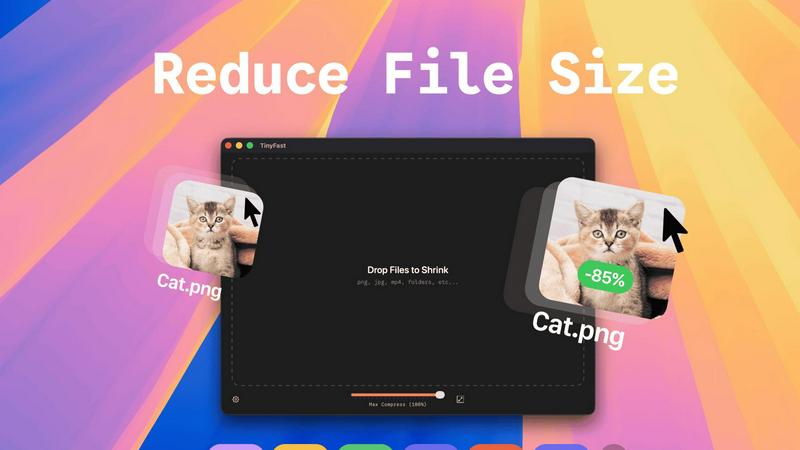
This feature allows users to compress entire folders of files simultaneously, streamlining the workflow significantly. With just a simple drag-and-drop action, users can quickly get optimized outputs in mere seconds, saving both time and effort.
Blazing-Fast Compression
TinyFast utilizes optimized native engines designed for speed, enabling users to shrink large files in seconds. This feature eliminates the waiting times typically associated with uploading and downloading files in online compression tools, providing users with instant results.
Resize Resolution
For image and video files, TinyFast offers an automatic resizing option that allows users to set preferred resolutions. This capability ensures that the output files are not just smaller, but also tailored to specific size requirements, enhancing usability across various platforms.
100% Local & Private
TinyFast is designed with user privacy as a top priority. All files remain on the user's device, ensuring that there are no uploads to cloud servers. This feature is particularly beneficial for professionals handling sensitive or confidential information, as it guarantees total privacy by design.
Use Cases
HeyVid
Marketing Campaigns
HeyVid can be leveraged to create compelling marketing videos that engage audiences and drive conversions. By utilizing the platform's video generation capabilities, marketers can quickly produce promotional content tailored to specific campaigns, enhancing their outreach efforts.
Educational Content
Educators can utilize HeyVid to develop dynamic lesson materials, tutorials, and presentations. The platform's ability to generate both videos and images allows for the creation of engaging educational content that can capture the attention of students and facilitate better learning experiences.
Social Media Content Creation
Content creators can use HeyVid to produce eye-catching videos and images for social media platforms. With the ease of generating high-quality visuals, users can maintain a consistent posting schedule and enhance their online presence, making their profiles more attractive to followers.
Business Presentations
HeyVid is an excellent tool for professionals needing to create impactful business presentations. Users can generate pitch videos, product launch materials, and client presentations that effectively communicate their ideas, helping them to stand out in competitive environments.
TinyFast
Graphic Design Projects
Graphic designers can use TinyFast to compress high-resolution images and vector files before including them in their projects. This ensures that the final artwork is optimized for faster loading times on websites without sacrificing quality.
Video Production
For video editors, TinyFast provides an efficient way to compress large video files for easier sharing and uploading. By quickly resizing and optimizing these files, editors can streamline their workflow and enhance collaboration with team members.
Document Preparation
TinyFast is an excellent tool for professionals who frequently work with large PDF or document files. By compressing these documents, users can ensure that email attachments remain manageable in size and accessible for recipients without losing important content.
Web Development
Web developers can benefit from TinyFast by compressing images and other assets before deploying them to websites. This practice optimizes the performance of web pages, contributing to faster loading times and a better user experience.
Overview
About HeyVid
HeyVid is an innovative all-in-one AI video and image generation platform designed to empower users with the ability to create high-quality multimedia content effortlessly. The platform is ideal for a diverse range of users, including entrepreneurs, marketers, educators, and content creators, enabling them to transform ideas into dynamic visuals with just a few clicks. With HeyVid, users can generate professional-grade videos and images through advanced AI models, making it a valuable tool for anyone looking to enhance their digital presence. The main value proposition of HeyVid lies in its simplicity and speed, allowing users to produce stunning videos and images without needing extensive editing skills or prior experience, thus streamlining the creative workflow from concept to execution.
About TinyFast
TinyFast is a cutting-edge macOS application designed for users who need to efficiently compress various file types including images, videos, and documents. This innovative tool is tailored for developers, designers, and content creators who value speed, privacy, and ease of use. Unlike online compression tools that require users to upload their files to external servers, TinyFast operates entirely on local machines, ensuring that sensitive data remains secure. The application's intuitive drag-and-drop interface allows users to quickly compress files; simply drag a file into the app to start the process and drag it out to retrieve the optimized version. With support for over 500 file types, TinyFast stands out in the market for its ability to deliver high-quality results in a fraction of the time typically required by traditional methods. By prioritizing user privacy and efficiency, TinyFast provides an essential solution for anyone working with large files on a regular basis.
Frequently Asked Questions
HeyVid FAQ
What types of content can I create with HeyVid?
HeyVid allows users to create a wide range of content, including videos from text and images, as well as stylized images. Users can also add custom music to enhance their videos, making it a versatile tool for various multimedia needs.
Is HeyVid suitable for beginners?
Yes, HeyVid is designed with user-friendliness in mind, making it accessible to beginners and professionals alike. The intuitive interface and straightforward processes allow anyone to create high-quality content without extensive technical skills.
Can I customize the videos and images I create with HeyVid?
Absolutely. HeyVid offers various customization options, including different AI models for video and image generation, as well as the ability to refine and stylize images to align with your unique brand identity.
What industries can benefit from using HeyVid?
HeyVid is beneficial across multiple industries, including marketing, education, entertainment, and corporate sectors. It serves a variety of users, from entrepreneurs and marketers to educators and content creators, enhancing their creative capabilities.
TinyFast FAQ
What types of files can I compress with TinyFast?
TinyFast supports a wide range of file types, including images (PNG, JPEG, GIF), videos (MP4, MOV), documents (PDF, DOCX), audio (MP3), and even code files (JS, CSS, JSON). This versatility makes it suitable for various professional needs.
Is TinyFast really free?
TinyFast offers a free plan that allows users to compress up to 5 files per day. This plan provides access to all features, making it a great option for casual users or those who need occasional file compression.
How does TinyFast ensure privacy?
TinyFast operates entirely on the user's local machine, meaning that files never leave the device. There are no uploads to external servers, which significantly reduces the risk of data breaches and ensures that confidential files remain secure.
Can I resize images and videos automatically?
Yes, TinyFast includes a resolution resizing feature that allows users to set preferred sizes for images and videos. This feature is particularly useful for optimizing media for specific platforms or applications where file dimensions matter.
Alternatives
HeyVid Alternatives
HeyVid is an all-in-one AI video and image generator designed to streamline the creation of high-quality visual content. It belongs to the productivity and management category, appealing to users who require efficient and professional tools for multimedia generation. However, users often seek alternatives due to various reasons such as pricing structures, feature sets that may not align with their specific needs, or compatibility issues with different platforms. When searching for an alternative, it is essential to consider factors such as ease of use, the range of features offered, the quality of output, customer support, and pricing plans. A well-rounded alternative should meet the specific requirements of the user while providing a seamless experience across various devices and platforms.
TinyFast Alternatives
TinyFast is an advanced macOS application that falls into the category of file compression tools. It specializes in efficiently compressing a variety of file types, including images, videos, and documents, directly on users' local machines. This ability to keep operations local ensures that sensitive files remain secure and private, making TinyFast a favored choice among developers, designers, and content creators. Users often seek alternatives to TinyFast for various reasons, including pricing, specific feature needs, or compatibility with different operating systems. When considering alternatives, it's essential to evaluate the features offered, ease of use, speed of compression, and privacy policies. Understanding your unique requirements will help in selecting the most suitable file optimization tool.