
ImaginePro vs Shrinkpad
Side-by-side comparison to help you choose the right product.

ImaginePro
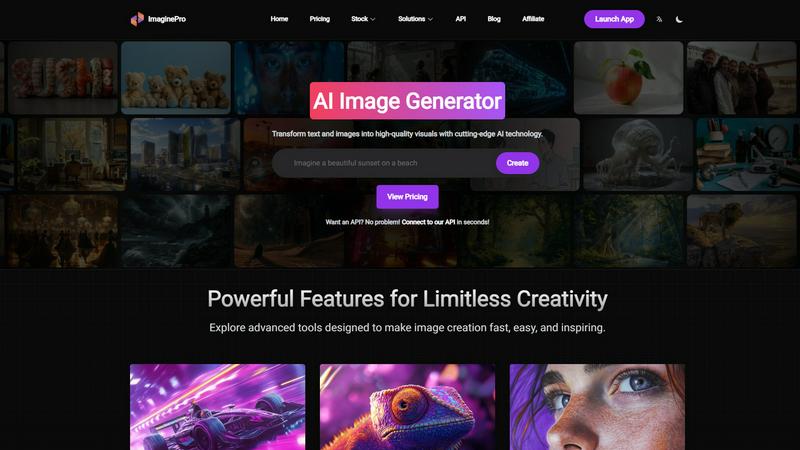
ImaginePro transforms text and images into stunning, high-quality visuals with advanced AI technology for limitless.
Last updated: March 1, 2026

Shrinkpad
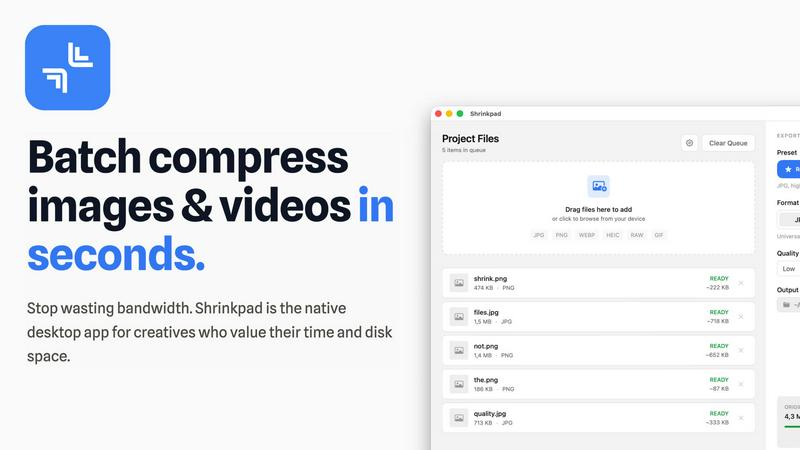
Effortlessly batch compress images and videos on your Mac to save time and optimize storage with Shrinkpad.
Last updated: February 28, 2026
Visual Comparison
ImaginePro
Shrinkpad
Feature Comparison
ImaginePro
Instant Masterpieces
ImaginePro allows users to create professional-quality images in seconds by leveraging top-tier AI models. This feature is particularly beneficial for generating content for social media, marketing materials, and various other applications. Users can easily produce stunning visuals that capture attention and convey messages effectively, streamlining the entire creative process.
Creative Control
With ImaginePro, users have the power to fine-tune their image results with precise style references, colors, and effects. This level of creative control enables individuals to adjust every detail according to their vision, ensuring that the final output aligns perfectly with their intended aesthetic. Whether for personal projects or professional use, this feature enhances customization.
High-Quality Images
The platform excels in generating lifelike, high-resolution images that stand out in any context. Ideal for commercial applications or personal endeavors requiring a polished finish, ImaginePro ensures that every image produced is of the highest quality. This focus on realism and detail makes it an invaluable tool for creatives looking to make a lasting impact.
Background Removal
ImaginePro features an efficient background removal tool that simplifies the process of isolating subjects within images. This capability is essential for various applications, such as e-commerce product images, professional headshots, and social media content. By allowing users to effortlessly remove backgrounds, ImaginePro enhances the versatility and utility of its generated visuals.
Shrinkpad
Automatic Compression Ratio Adjustment
Shrinkpad utilizes advanced algorithms to automatically analyze the visual complexity of images and videos, applying the optimal compression ratio without introducing artifacts. This feature ensures that users achieve high-quality results, making it ideal for preserving visual integrity while significantly reducing file sizes.
Unlimited Batching Capability
With Shrinkpad, users can process thousands of media files simultaneously without crashing or slowing down. Unlike online tools that may limit batch sizes, Shrinkpad's robust architecture allows for massive queues, enabling users to handle extensive projects efficiently and effectively.
Folder Mode for Convenience
The Folder Mode feature allows users to drag and drop entire folders onto Shrinkpad, where the application automatically detects and processes all supported media files within. This removes the hassle of manually selecting files one by one, streamlining the workflow and saving time for busy professionals.
Privacy-Focused Local Processing
Shrinkpad prioritizes user privacy by ensuring that all processing occurs locally on the user's machine. This means that sensitive assets remain on the device, eliminating any concerns about cloud uploads or data breaches, which is especially crucial for creative professionals handling proprietary content.
Use Cases
ImaginePro
Social Media Content Creation
ImaginePro is perfect for social media managers looking to create eye-catching visuals quickly. Users can generate images tailored to specific campaigns, ensuring that their content stands out in busy feeds and resonates with their audience, ultimately driving engagement and brand recognition.
Marketing Materials
Marketers can leverage ImaginePro to produce high-quality graphics for brochures, advertisements, and promotional materials. The tool’s ability to create professional images that align with brand aesthetics allows teams to develop cohesive campaigns that capture consumer interest and convey key messages effectively.
Graphic Design Projects
Graphic designers can utilize ImaginePro to enhance their projects by generating unique visuals that complement their work. The platform’s customization options enable designers to experiment with different styles and concepts, fostering creativity and innovation in their designs.
Digital Art and Photo Manipulation
Artists and photographers can harness ImaginePro for digital art and photo manipulation. The tool’s capabilities allow for the creation of stunning compositions and the enhancement of existing images, providing artists with a powerful resource for exploring their creative vision and producing compelling artwork.
Shrinkpad
Optimizing Digital Asset Management
Photographers and designers can utilize Shrinkpad to optimize their digital asset management workflows by batch compressing images and videos for use in portfolios and websites. By reducing file sizes, they can enhance loading times and overall user experience on their platforms.
Streamlining Social Media Content Creation
Content creators can leverage Shrinkpad to prepare images and videos for social media by quickly compressing media files to meet platform requirements without sacrificing quality. This allows for faster uploads and better engagement with audiences, enhancing their social media presence.
Enhancing Website Performance
Web developers can benefit from using Shrinkpad to compress images and videos before uploading them to websites. By reducing file sizes, developers can significantly decrease loading times, leading to improved Core Web Vitals and overall site performance, which is crucial for SEO.
Facilitating Efficient Team Collaboration
For teams working on design projects, Shrinkpad provides a way to compress shared media files for collaborative use. By allowing team members to quickly process and optimize assets, it fosters smoother collaboration and ensures that all members are working with the most efficient file versions available.
Overview
About ImaginePro
ImaginePro is an innovative AI image generation tool that transforms text prompts and creative ideas into breathtaking, high-quality visuals in mere seconds. Built upon state-of-the-art artificial intelligence technology, ImaginePro caters to a diverse user base, including graphic designers, marketers, social media managers, and anyone seeking high-resolution images for various projects. Its primary value proposition lies in its ability to streamline the creative process, enabling users to effortlessly generate professional-grade images, remove backgrounds, and manipulate text placement—all within an intuitive web interface. With flexible options spanning free, standard, and premium plans, ImaginePro serves both casual users and professionals aiming to elevate their creative output. The platform not only enhances productivity but also empowers users to explore their creativity without the barriers typically associated with traditional graphic design tools.
About Shrinkpad
Shrinkpad is a sophisticated batch compression tool meticulously crafted for macOS users who seek an efficient and reliable method to compress images and videos without sacrificing quality. Designed with photographers, designers, content creators, and everyday users in mind, Shrinkpad enables users to manage their media files more effectively by achieving file size reductions of up to 90%. The application processes files locally, guaranteeing user privacy by ensuring that no files are uploaded to the cloud. With a simple drag-and-drop interface, users can compress hundreds of files or entire folders in mere seconds. Shrinkpad supports over 50 file formats, making it a versatile solution for diverse media types, and its user-friendly interface includes both quick compression presets and detailed settings for advanced users. By utilizing Shrinkpad, users can reclaim valuable disk space, streamline their asset management processes, and improve their workflow efficiency, all while maintaining the highest standards of media quality.
Frequently Asked Questions
ImaginePro FAQ
What is ImaginePro?
ImaginePro is an AI-powered image generation tool that converts text prompts into high-quality visuals, allowing users to create stunning images for various applications, including marketing, social media, and graphic design.
How does the background removal feature work?
The background removal feature of ImaginePro allows users to effortlessly isolate subjects in their images. This is particularly useful for creating professional headshots, product images for e-commerce, and enhancing social media content without complex editing software.
Can I use the images created for commercial purposes?
Yes, images generated using ImaginePro are high-quality and suitable for commercial use. Users can confidently utilize the visuals for marketing materials, advertisements, and other professional applications without concerns about image quality.
Is there an API available for developers?
Absolutely! ImaginePro offers an API that allows developers to integrate image generation capabilities into their applications. This API is user-friendly and facilitates seamless connections, making it ideal for automated content pipelines and developer workflows.
Shrinkpad FAQ
Can I use Shrinkpad for free?
Yes, Shrinkpad offers a Free Starter plan that provides essential tools for casual users. This plan includes standard compression features with a limit of 10 files per batch, making it suitable for those who need basic functionality without a financial commitment.
What file formats does Shrinkpad support?
Shrinkpad supports over 50 file formats, including popular image formats such as JPG, PNG, WEBP, and AVIF, as well as video formats like MP4 and MOV. This extensive compatibility makes it a versatile tool for handling various media types.
Does Shrinkpad support video compression?
Absolutely, Shrinkpad includes robust video compression capabilities, allowing users to optimize video files alongside images. This feature ensures that both images and videos can be efficiently compressed, making it ideal for multimedia projects.
How many files can I process at once?
Shrinkpad's unlimited batching capability allows users to process thousands of files simultaneously. This feature is particularly advantageous for professionals who need to handle large volumes of media files without worrying about crashes or performance issues.
Alternatives
ImaginePro Alternatives
ImaginePro is a sophisticated AI image generation tool that falls within the category of image and photo creation software. It specializes in transforming text and images into stunning visuals, making it an essential resource for graphic designers, marketers, and content creators. Users often seek alternatives to ImaginePro for various reasons, including pricing structures, feature sets, and specific platform requirements. As the needs of creators vary widely, finding an alternative that offers the right balance of functionality, usability, and cost-effectiveness is crucial. When evaluating alternatives to ImaginePro, users should consider several factors, such as the quality of images produced, the level of customization available, and the overall user experience. Additionally, it is important to assess the pricing plans offered, ensuring they align with individual or organizational budgets. Compatibility with different platforms and ease of integration into existing workflows also play a significant role in making the right choice for an image generation tool.
Shrinkpad Alternatives
Shrinkpad is an advanced batch compression tool designed specifically for macOS users, enabling them to compress images and videos without sacrificing quality. It is particularly beneficial for photographers, designers, content creators, and everyday users who need an efficient way to manage large media files and optimize disk space. With its ability to reduce file sizes by up to 90%, Shrinkpad stands out in the image and video processing category. Users often seek alternatives to Shrinkpad for various reasons, including pricing, differing feature sets, or specific platform compatibility needs. Some may prefer options that cater to additional operating systems or offer unique functionalities that better fit their workflows. When choosing an alternative, users should consider factors such as batch processing capabilities, local versus cloud processing, supported file formats, and customization options to ensure they select a solution that meets their individual requirements.