
ImaginePro vs SparkPix
Side-by-side comparison to help you choose the right product.

ImaginePro
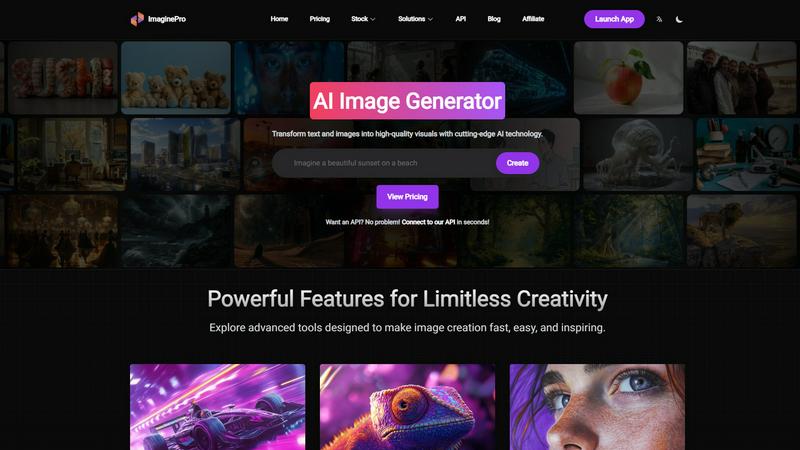
ImaginePro transforms text and images into stunning, high-quality visuals with advanced AI technology for limitless.
Last updated: March 1, 2026

SparkPix
SparkPix is a professional AI photo editor that transforms images through text commands for restoration, enhancement, and style conversion.
Last updated: March 11, 2026
Visual Comparison
ImaginePro
SparkPix

Feature Comparison
ImaginePro
Instant Masterpieces
ImaginePro allows users to create professional-quality images in seconds by leveraging top-tier AI models. This feature is particularly beneficial for generating content for social media, marketing materials, and various other applications. Users can easily produce stunning visuals that capture attention and convey messages effectively, streamlining the entire creative process.
Creative Control
With ImaginePro, users have the power to fine-tune their image results with precise style references, colors, and effects. This level of creative control enables individuals to adjust every detail according to their vision, ensuring that the final output aligns perfectly with their intended aesthetic. Whether for personal projects or professional use, this feature enhances customization.
High-Quality Images
The platform excels in generating lifelike, high-resolution images that stand out in any context. Ideal for commercial applications or personal endeavors requiring a polished finish, ImaginePro ensures that every image produced is of the highest quality. This focus on realism and detail makes it an invaluable tool for creatives looking to make a lasting impact.
Background Removal
ImaginePro features an efficient background removal tool that simplifies the process of isolating subjects within images. This capability is essential for various applications, such as e-commerce product images, professional headshots, and social media content. By allowing users to effortlessly remove backgrounds, ImaginePro enhances the versatility and utility of its generated visuals.
About SparkPix
AI Photo Editor with Text Commands
This flagship feature allows users to edit photos by typing descriptive instructions into a prompt box. The AI interprets commands ranging from simple object removal to complex scene transformations, applying changes contextually. Users can specify aspect ratios and utilize a reference image for style consistency, enabling precise control over the final output without manual use of brushes, layers, or selection tools. This natural language interface fundamentally changes the photo editing workflow, making it intuitive and accessible.
AI Background Remover
SparkPix provides a one-click solution for isolating subjects from their backgrounds. The AI is trained to handle complex scenes, including fine details like hair, fur, and transparent objects, producing clean cutouts with transparent backgrounds. This is essential for creating professional product listings, portrait photoshoots, and marketing materials. The tool serves as a direct, often more affordable, alternative to dedicated services like Remove.bg or PhotoRoom, with the added benefit of being integrated into a larger editing suite.
AI Photo Restoration & Enhancement
This dual-function feature addresses both historical and technical photo quality issues. The restoration AI can repair physical damage like scratches, tears, and fading, as well as colorize black-and-white images, breathing new life into old family archives. Simultaneously, the enhancement function improves modern digital photos by sharpening details, reducing noise and blur, enhancing colors, and upscaling resolution to HD standards. It consolidates the capabilities of tools like Remini and traditional upscalers into a single step.
AI Style Transfer & Image Generator
Beyond editing, SparkPix enables creative transformation. The Style Transfer feature can convert any photo into over 15 artistic styles, including anime, oil painting, and pencil sketch. Furthermore, its integrated AI Image Generator creates entirely new visuals from text prompts at resolutions up to 4K. This combines the creative functions of apps like Prisma with generative AI capabilities, allowing users to both modify existing images and generate original artwork for projects, all within the same platform.
Use Cases
ImaginePro
Social Media Content Creation
ImaginePro is perfect for social media managers looking to create eye-catching visuals quickly. Users can generate images tailored to specific campaigns, ensuring that their content stands out in busy feeds and resonates with their audience, ultimately driving engagement and brand recognition.
Marketing Materials
Marketers can leverage ImaginePro to produce high-quality graphics for brochures, advertisements, and promotional materials. The tool’s ability to create professional images that align with brand aesthetics allows teams to develop cohesive campaigns that capture consumer interest and convey key messages effectively.
Graphic Design Projects
Graphic designers can utilize ImaginePro to enhance their projects by generating unique visuals that complement their work. The platform’s customization options enable designers to experiment with different styles and concepts, fostering creativity and innovation in their designs.
Digital Art and Photo Manipulation
Artists and photographers can harness ImaginePro for digital art and photo manipulation. The tool’s capabilities allow for the creation of stunning compositions and the enhancement of existing images, providing artists with a powerful resource for exploring their creative vision and producing compelling artwork.
SparkPix
E-commerce & Product Photography
Online sellers can use SparkPix to generate professional product photos instantly. Key applications include removing backgrounds for clean white-backdrop listings, creating realistic product mockups in different settings via text prompts, and enhancing low-quality phone photos to look studio-shot. This eliminates the need for expensive photoshoots or complex software like Photoshop, enabling small businesses and dropshippers to maintain a high-quality, consistent storefront on platforms like Shopify and Amazon.
Personal Photo Restoration & Archiving
Individuals and genealogists can digitally preserve family history. SparkPix is used to restore damaged, faded, or scratched physical photographs from albums, colorize black-and-white portraits, and enhance the clarity of old group pictures. This provides a powerful and accessible alternative to specialized services like MyHeritage, allowing users to personally manage and restore their archival materials before sharing them digitally or reprinting them.
Social Media & Content Creation
Content creators, influencers, and social media managers can rapidly produce eye-catching visuals. Use cases include removing unwanted objects or photobombers from images, applying trendy artistic filters (like anime or painting styles), generating custom graphics from text prompts for posts, and creating perfect profile pictures or YouTube thumbnails with removed or replaced backgrounds. The speed and ease facilitate maintaining a consistent and engaging online aesthetic.
Professional & Formal Photography
Professionals and job seekers can create official photos without a studio visit. SparkPix can generate compliant passport, visa, or ID photos by adjusting attire and background based on text prompts. Similarly, it can be used to craft professional LinkedIn headshots or business profile pictures by enhancing a casual photo, refining details, and placing the subject in a formal setting. This offers a convenient and cost-effective solution compared to retail photo services.
Overview
About ImaginePro
ImaginePro is an innovative AI image generation tool that transforms text prompts and creative ideas into breathtaking, high-quality visuals in mere seconds. Built upon state-of-the-art artificial intelligence technology, ImaginePro caters to a diverse user base, including graphic designers, marketers, social media managers, and anyone seeking high-resolution images for various projects. Its primary value proposition lies in its ability to streamline the creative process, enabling users to effortlessly generate professional-grade images, remove backgrounds, and manipulate text placement—all within an intuitive web interface. With flexible options spanning free, standard, and premium plans, ImaginePro serves both casual users and professionals aiming to elevate their creative output. The platform not only enhances productivity but also empowers users to explore their creativity without the barriers typically associated with traditional graphic design tools.
About SparkPix
SparkPix is a comprehensive, web-based artificial intelligence photo editing platform designed to democratize professional-grade image manipulation. Its core value proposition is the elimination of complex software like Adobe Photoshop, allowing users to perform sophisticated edits through simple text-based instructions. By leveraging advanced AI models, SparkPix interprets natural language commands—such as "remove the background" or "restore this damaged photo"—and executes the requested transformations in under 30 seconds. This makes it an ideal solution for a broad audience, including social media managers, e-commerce entrepreneurs, photographers, genealogists, and everyday users who lack technical editing skills but require high-quality visual content. The platform operates entirely online, ensuring accessibility from any desktop or mobile device without downloads. With a free tier offering initial credits and scalable paid plans, SparkPix positions itself as a versatile, cost-effective alternative to traditional subscription-based editing software and single-function online tools.
Frequently Asked Questions
ImaginePro FAQ
What is ImaginePro?
ImaginePro is an AI-powered image generation tool that converts text prompts into high-quality visuals, allowing users to create stunning images for various applications, including marketing, social media, and graphic design.
How does the background removal feature work?
The background removal feature of ImaginePro allows users to effortlessly isolate subjects in their images. This is particularly useful for creating professional headshots, product images for e-commerce, and enhancing social media content without complex editing software.
Can I use the images created for commercial purposes?
Yes, images generated using ImaginePro are high-quality and suitable for commercial use. Users can confidently utilize the visuals for marketing materials, advertisements, and other professional applications without concerns about image quality.
Is there an API available for developers?
Absolutely! ImaginePro offers an API that allows developers to integrate image generation capabilities into their applications. This API is user-friendly and facilitates seamless connections, making it ideal for automated content pipelines and developer workflows.
SparkPix FAQ
Is SparkPix free to use?
Yes, SparkPix operates on a freemium model. New users can start immediately without a credit card and receive 5 free credits to test the platform's core features. Additionally, free accounts may receive 1 credit daily. For higher-volume usage, paid plans begin at $9.99, offering larger credit bundles for extensive editing and generation tasks.
What kind of edits can I make with text prompts?
You can instruct the AI to perform a vast array of edits. Common and effective prompts include commands to remove or replace backgrounds, erase specific objects or people, restore damaged areas, colorize images, change the artistic style (e.g., "make it look like a watercolor painting"), enhance resolution and sharpness, and even generate entirely new elements or scenes based on the uploaded photo.
Do I need to download any software?
No, SparkPix is entirely web-based. It runs in your internet browser on any device, including desktop computers, iPhones, and Android phones. There is no software to download or install, and all processing happens on secure cloud servers, ensuring you can access your projects and the full toolset from anywhere.
How does SparkPix compare to Photoshop?
SparkPix is designed for accessibility and speed, whereas Photoshop is a professional, complex toolkit. SparkPix uses AI to automate complex edits based on text, requiring no manual skill, and is significantly more affordable. Photoshop offers granular, manual control for experts but has a steep learning curve and higher cost. SparkPix is often sufficient for common editing tasks, making it a powerful alternative for non-professionals.
Alternatives
ImaginePro Alternatives
ImaginePro is a sophisticated AI image generation tool that falls within the category of image and photo creation software. It specializes in transforming text and images into stunning visuals, making it an essential resource for graphic designers, marketers, and content creators. Users often seek alternatives to ImaginePro for various reasons, including pricing structures, feature sets, and specific platform requirements. As the needs of creators vary widely, finding an alternative that offers the right balance of functionality, usability, and cost-effectiveness is crucial. When evaluating alternatives to ImaginePro, users should consider several factors, such as the quality of images produced, the level of customization available, and the overall user experience. Additionally, it is important to assess the pricing plans offered, ensuring they align with individual or organizational budgets. Compatibility with different platforms and ease of integration into existing workflows also play a significant role in making the right choice for an image generation tool.
SparkPix Alternatives
SparkPix is an AI-powered online photo editor that allows users to edit images through simple text commands. It falls into the category of web-based, automated image editing tools designed for accessibility and speed. Users can perform complex edits like background removal, photo restoration, and style transfer without needing traditional software expertise. Users often seek alternatives to SparkPix for various reasons. Common motivations include exploring different pricing models, such as subscription-free options or one-time purchases. Others may require specific advanced features not offered, need offline functionality, or prefer a tool integrated into a larger creative suite. Platform preferences, like dedicated mobile apps or desktop software, also drive the search for different solutions. When evaluating an alternative, consider your primary use case. Key factors include the core editing capabilities you need, the overall cost-effectiveness for your volume of work, and the platform's ease of use. Also, assess the quality of output for your specific tasks, the availability of free trials, and the tool's processing speed to ensure it aligns with your workflow and budget.