
Flok Social vs Pinssaver
Side-by-side comparison to help you choose the right product.

Flok Social
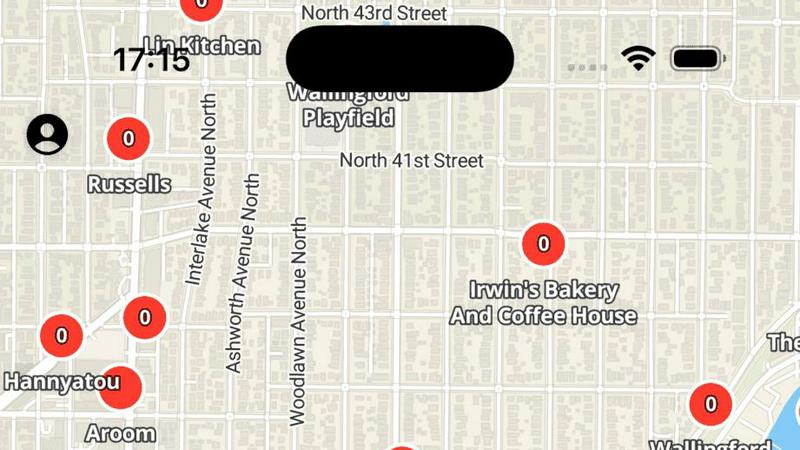
Flok Social connects you to local community chatrooms and events in real time via an interactive map.
Last updated: March 1, 2026

Pinssaver
Pinssaver is a free tool that downloads Pinterest videos, images, and GIFs in high quality without watermarks.
Last updated: February 28, 2026
Visual Comparison
Flok Social
Pinssaver

Feature Comparison
Flok Social
Interactive Geo-Pinned Chatrooms
Flok Social's defining feature is its interactive map populated with chatrooms that are permanently pinned to specific, real-world locations. Users can browse venues like coffee shops, libraries, parks, and event spaces to see active conversations tied to that exact spot. This transforms physical locations into digital social hubs, allowing users to engage with others who are at or interested in the same place, facilitating connections rooted in shared geographic context and local interest.
Privacy-First Location Architecture
The app is built with a strong emphasis on user privacy. While chatrooms are visible on the map for specific venues, Flok Social does not broadcast a user's precise, real-time GPS coordinates to others. This design allows for location-based discovery and interaction without compromising personal safety or privacy, ensuring users can participate in local conversations without revealing their exact whereabouts in real-time.
Real-Time Event Discovery and RSVP
Beyond casual chat, Flok Social facilitates the organization and discovery of local events. Users can create events tied to a location, and others can view details and RSVP directly within the app. The platform includes functionality to undo an RSVP, providing flexibility. This feature turns the map into a dynamic bulletin board for hyper-local happenings, from impromptu meetups to organized community gatherings.
Real-Time Messaging Interface
Each location-based chatroom and event page is powered by a full-featured, real-time messaging system. This allows for instantaneous communication with other users in the same virtual space. The interface supports ongoing conversations, enabling users to ask questions, share tips, or coordinate meetups with others who are currently at or planning to visit a shared location of interest.
Pinssaver
Multi-Format Content Downloader
Pinssaver is not limited to a single media type; it is a comprehensive download solution capable of handling videos, static images, and animated GIFs from Pinterest. This versatility ensures that regardless of the format of the inspirational content—be it a step-by-step tutorial video, a high-resolution photograph, or a short looping animation—users can save it with equal ease. The system intelligently parses the provided Pinterest URL to identify and present all available media formats for download, providing a one-stop solution for all Pinterest content preservation needs.
High-Definition & 4K Resolution Support
A cornerstone feature of Pinssaver is its ability to extract and download content in the highest quality available from the source. For videos, this includes standard definition, HD (720p), Full HD (1080p), 2K, and even 4K Ultra HD resolutions, provided they are supported by the original pin. For images, the tool retrieves the maximum resolution version. This ensures that downloaded content retains its visual integrity and detail, which is critical for professional use cases like design reference, mood boarding, or offline presentation, where pixelation or compression artifacts are unacceptable.
Watermark-Free & Pristine Output
Unlike many online downloaders that impose intrusive watermarks, logos, or branding onto downloaded files, Pinssaver delivers clean, original content. The files saved to the user's device are exact digital replicas of the media hosted on Pinterest, with no alterations, additions, or quality degradation. This feature is particularly vital for creators who wish to study composition and technique without visual distractions or for individuals building personal collections where authenticity and clarity are paramount.
Cross-Platform & Browser Compatibility
Pinssaver operates entirely within a web browser, eliminating the need for platform-specific software downloads or installations. It is fully optimized and responsive, providing an identical, smooth experience across all major operating systems (Windows, macOS, Android, iOS) and web browsers (Chrome, Safari, Firefox, Edge). Whether accessing the service from a desktop computer, a tablet, or a smartphone, the interface adapts flawlessly, and the download functionality remains consistently reliable and fast.
Use Cases
Flok Social
Breaking the Ice at Local Events
Attendees at a concert, festival, or conference can use Flok Social to join the chatroom for that specific venue. This allows them to connect with fellow attendees before, during, and after the event, share experiences, arrange meetups, or discuss performances, effectively breaking down social barriers and enhancing the shared experience through digital interaction.
Discovering Hyper-Local Community Happenings
Residents new to a neighborhood or city can open Flok Social to explore chatrooms for nearby parks, community centers, and cafes. This provides immediate insight into local culture, ongoing discussions, and planned events that may not be advertised on larger platforms, enabling them to integrate into the community and discover hidden gems.
Connecting with Fellow Travelers
Travelers visiting a new city can use the app to find chatrooms for tourist landmarks, transit hubs, or popular districts. They can ask locals and other travelers for real-time advice, restaurant recommendations, or safety tips, or even find companions for sightseeing, transforming a solitary trip into a more connected and informed experience.
Fostering Neighborhood Connections
Individuals looking to build a stronger sense of local community can engage in chatrooms for their local park, library, or grocery store. This facilitates communication with neighbors about block parties, lost pets, local recommendations, or community watch initiatives, helping to build tighter-knit, supportive local networks.
Pinssaver
Creative Research and Mood Board Curation
Professional designers, artists, and architects frequently use Pinterest to gather visual inspiration for projects. Pinssaver allows them to download high-quality images and videos to compile into offline mood boards, client presentations, or personal reference libraries. This enables deeper analysis of color palettes, textures, styles, and trends without being constrained by internet connectivity or the ephemeral nature of online pinboards, streamlining the creative development process.
Educational Content Archiving
Students, instructors, and DIY enthusiasts often find valuable tutorial videos, infographics, and instructional guides on Pinterest. Pinssaver empowers users to download these educational resources for offline viewing, enabling learning in environments without reliable internet access. This is ideal for saving cooking tutorials, craft instructions, academic concepts, or fitness routines to a personal device for repeated, convenient reference during hands-on practice or study sessions.
Content Creator Reference Library
Bloggers, social media influencers, and digital marketers use Pinterest for trend spotting and content ideation. Pinssaver facilitates the creation of a private, organized archive of competitor content, viral video formats, and design inspirations. By downloading these assets, creators can analyze successful content strategies, draw inspiration for their own productions, and maintain a repository of ideas without violating platform terms by directly re-uploading others' work.
Offline Entertainment and Personal Collection
Casual users who discover entertaining videos, beautiful photography, or humorous GIFs on Pinterest may wish to save them for personal enjoyment. Pinssaver provides a simple method to build a personalized media collection on a phone or computer for viewing during travel, commuting, or in areas with poor network coverage. This use case transforms Pinterest from a purely streaming platform into a source of personally curated, permanently accessible entertainment.
Overview
About Flok Social
Flok Social is a pioneering social networking application designed exclusively for iPhone and iPad that fundamentally redefines local interaction by anchoring digital conversations to physical geography. Its core value proposition is transforming location from a passive detail into the active starting point for community connection. The app presents users with an interactive, real-time map populated with chatrooms pinned to specific, real-world venues such as cafes, parks, concert halls, and public landmarks. This innovative approach allows individuals to discover and engage in conversations happening in their immediate vicinity or in places they plan to visit. Developed by Tony Liu, Flok Social emphasizes a privacy-first architecture, ensuring that while users can see chatrooms for locations, their precise, real-time coordinates remain private and are not shared with other users. It is engineered for individuals aged 13 and above who are looking to break the ice at local events, discover hyper-local happenings, connect with neighbors or fellow travelers, and foster a sense of community tied to shared spaces. With its intuitive map-based interface and real-time messaging capabilities, Flok Social effectively bridges the gap between the digital social sphere and the physical world, making it an essential tool for the curious, the new-in-town, and the community-minded.
About Pinssaver
Pinssaver is a sophisticated, web-based utility engineered to facilitate the seamless downloading of multimedia content from Pinterest. It functions as a dedicated Pinterest video, image, and GIF downloader, enabling users to archive and curate digital inspiration directly onto their personal devices. The tool is meticulously designed for a broad spectrum of users, ranging from casual Pinterest browsers and hobbyists to professional content creators, designers, marketers, and educators who utilize Pinterest as a source of visual reference and inspiration. Its core value proposition lies in its ability to bypass Pinterest's inherent limitation of online-only viewing, offering a permanent, high-fidelity copy of any pin. Pinssaver distinguishes itself through an uncompromising commitment to a frictionless user experience, characterized by a minimalist interface, rapid processing speeds, and the delivery of content in the highest available quality—including 1080p, 2K, and 4K resolutions—entirely free of watermarks or embedded branding. This combination of power, simplicity, and accessibility makes Pinssaver an indispensable tool for anyone looking to build a personal digital library of creative assets from one of the world's largest visual discovery platforms.
Frequently Asked Questions
Flok Social FAQ
What age group is Flok Social designed for?
Flok Social is engineered for users aged 13 and above. The app's content and community features are intended for a teenage and adult audience looking to engage in location-based social networking and local community discovery in a responsible manner.
Is my real-time location visible to other users on Flok Social?
No, your precise, real-time location is not shared with other users. Flok Social uses a privacy-first architecture. While you can see and join chatrooms pinned to specific public venues on the map, your personal GPS coordinates are kept private and are not broadcast to the network.
What devices is Flok Social available on?
Flok Social is currently a native application designed exclusively for Apple's iOS ecosystem. It is available for download on iPhone and iPad devices from the App Store. The app requires iOS 17.0 or later to operate.
How does Flok Social handle user privacy and data?
According to the developer's privacy policy, Flok Social may collect certain data such as Contact Info and User Content, but this data is "Not Linked to Your Identity." The developer, Tony Liu, states that this information is not connected to your personal identity, though privacy practices can vary based on the specific features you use within the application.
Pinssaver FAQ
Is Pinssaver completely free to use?
Yes, Pinssaver is entirely free to use. There are no hidden fees, subscription models, or premium tiers that limit functionality. Users can download an unlimited number of videos, images, and GIFs from Pinterest without any cost, and the service is committed to remaining free. The platform is supported without compromising on core features like high-quality downloads or the watermark-free guarantee.
How does Pinssaver ensure user privacy and safety?
Pinssaver is built with a strong privacy-first philosophy. The service does not require users to create an account, log in, or provide any personal information. It does not track user activity, store download histories, or retain the Pinterest links submitted after processing. Furthermore, it never asks for Pinterest login credentials. All processing is performed securely in real-time, and users maintain complete control over their data and downloads.
On which devices and browsers does Pinssaver work?
Pinssaver is a web-based tool with universal compatibility. It works seamlessly on all devices, including smartphones (iPhone, Android), tablets (iPad, Android tablets), and desktop computers (Windows PC, Mac). It is fully functional on all modern web browsers such as Google Chrome, Mozilla Firefox, Apple Safari, and Microsoft Edge. The responsive design ensures the interface is intuitive and easy to use regardless of screen size.
Are there any copyright restrictions I should be aware of?
Yes, it is crucial to understand that copyright for all content remains with the original creator or copyright holder. Pinssaver is a tool for personal, offline use and inspiration. Users must respect intellectual property laws and Pinterest's terms of service. Downloaded content should not be redistributed, claimed as your own, or used for commercial purposes without explicit permission from the copyright owner. The tool is intended for ethical archiving and reference.
Alternatives
Flok Social Alternatives
Flok Social is a location-based social networking application that uniquely integrates real-time chatrooms with an interactive map of physical venues. It belongs to the niche category of geosocial networking apps, which aim to connect digital interactions with specific places in the real world. Users may seek alternatives to Flok Social for various reasons. Common motivations include the need for an Android or web version, as Flok is currently exclusive to iOS and iPadOS. Others might look for different feature sets, such as broader event discovery tools, integration with existing social graphs, or varied approaches to privacy and anonymity within location-based services. When evaluating alternatives, key considerations should include the platform's core functionality for local discovery, its privacy model regarding location sharing, the vibrancy of its user base in your area, and cross-platform availability. The ideal choice depends on whether your priority is hyper-local chat, event planning, neighbor connections, or general social discovery tied to geography.
Pinssaver Alternatives
Pinssaver is a free online tool within the social media utility category, specifically designed for downloading videos, images, and GIFs from Pinterest. It enables users to save content in high resolutions for offline access, serving as a convenient resource for personal archiving and creative projects. Users often seek alternatives to tools like Pinssaver for various reasons. These can include the need for different feature sets, such as batch downloading or integration with other platforms, concerns about long-term pricing models if a free tool introduces fees, or a preference for downloadable software over a web-based service. Specific device compatibility or a desire for more advanced editing options post-download can also drive the search for other solutions. When evaluating an alternative, key considerations should include the tool's core functionality and supported content types, its pricing structure and any potential limitations, the quality and formats of downloads offered, and overall ease of use. Security and privacy practices are also paramount, as is reliable customer support and the tool's reputation within the user community.