
Rallied AI vs StreamVox - AI Live Translator
Side-by-side comparison to help you choose the right product.

Rallied AI
Rallied AI empowers MSPs by autonomously resolving L1 and L2 tickets, allowing your team to focus on strategic growth.
Last updated: April 4, 2026

StreamVox is a real-time AI translator that provides instant subtitles for calls, media, and games directly on your Windows PC.
Last updated: April 4, 2026
Visual Comparison
Rallied AI
StreamVox - AI Live Translator

Feature Comparison
Rallied AI
Autonomous Ticket Resolution
Rallied AI autonomously resolves L1 and L2 tickets, such as password resets and account unlocks. This feature allows it to execute fixes, notify users, and update the ticket without human intervention, saving time and resources.
Intelligent Triage and Dispatch
The tool intelligently triages user requests by asking pertinent questions and categorizing them by priority. It fills in necessary triage fields, retrieves documentation from integrated systems like IT Glue or Hudu, and routes tickets to the appropriate technician for more complex issues.
Automated Onboarding and Offboarding
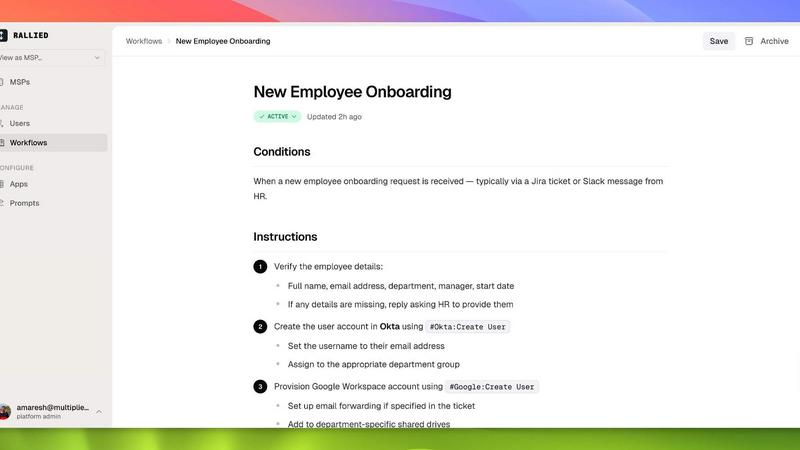
Rallied streamlines the onboarding and offboarding processes for new hires and departing contractors. It manages everything from M365 licenses to Active Directory accounts, ensuring a smooth transition with minimal manual input.
Comprehensive Stack Connectivity
Rallied connects to a wide array of systems, including popular PSAs and RMM tools, such as ConnectWise, Autotask, and Datto RMM, among others. This extensive connectivity allows it to operate efficiently within your existing technology infrastructure, enhancing its effectiveness.
About StreamVox - AI Live Translator
Multi-Source Audio Capture with Per-App Isolation
StreamVox offers three distinct audio capture modes to suit any situation: System Audio, Microphone, and Per-App Capture. The Per-App isolation feature is particularly advanced, allowing users to select specific applications like Zoom, Chrome, or Discord for translation while automatically ignoring all other background noise and system sounds. This ensures clean, focused subtitles by capturing only the audio you intend to translate, which is critical for maintaining clarity during meetings or while gaming.
Intelligent and Customizable Transparent Overlay
The application utilizes a persistent transparent overlay that stays on top of any other window or full-screen application. Users have extensive control over its appearance, including adjustable font size (from 12px to 72px), text color, and overlay opacity. This customization allows the subtitles to be integrated unobtrusively into the viewing experience, whether for cinematic immersion during movies or for quick readability during fast-paced gaming sessions and live streams.
Extensive Language Support and Bidirectional Translation
Powered by advanced AI, StreamVox supports an impressive repertoire of 49+ input languages and can translate into 49+ target languages. Furthermore, the application supports bidirectional translation, meaning it can translate both incoming system audio (like a caller's voice) and your own microphone input in real time. This facilitates natural two-way conversations where all participants can communicate in their preferred language, making it ideal for business calls and international collaborations.
Privacy-First Architecture and Ultra-Low Latency
StreamVox is built with a strong commitment to user privacy. All audio processing for translation is performed in real-time, and the audio data is never stored on servers or locally after the translation is complete. Coupled with its optimized ultra-low latency AI engine, this ensures that translations appear almost instantaneously, making conversations feel natural and fluid without disruptive delays that can hinder real-time interaction and comprehension.
Use Cases
Rallied AI
Streamlining IT Support Operations
Rallied AI is ideal for MSPs that handle a high volume of L1 and L2 tickets. By automating routine tasks, it allows technical staff to concentrate on high-value projects, thus increasing productivity and reducing labor costs.
Enhancing Customer Satisfaction
With Rallied managing frequent support requests, response times are drastically improved. Clients receive faster resolutions for their issues, leading to higher satisfaction rates and stronger client relationships.
Reducing Operational Costs
By automating ticket resolution and decreasing the need for additional L1 staff, Rallied helps MSPs save significant operational costs. This is particularly beneficial for growing MSPs facing high ticket volumes without the budget for hiring.
Simplifying Employee Transitions
Rallied simplifies the onboarding and offboarding of employees. It automates the assignment of necessary access rights and licenses, making the process more efficient and reducing the risk of human error during critical transitions.
StreamVox - AI Live Translator
International Business Calls and Virtual Meetings
Professionals can use StreamVox to seamlessly participate in video conferences on platforms like Zoom, Microsoft Teams, or Google Meet with international colleagues. By capturing the app's audio directly, it provides real-time subtitles in the user's native language, ensuring no nuance is lost and improving meeting efficiency and inclusivity without requiring other participants to change their language.
Consuming Foreign-Language Media and Live Streams
Viewers can watch movies, TV shows, YouTube videos, or Twitch streams in any language without relying on official, often delayed or unavailable, subtitles. The transparent overlay works on top of any video player or browser window, providing instant translation and opening up a vast library of global content for entertainment and education.
Cross-Language Gaming and In-Game Communication
Gamers in international multiplayer matches can use StreamVox to understand in-game voice chat from teammates speaking different languages. The line-by-line display mode is tailored for fast-paced environments, providing quick translations of crucial call-outs and strategy discussions, thereby enhancing teamwork and the overall competitive gaming experience.
Translating Mobile Phone Calls on PC
Through integration with Microsoft's Phone Link feature, StreamVox can display live subtitles for phone calls directly on the user's PC screen. Whether receiving a call on an iPhone or Android device linked to the computer, users can read real-time translations of the conversation, making cross-language personal or business phone calls significantly more accessible.
Overview
About Rallied AI
Rallied AI is an advanced artificial intelligence technician designed specifically for Managed Service Providers (MSPs). It seamlessly integrates with your entire tech stack to autonomously resolve Level 1 (L1) and Level 2 (L2) support tickets, thus freeing your skilled engineers to focus on more complex, revenue-generating projects. Rallied operates through popular communication platforms like Slack and Microsoft Teams, allowing users to interact with it just as they would with a human coworker. This innovative tool not only executes tasks such as password resets and account unlocks but also triages and dispatches requests based on priority. By automating routine IT support tasks, Rallied significantly reduces operational costs and enhances service efficiency, enabling MSPs to maximize their margins and improve customer satisfaction.
About StreamVox - AI Live Translator
StreamVox - AI Live Translator is a sophisticated real-time translation and live subtitle application designed exclusively for Windows PCs. Its core function is to process any audio source on a user's computer—including system sounds, microphone input, or audio from specific applications—and instantly overlay translated subtitles directly onto the screen. This effectively breaks down language barriers in real-time across a vast array of scenarios. The primary value proposition of StreamVox lies in its seamless integration into the Windows ecosystem, offering a privacy-first, low-latency translation experience that requires no special configuration from other software. It is engineered for a diverse user base, including professionals engaged in international video conferences, gamers participating in global multiplayer sessions, content consumers watching foreign-language media on platforms like YouTube or Netflix, and individuals receiving phone calls in different languages via their PC. By providing immediate comprehension without the need for pre-recorded subtitles or a third-party interpreter, StreamVox positions itself as an essential tool for enhancing productivity, entertainment, and global communication directly from the desktop.
Frequently Asked Questions
Rallied AI FAQ
What if it breaks something?
You have control over what tasks Rallied can perform autonomously. By initially limiting its capabilities, you can gradually expand its autonomy as you become more comfortable with its performance.
How does Rallied AI compare to other AI tools?
Unlike many other AI solutions that require extensive training and ongoing management, Rallied can be deployed quickly with minimal setup. It operates effectively without needing a dedicated administrator, making it a more efficient choice for MSPs.
Can Rallied handle complex issues?
While Rallied excels at resolving L1 and L2 tickets, it is designed to triage and dispatch more complex issues to human technicians. This ensures that higher-level support is still available when needed.
How quickly can Rallied be implemented?
Most MSP AI tools take months for implementation, but Rallied can be connected and operational within the same week. This rapid deployment means you can start benefiting from its capabilities almost immediately.
StreamVox - AI Live Translator FAQ
Is my audio data stored or sent to external servers?
No, StreamVox operates on a strict privacy-first principle. All audio processing for translation is performed in real-time using on-device or highly efficient cloud processing with no data retention. The audio is not stored on your PC or on any external servers after the translation is complete, ensuring your conversations remain confidential.
What are the system requirements for StreamVox?
StreamVox requires a PC running a 64-bit version of Windows 10 or Windows 11. A stable internet connection is necessary for the AI translation processing. The application is optimized for performance but having a modern CPU will ensure the best experience with ultra-low latency.
Can I use StreamVox with any application on my PC?
Yes, StreamVox is designed to work with virtually any application that produces audio. The System Audio mode captures all sound from your PC, while the Per-App Capture mode allows you to target specific applications like Discord, games, browsers (Chrome, Edge), and communication software (Zoom, Skype) for isolated translation.
How does the free plan differ from the paid subscriptions?
The Free Starter plan offers 20 minutes of translation time per 24-hour period, allowing users to test core functionalities. Paid Pro ($8.99/month) and Pro+ ($14.99/month) plans offer 40 and 70 hours of translation per month, respectively, and include access to all current and future advanced features, along with priority email support. The Unlimited plan removes all time restrictions.
Alternatives
Rallied AI Alternatives
Rallied AI is an innovative artificial intelligence solution designed specifically for Managed Service Providers (MSPs). It operates within the software category, functioning as an AI technician that autonomously resolves Level 1 and Level 2 support tickets. By integrating seamlessly with popular communication platforms like Slack and Teams, Rallied AI enhances operational efficiency by allowing users to interact with it as they would with a human coworker, or by enabling it to manage tickets directly within a Professional Services Automation (PSA) system. Users often seek alternatives to Rallied AI for various reasons, including cost considerations, feature sets, and specific platform compatibility. When evaluating potential alternatives, it is essential to consider factors such as the ease of integration with existing systems, the range of functionalities offered, the responsiveness of support services, and user feedback on overall performance. Understanding these elements can significantly influence the decision-making process for organizations aiming to optimize their ticket resolution workflows.
StreamVox - AI Live Translator Alternatives
StreamVox - AI Live Translator is a specialized Windows software application that provides real-time AI-generated subtitles and translation for any audio source on a user's computer. It falls into the category of real-time communication and accessibility tools, designed to break down language barriers during live calls, gaming sessions, streaming, and media playback. Users may explore alternatives to StreamVox for various reasons. Common motivations include budget constraints, as individual needs may not align with available subscription tiers. Others might require support for different operating systems like macOS or Linux, seek integration with specific professional platforms, or desire a different balance between core translation accuracy and additional features like advanced recording or meeting analytics. When evaluating alternatives, key considerations should include the range of supported input and output languages, the software's ability to accurately capture audio from specific applications or system-wide sources, and the flexibility of the subtitle display. The pricing model, especially any free tier or trial offerings, is also crucial, alongside the overall user experience and how well the tool integrates into your existing workflow without disruption.