
TrafficClaw vs URL to Any
Side-by-side comparison to help you choose the right product.

TrafficClaw
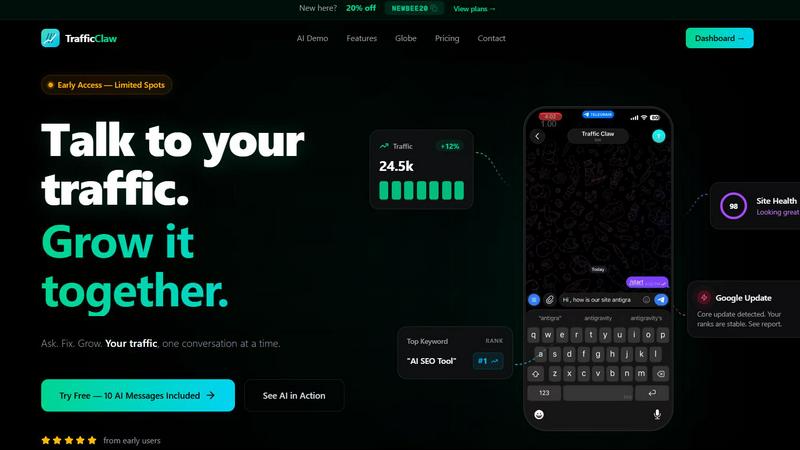
TrafficClaw transforms your SEO and analytics data into actionable insights through natural language conversations for effortless growth.
Last updated: April 13, 2026

URL to Any
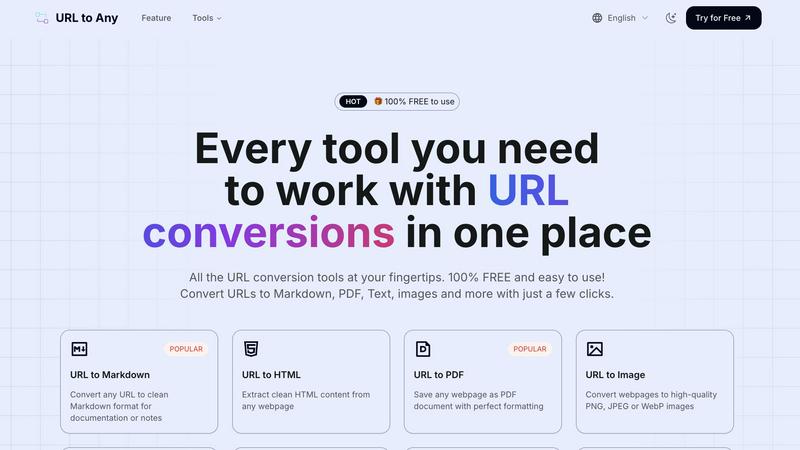
URL to Any seamlessly transforms web content into various formats, ensuring accessibility and versatility for all users.
Last updated: March 2, 2026
Visual Comparison
TrafficClaw
URL to Any
Feature Comparison
TrafficClaw
AI Chat
The AI Chat feature allows users to interact with their analytics data in a conversational manner. By asking questions in natural language, users receive instant responses, visualizations, and actionable insights tailored to their specific queries. This eliminates the learning curve associated with traditional analytics tools.
SEO Intelligence
TrafficClaw’s SEO Intelligence feature provides in-depth analysis of keyword gaps, content decay alerts, and cannibalization detection. It also includes an AI-powered engine to optimize search performance, ensuring users can identify opportunities for improvement and capitalize on trends effectively.
Analytics Dashboard
The Analytics Dashboard consolidates real-time visitor data, traffic trends, bounce rates, and conversion funnels into a single, easy-to-navigate interface. This holistic view enables users to monitor their website’s performance at a glance, allowing for informed decision-making.
Site Audit
With the Site Audit feature, users can conduct comprehensive page-level audits to assess performance scores, Core Web Vitals, and receive auto-fix suggestions. This proactive approach helps maintain website health and enhances user experience by addressing potential issues before they escalate.
About URL to Any
URL to Markdown
This feature allows users to convert any URL into clean Markdown format, which is ideal for documentation or note-taking. Markdown is a lightweight markup language that is easy to read and write, making it a popular choice among developers and writers for creating formatted text.
URL to PDF
With the URL to PDF feature, users can save any webpage as a PDF document while preserving its formatting. This ensures that the visual integrity of the content is maintained, making it perfect for sharing or archiving web content in a universally accepted format.
URL to Image
The URL to Image feature enables users to convert webpages into high-quality images in formats such as PNG, JPEG, or WebP. This is particularly useful for capturing visual content or for creating thumbnails that can be easily shared or embedded in presentations.
URL to JSON
This feature allows users to convert webpage content into structured JSON format. JSON is a lightweight data interchange format that is easy for humans to read and write, and easy for machines to parse and generate, making it an essential tool for developers working with APIs or data integrations.
Use Cases
TrafficClaw
Identifying Traffic Drops
TrafficClaw is ideal for users who experience sudden drops in website traffic. By interacting with the AI, they can pinpoint the underlying issues, such as algorithm changes or content gaps, and receive actionable solutions to rectify the situation.
Optimizing SEO Strategies
Digital marketers can leverage TrafficClaw to optimize their SEO strategies. The tool identifies keyword opportunities and provides insights into content performance, helping marketers to refine their approach and improve search engine rankings.
Enhancing Content Performance
Content creators can utilize TrafficClaw to assess their articles for performance metrics and identify areas for improvement. By analyzing content decay alerts and cannibalization issues, users can ensure their material remains relevant and competitive.
Monitoring Real-Time Analytics
Businesses can benefit from TrafficClaw’s real-time analytics capabilities. With live data on visitor behavior and traffic trends, they can adapt their marketing strategies on the fly, responding to user interactions and optimizing conversion rates effectively.
URL to Any
Content Creation
Content creators can utilize URL to Any to convert online articles and resources into preferred formats like PDF or Markdown, facilitating easier documentation and reference during their writing processes.
Research and Development
Developers and researchers can quickly convert relevant web pages into JSON or XML formats, streamlining data collection and integration into their projects or applications for more efficient workflows.
Educational Purposes
Educators can convert online resources into PDF or image formats to create teaching materials. This feature enables the easy distribution of content in a format that is accessible to students.
Marketing and SEO
Marketers can leverage the URL Meta Tags Extractor to analyze meta tags from web pages, providing insights on SEO performance. This allows them to optimize their web content effectively and improve visibility in search engines.
Overview
About TrafficClaw
TrafficClaw is an innovative AI-driven analytics tool designed to empower users with actionable insights derived from their website data. It connects seamlessly with Google Analytics 4 (GA4) and Google Search Console, allowing users to ask specific questions like "Why did my traffic drop?" and receive tailored answers based on their unique data. This eliminates the need for generic advice often found in blog posts, providing clarity and direction for website owners, digital marketers, and SEO specialists. With its user-friendly interface, TrafficClaw simplifies the analysis process, enabling users to understand their traffic patterns, identify issues, and implement solutions effectively. The platform is especially valuable for those looking to grow their online presence without having to navigate through complex analytics tools. Whether you are a small business owner or a seasoned digital marketer, TrafficClaw offers a reliable way to enhance your website's performance and drive meaningful growth.
About URL to Any
URL to Any is an innovative web content conversion tool that empowers users to seamlessly transform online content into a variety of formats. Catering to a diverse audience including content creators, developers, and professionals, it offers efficient methods to convert web pages into Markdown, PDF, HTML, images, and QR codes. Its main value proposition lies in its user-friendly interface, enabling users to convert any webpage instantly without the need for registration or complex procedures. URL to Any distinguishes itself by providing a completely free service, making it accessible to individuals and businesses alike. With just a few clicks, users can achieve their desired content format, enhancing productivity and simplifying document management. This tool is designed to meet the demands of modern workflows, enabling users to save time while ensuring that the content they need is at their fingertips, ready for sharing or further editing.
Frequently Asked Questions
TrafficClaw FAQ
How does TrafficClaw connect to my existing analytics?
TrafficClaw connects to your existing analytics through Google OAuth, allowing for secure access to your Google Analytics 4 and Search Console data. The setup process takes less than 30 seconds, enabling you to start analyzing your data immediately.
What type of insights can I expect from TrafficClaw?
Users can expect actionable insights tailored to their specific data. This includes identifying traffic drops, detecting keyword gaps, and receiving suggestions for content optimization, all delivered in a user-friendly format through AI-powered interactions.
Is my data safe with TrafficClaw?
Yes, your data is safe with TrafficClaw. The platform employs read-only access to your Google accounts, meaning that your data remains yours, and TrafficClaw cannot alter or use it without your consent.
Can I use TrafficClaw for multiple sites?
Absolutely. TrafficClaw supports multiple GA4 properties and Search Console sites, allowing users to manage and analyze data across various websites from a single dashboard. This feature is particularly beneficial for agencies and marketers managing multiple clients.
URL to Any FAQ
What types of content can I convert using URL to Any?
URL to Any allows you to convert a wide range of online content into various formats including Markdown, PDF, HTML, images, JSON, XML, and more. This versatility caters to different user needs and preferences.
Is URL to Any really free to use?
Yes, URL to Any is completely free to use. There are no hidden fees or requirements for registration, making it accessible to everyone who needs to convert web content.
How do I ensure my data is secure while using URL to Any?
URL to Any processes your data securely and does not store it on their servers. This commitment to privacy ensures that your information remains confidential throughout the conversion process.
Can I use URL to Any on my mobile device?
Absolutely! URL to Any is designed to be accessible from any device, including desktops, laptops, tablets, and smartphones, allowing users to convert web content anytime and anywhere.
Alternatives
TrafficClaw Alternatives
TrafficClaw is an innovative analytics tool designed to enhance the way users interact with their SEO and analytics data. As a part of the AI Assistants category, it leverages artificial intelligence to provide insightful answers to complex queries regarding website traffic fluctuations. Users can seamlessly connect their Google Analytics 4 and Search Console accounts, allowing them to inquire directly about their data and receive actionable insights. Many users seek alternatives to TrafficClaw for various reasons, including pricing considerations, the need for additional features, or compatibility with specific platforms. When exploring alternatives, it is essential to assess factors such as ease of integration, the comprehensiveness of insights provided, user interface design, and overall cost-effectiveness. A well-rounded alternative should not only meet basic analytics needs but also enhance user experience through intuitive interactions and personalized data responses.
URL to Any Alternatives
URL to Any is an advanced web content conversion tool that belongs to the category of AI Assistants. It allows users to transform online content into various formats such as Markdown, PDF, HTML, images, and QR codes, enhancing accessibility and versatility for content creators and professionals alike. Users often seek alternatives to URL to Any for various reasons, including specific platform needs, varying feature sets, or concerns regarding pricing and usability. When choosing an alternative, it is essential to evaluate factors such as ease of use, the range of supported formats, pricing structures, and any additional features that may enhance the conversion process. A user-friendly interface and the absence of registration requirements are also critical components in making a decision.