
AI Audio Translator
AI Audio Translator transcribes, translates, and dubs spoken content in real time with low-latency preview and interactive mode switching.
Visit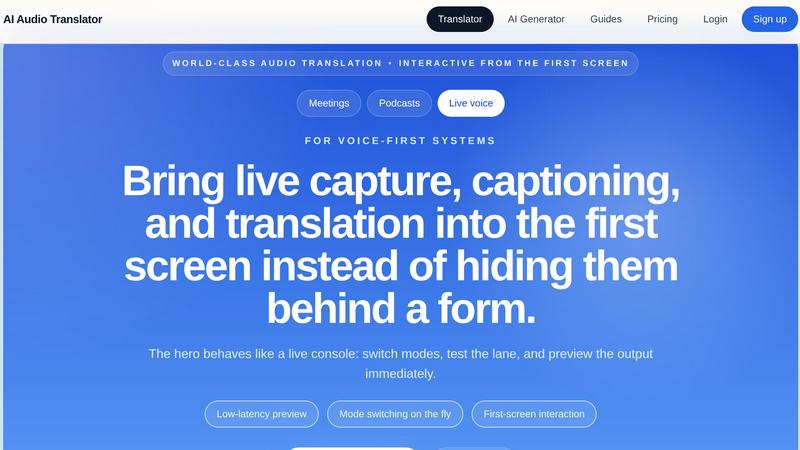
About AI Audio Translator
AI Audio Translator is a comprehensive, browser-based tool designed to streamline spoken-content workflows by combining transcription, translation, and optional dubbed audio generation into a single, focused platform. Unlike many generic AI tools that hide complex features behind multiple forms and menus, AI Audio Translator places interactivity and user control at the forefront, allowing users to upload audio files, paste public audio URLs, or record directly in the browser from the very first screen. The product is specifically built for practical review and quality assurance, enabling users to inspect the transcript first, verify the translated text, and only generate dubbed speech when it is actually needed for playback or distribution. This makes it an ideal solution for professionals working with podcasts, interviews, lessons, product demos, and localization tasks where accuracy and workflow efficiency are paramount. The tool supports a wide range of source and target languages, including English, Chinese, Japanese, Korean, French, German, Spanish, Portuguese, Italian, Russian, Arabic, Hindi, Dutch, Polish, Turkish, Vietnamese, Thai, and Indonesian, catering to a global user base. By offering low-latency previews, mode switching on the fly, and a first-screen interaction model that behaves like a live console, AI Audio Translator transforms what is typically a disjointed process into a seamless, inspectable pipeline. The platform is designed for teams that value clarity, reviewability, and practical output over unnecessary complexity, making it a powerful addition to any spoken-content workflow.
Features of AI Audio Translator
Interactive Studio with First-Screen Functionality
The AI Audio Translator features an interactive studio that places live capture, captioning, and translation capabilities directly on the first screen, rather than hiding them behind forms or multiple navigation steps. Users can switch between modes such as upload, URL paste, or browser recording instantly, test the audio lane, and preview the output immediately without any delay. This low-latency preview and mode switching on the fly ensures that professionals can quickly assess audio quality and translation accuracy before committing to full processing, saving time and reducing friction in fast-paced environments like live meetings or podcast production.
Transcript-First Review Lane
A core feature of the platform is its transcript-first review lane, which prioritizes the generation and inspection of the written transcript before any translation or dubbing occurs. Users can view the original speech as text, verify its accuracy, and then proceed to translation, ensuring that errors in transcription are caught early in the workflow. This review-first approach is critical for quality assurance, allowing editors, localization teams, and content creators to make corrections or annotations on the transcript before moving forward, ultimately leading to higher-quality translated output and dubbed audio.
Multi-Language Translation and Dubbing Pipeline
The tool supports a robust multi-language translation pipeline that allows users to lock a language pair and run the full transcript plus translation process seamlessly. After transcription, the text is translated into the target language with contextual awareness, and users have the option to generate dubbed audio using AI voices. This optional dubbing feature is particularly valuable for creating playable translated audio for demos, learning materials, and localization projects, as it can be toggled on or off based on need, preventing unnecessary processing and costs.
Flexible Input Methods and File Support
AI Audio Translator accommodates a variety of input methods, including direct file uploads (MP3, WAV, M4A, AAC, OGG up to 100MB), pasting a public audio URL, or recording audio directly in the browser. This flexibility ensures that users can work with content from multiple sources without switching between different tools or interfaces. The unified studio design treats all input methods as part of one translation lane, simplifying the user experience and making it easy to handle podcasts, interviews, live voice, or recorded meetings from a single starting point.
Use Cases of AI Audio Translator
Podcast Production and International Distribution
Podcasters can use AI Audio Translator to turn interviews and episodes into translated transcripts and dubbed clips for international audiences. By uploading an episode, reviewing the transcript for accuracy, and then generating translated text and optional dubbed audio, podcasters can expand their reach to non-English speaking listeners without needing separate transcription, translation, or voice-over services. The transcript-first review lane ensures that the original content is correctly captured before translation, maintaining the integrity of the podcast's message.
Localization and Quality Assurance for Global Teams
Localization teams handling spoken content for product demos, training videos, or customer calls can leverage the tool to review transcripts and translations before generating dubbed audio. This workflow allows teams to inspect the translated text for cultural and linguistic accuracy, make necessary edits, and then produce playable audio only when the text is finalized. The ability to lock a language pair and run the entire pipeline in one focused session reduces handoff errors and accelerates the localization process for global releases.
Educational Content Translation for E-Learning
Educators and e-learning content creators can translate lessons, lectures, and recorded explainers into multiple languages to serve diverse student populations. By uploading a lecture recording, generating a transcript, and then translating the text into a target language, instructors can create subtitled or dubbed versions of their content. The optional dubbing feature is particularly useful for producing audio tracks that match the translated text, making the material accessible to auditory learners and non-native speakers.
Business Meetings and Multilingual Collaboration
Professionals involved in international business meetings can use AI Audio Translator to capture, transcribe, and translate live or recorded meeting audio. The browser recording feature allows for real-time capture, while the transcript-first review lane enables participants to verify key points and action items before sharing translated summaries with global teams. This use case is ideal for distributed teams that need accurate, searchable records of meetings in multiple languages without relying on manual note-taking or separate translation tools.
Frequently Asked Questions
What audio formats and file sizes does AI Audio Translator support?
AI Audio Translator supports common audio formats including MP3, WAV, M4A, AAC, and OGG. Uploaded files can be up to 100MB in size, which accommodates most standard-length podcasts, interviews, and meeting recordings. For longer audio content, users can paste a public audio URL or use the browser recording feature to capture clips directly, ensuring flexibility regardless of file type or length.
Can I review the transcript before generating the translation and dubbed audio?
Yes, the transcript-first review lane is a core feature of the platform. After uploading or recording audio, the tool generates a transcript that you can inspect for accuracy. You can then review the translated text before deciding to generate dubbed audio. This workflow ensures that errors are caught early and that only finalized content moves through the pipeline, saving time and improving output quality.
What languages are supported for translation and dubbing?
AI Audio Translator supports a wide range of source and target languages, including English, Chinese, Japanese, Korean, French, German, Spanish, Portuguese, Italian, Russian, Arabic, Hindi, Dutch, Polish, Turkish, Vietnamese, Thai, and Indonesian. Users can select from these languages for both transcription and translation, and the tool can auto-detect the source language for convenience. The platform continues to expand its language offerings based on user demand.
How does the pricing model work for AI Audio Translator?
AI Audio Translator uses a clear, credit-based pricing model that maps directly to actual audio work rather than bundling unrelated features. Credits are consumed based on audio length and processing requirements, such as transcription, translation, and dubbed audio generation. This transparent approach allows users to estimate costs accurately for their specific needs, whether they are processing a single podcast episode or managing ongoing localization projects. For detailed pricing plans and tier information, users are encouraged to visit the pricing page on the website.
Explore more in this category:
Similar to AI Audio Translator

AI generates instant royalty-free music from text.

MusicAny turns text prompts into original songs, AI background music, EDM ideas, and video-ready audio in one free AI music generator online workflow.

Transform your ideas into studio-quality, royalty-free music in seconds with our effortless AI Music Generator.

The Audio Stuff delivers independent, benchmark-anchored reviews and tools to help you build a better hi-fi system with zero sponsored verdicts.

Lyria 3 Pro is an AI music generator that creates longer custom tracks with precise control for all creators, enhancing your musical projects.

LoveTunesAI crafts fully personalized songs for your loved ones, transforming your unique stories into heartfelt musical gifts in minutes.

ClubDJ Pro is professional DJ software featuring built-in dual-deck video mixing, GPU effects, and a one-time purchase license.

GenSong is an AI song generator that instantly creates royalty-free, professional music in any genre from a simple text description.