
Easy Watermark Remover
Easy Watermark Remover is a free online tool that eliminates Google Gemini watermarks and SynthID from images using Quick Crop or AI Smart Removal.
Visit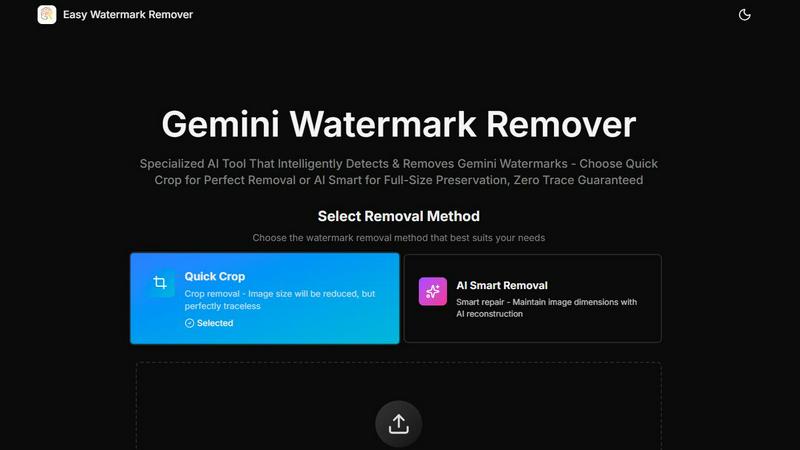
About Easy Watermark Remover
Easy Watermark Remover is a specialized, browser-based online tool designed to remove the distinctive Gemini AI lightning logos and invisible SynthID watermarks from images generated by Google's Imagen 3 model. Unlike generic watermark removal tools that attempt to handle a wide variety of watermark types and placements, this product is purpose-built for a specific, common challenge: the lower-right corner watermark that appears on Gemini-exported images. The tool offers two distinct removal methodologies to accommodate different image compositions and use cases. Quick Crop provides a fast, traceless solution by trimming the watermarked corner, ideal for images where the lower-right area contains no critical content. AI Smart Removal employs deep learning pixel reconstruction to intelligently fill in the watermark area while preserving the original image dimensions, making it suitable for images where every pixel matters. All processing occurs entirely on the user's local device, ensuring complete privacy with no server uploads or data retention. The tool supports common image formats including PNG, JPG, and WebP, handles files up to 16MB, enables batch processing for efficiency, works seamlessly across all devices from desktops to smartphones, and exports clean images in their original quality without requiring any signup, registration, or software installation. This makes it an ideal solution for content creators, digital marketers, e-commerce professionals, social media managers, and anyone who regularly works with AI-generated imagery and needs a fast, professional, and private way to remove Gemini watermarks for commercial or personal use.
Features of Easy Watermark Remover
Quick Crop Removal
This method provides the fastest and most straightforward approach to watermark removal. By simply cropping out the lower-right corner where the Gemini visible mark is typically placed, Quick Crop delivers a perfectly traceless result with no risk of visual artifacts or reconstruction errors. This method is ideal when the watermarked corner contains empty space such as sky, plain backgrounds, blurred walls, or other non-essential content that can be safely trimmed without affecting the image's overall composition or message. The trade-off is a slight reduction in image dimensions, but for many use cases like social media posts or thumbnails, this loss is negligible.
AI Smart Removal
For images where maintaining the original canvas size is critical, the AI Smart Removal feature uses advanced deep learning algorithms to analyze the watermark area and reconstruct the missing pixels. This method goes beyond simple cloning or patching by understanding the surrounding textures, colors, lighting, and generated patterns to create a seamless repair. It is particularly effective when the watermark overlaps a subject edge, product shadow, layout detail, or any content that would be damaged by cropping. The AI is trained to handle the specific challenges of AI-generated imagery, including gradients, compression noise, and synthetic textures, ensuring the repaired area blends naturally with the rest of the image.
Local Processing for Privacy
All image processing is performed entirely within the user's web browser on their local device. Images are never uploaded to any external server, cloud service, or third-party platform. This architecture ensures complete data privacy and security, making the tool suitable for handling sensitive or confidential images that cannot be shared externally. Users can process proprietary product mockups, unpublished marketing materials, or personal photographs with complete confidence that their files remain under their control. This local processing also eliminates any concerns about data retention, server logs, or potential misuse of uploaded content, and it allows the tool to function without requiring an internet connection for the actual processing step.
Batch Processing Support
Easy Watermark Remover enables users to process multiple images simultaneously, significantly improving workflow efficiency for those handling large volumes of Gemini-generated content. The batch processing feature maintains the same privacy guarantees, format support, and quality output as single-image processing. Users can select multiple files at once and apply their chosen removal method uniformly across all images, or they can individually assess each image before processing. This feature is particularly valuable for e-commerce sellers uploading multiple product images, content creators managing a library of AI-generated assets, or marketing teams preparing campaign materials at scale.
Use Cases of Easy Watermark Remover
E-Commerce Product Photography
Online sellers who use Gemini AI to generate product mockups, lifestyle images, or promotional graphics frequently encounter the visible watermark on their generated assets. For e-commerce platforms like Amazon, Etsy, or Shopify, product images must appear professional and free of any third-party branding or watermarks. Easy Watermark Remover allows sellers to quickly clean their product images, with AI Smart Removal being particularly useful when the watermark overlaps product edges, shadows, or detailed textures. The ability to batch process multiple product images at once streamlines the workflow for listing new inventory, while local processing ensures proprietary product designs remain confidential.
Social Media Content Creation
Social media managers and content creators who use Gemini AI to generate eye-catching visuals for platforms like Instagram, TikTok, LinkedIn, or Twitter need clean, watermark-free images for posting. Quick Crop is often sufficient for social media content, as the slight dimension reduction is usually acceptable within platform-specific aspect ratios. The tool's mobile-friendly design allows creators to process images directly from their smartphones or tablets, enabling on-the-go content preparation. The no-signup requirement means creators can quickly process images without interrupting their creative workflow, making it ideal for time-sensitive social media campaigns.
Marketing and Advertising Materials
Marketing professionals creating presentation slides, digital ads, brochures, or website graphics with AI-generated imagery require precise control over image dimensions and visual quality. AI Smart Removal is the preferred method for these use cases, as it preserves the original canvas size necessary for layout-specific designs. A presentation slide, for example, may have text or other elements precisely positioned around the image, and cropping would disrupt the entire layout. The tool's ability to maintain original dimensions while seamlessly removing the watermark ensures that marketing materials retain their professional appearance and design integrity.
Blog and Website Visuals
Bloggers, website owners, and content publishers who use Gemini AI to generate featured images, thumbnails, or illustrative graphics need clean visuals that enhance their content without distracting watermarks. The tool's support for WebP format is particularly relevant for web use, as this modern format offers superior compression and quality for online images. Bloggers can process multiple images for an entire article or series of posts using the batch feature, ensuring consistent visual quality throughout their content. The preview-before-download functionality is especially important for this use case, allowing publishers to verify the repair quality before committing an image to their live website.
Frequently Asked Questions
What types of watermarks does Easy Watermark Remover remove?
Easy Watermark Remover is specifically designed to remove both visible Gemini AI lightning logos and invisible SynthID watermarks from images generated by Google's Imagen 3 model. The visible mark typically appears as a small lightning bolt icon in the lower-right corner of the image, while SynthID is an imperceptible digital watermark embedded in the pixel data. The tool is optimized for the specific placement, size, and visual characteristics of these Gemini watermarks and may not be effective for other types of watermarks from different AI generators or editing software.
Which removal method should I choose for my image?
The choice between Quick Crop and AI Smart Removal depends on the content in the lower-right corner of your image. Choose Quick Crop when the watermark sits on empty space such as sky, plain backgrounds, blurred areas, or any content that can be safely trimmed without affecting the main subject. Choose AI Smart Removal when the watermark overlaps important edge detail such as product outlines, subject edges, shadows, text, faces, or layout boundaries, or when you must maintain the original image dimensions for a specific design or format requirement.
Is my privacy protected when using this tool?
Yes, complete privacy is a core feature of Easy Watermark Remover. All image processing is performed locally on your own device within your web browser. Images are never uploaded to any external server, cloud service, or third-party platform. This means your files remain under your control at all times, and there is no risk of data retention, server logs, or unauthorized access to your images. You can process sensitive or confidential images with complete confidence.
What image formats and file sizes are supported?
The tool supports PNG, JPG, and WebP image formats, which cover the most common file types used for digital imagery. The maximum file size limit is 16MB per image, accommodating high-resolution photographs and detailed AI-generated graphics. For batch processing, the total file size depends on your device's available memory, as all processing occurs locally. The tool exports cleaned images in their original quality and format, ensuring no degradation in visual fidelity after watermark removal.
Explore more in this category:
Similar to Easy Watermark Remover

Art & See Custom Oil Painting Portraits transforms your cherished photos into stunning, handcrafted oil portraits, perfect for any occasion.

Nano Banana AI is an intuitive platform for generating and editing images using natural language, streamlining your creative workflow effortlessly.

PicSpeak is an AI web app that provides instant professional photography critiques on composition, lighting, and color.

Nano Banana empowers you to effortlessly create and edit stunning images through simple chat interactions with its advanced AI technology.

SparkPix is a professional AI photo editor that transforms images through text commands for restoration, enhancement, and style conversion.

RemoveTexts is a free AI-powered online tool that instantly removes text and watermarks from images without requiring any design skills.

Create stunning, photorealistic images from text or existing photos effortlessly with our fast and user-friendly AI Photo Generator.

Facejam transforms your selfies into professional headshots in minutes, perfect for LinkedIn and business profiles.