
ProspectBuddy
ProspectBuddy is a compliant Chrome extension that manually captures LinkedIn lead data and saves it directly to your CRM with one click.
Visit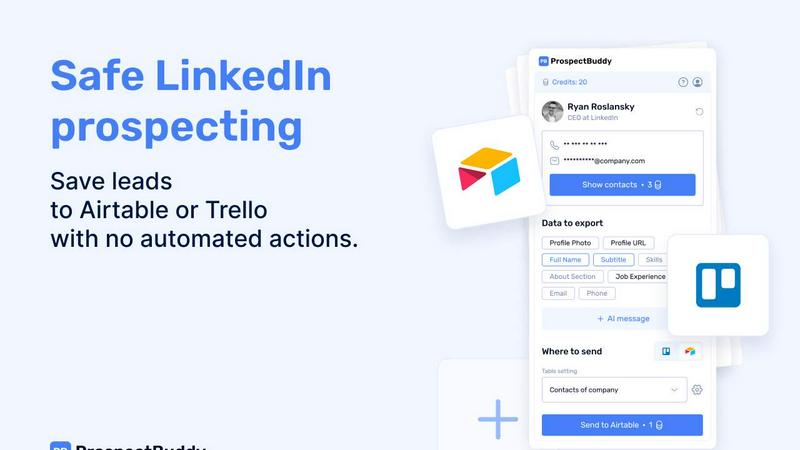
About ProspectBuddy
ProspectBuddy is a specialized browser extension designed to revolutionize manual LinkedIn prospecting by seamlessly integrating with popular workflow tools like Airtable and Trello. It serves as a critical bridge between LinkedIn's vast professional network and a user's Customer Relationship Management (CRM) or project management system. The core value proposition lies in its ability to transform the tedious, error-prone task of manually copying and pasting profile information into a streamlined, one-click operation. This tool is explicitly built for sales professionals, recruiters, founders, and operational staff who rely on LinkedIn for lead generation and talent acquisition but require a safe, compliant, and organized method to capture and utilize that data.
Unlike aggressive automation tools or bots that perform actions on a user's behalf—which can violate LinkedIn's Terms of Service and risk account restrictions—ProspectBuddy emphasizes user-controlled, manual prospecting. This philosophy ensures full compliance and safety while significantly enhancing efficiency. By allowing users to select specific data fields from a LinkedIn profile, the tool creates clean, structured records complete with verified contact information and AI-generated outreach messages. This approach not only saves hours of administrative work each week but also guarantees that lead data is consistent, actionable, and ready for personalized follow-up campaigns directly from within the user's existing Airtable or Trello workflow.
Features of ProspectBuddy
One-Click Save to Airtable or Trello
This foundational feature allows users to instantly save a complete LinkedIn profile to a pre-configured Airtable base or Trello board with a single click. It eliminates the manual process of switching tabs, copying data field-by-field, and pasting it into a CRM, which is both time-consuming and prone to errors. The extension parses the LinkedIn page and populates the connected database with structured data, ensuring that every new lead or candidate is captured immediately and consistently, directly from the source without any interruption to the prospecting workflow.
Verified Email and Phone Number Discovery
ProspectBuddy enhances contact data by uncovering verified business email addresses and, for B2B users, direct phone numbers associated with the LinkedIn profile. This enrichment happens within the extension's interface, providing reliable contact points that are crucial for outreach. The system uses credits for email searches, but charges only when a valid email is successfully found, ensuring users pay for value received. This feature turns a basic profile save into a rich, actionable contact record ready for communication.
Selective Field Capture and Mapping
Users are not forced to import every piece of data from a LinkedIn profile. Instead, they can create custom settings to map and capture only the specific fields they need—such as name, current job title, company, skills, or about section—into corresponding fields in their Airtable or Trello. This level of customization ensures that databases remain clean and relevant, avoiding clutter with unnecessary information and aligning perfectly with the user's unique sales or recruitment pipeline structure.
AI-Powered Outreach Message Generation
Leveraging the data extracted from the LinkedIn profile, ProspectBuddy can generate personalized, context-aware outreach messages in seconds. This AI feature helps users craft tailored connection requests or follow-up emails that reference the prospect's specific role, experience, or skills, significantly increasing the likelihood of engagement. It streamlines the message creation process, providing a strong starting point that users can further refine, making personalized outreach scalable and efficient.
Use Cases of ProspectBuddy
Sales Team Lead Generation
Sales development representatives and account executives can use ProspectBuddy to efficiently build targeted prospect lists from LinkedIn. By saving ideal customer profiles directly into their team's Airtable CRM with verified emails, they can maintain a organized pipeline. The AI message generator then helps craft personalized cold outreach based on the prospect's profile, enabling faster and more effective sales cycles while keeping all lead data synchronized and accessible to the entire team.
Recruitment and Talent Sourcing
Recruiters and hiring managers sourcing candidates on LinkedIn can streamline their process by instantly saving promising profiles to a Trello board configured as a hiring pipeline. Each candidate becomes a structured card with key details like current role, skills, and experience. This eliminates manual data entry, allows for easy collaboration with hiring teams, and ensures no potential candidate is lost in a disorganized spreadsheet or bookmark list.
Founder and Startup Networking
Founders and startup operators building their network, seeking investors, or looking for partners can use ProspectBuddy to manage these high-value connections. They can save contacts to a private Airtable base, enriching records with contact details. This creates a centralized, searchable network database, making it easy to track interactions, follow up systematically, and maintain relationships without letting valuable connections fade after an initial LinkedIn encounter.
Agency Client Prospecting
Marketing, consulting, or SaaS agencies prospecting for new clients can employ ProspectBuddy to identify and capture leads from LinkedIn. Teams can save profiles of key decision-makers at target companies into a shared Airtable base, ensuring all business development activities are logged in one place. The consistent, enriched data allows for coordinated outreach campaigns and accurate tracking of prospect engagement across the agency.
Frequently Asked Questions
How do I connect ProspectBuddy to Airtable?
Connecting to Airtable is a straightforward process. Within the ProspectBuddy extension, navigate to the Connect screen or your Profile page and select the Airtable option. You will be prompted to grant ProspectBuddy access to specific Airtable bases or workspaces. Once you click "Grant access," the connection is established, and the status will be displayed on your Profile page. You can disconnect this access at any time through the same interface.
Is ProspectBuddy safe to use with LinkedIn?
Yes, ProspectBuddy is explicitly designed for safe and compliant manual prospecting. It does not automate any actions on LinkedIn, such as automatically sending connection requests or scraping profiles in bulk. You, the user, are in full control, manually visiting profiles and triggering the save action. This manual approach aligns with LinkedIn's Terms of Service, making it a safer alternative to tools that use bots or automation, which can lead to account restrictions.
What can I spend credits on in ProspectBuddy?
Credits are primarily used for premium data enrichment actions within the extension. The main credit expenditure is for searching for a verified business email address, which costs 10 credits per search. Importantly, credits are only consumed if a valid email is successfully found; if no email is discovered, no credits are charged. Credits are purchased securely via Stripe, and your balance updates automatically after a successful payment.
Why are some of my Airtable fields not appearing for mapping?
ProspectBuddy supports mapping to specific, compatible Airtable field types. Supported types include: Attachment (for photos), URL, Text (for name, subtitle, about, etc.), Email, and Phone. If you have a field in your Airtable table that uses an unsupported field type (like a checkbox, rating, or formula field), it will not appear in the dropdown menu within ProspectBuddy's settings during the field mapping process. You may need to change the field type in Airtable to a supported one.
Similar to ProspectBuddy


Powerful web scraping tools designed for businesses to gather leads from various platforms.


The launch platform for indie makers — schedule your launch, get in front of buyers, and blast across directories.

