
Subclip
Subclip is an AI-driven video editor that simplifies editing, captions, dubbing, and collaboration, saving creators valuable time.
Visit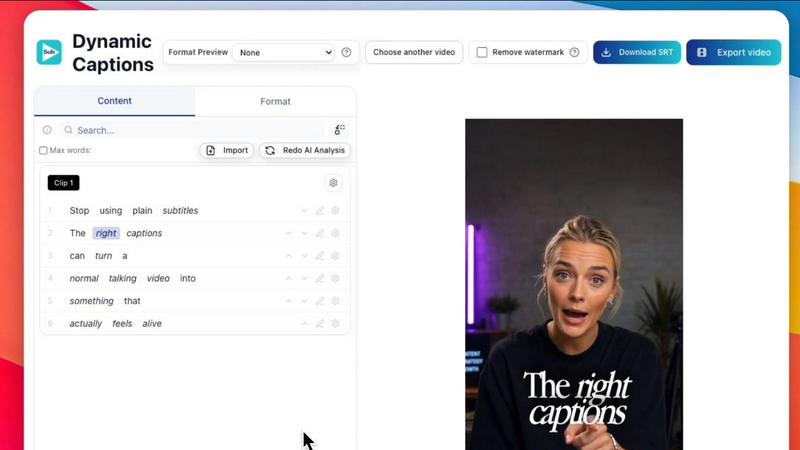
About Subclip
Subclip is an innovative AI-powered video editing platform designed specifically for creators, marketers, and educators. This versatile tool allows users to edit videos with the ease of manipulating a text document, enabling a streamlined editing experience through features like transcript editing. Subclip stands out by offering advanced functionalities such as cloning your voice for re-recording segments, efficiently removing silences and filler words with a single click, and automatically generating accurate subtitles. Additionally, it supports multi-language dubbing, maintaining background music while providing translations. With its focus on speed and simplicity, Subclip replaces the intricate processes associated with traditional video editing tools, making it an invaluable asset for YouTubers, podcasters, course creators, and content teams alike. The platform's freemium pricing model further enhances its accessibility, offering a free tier alongside affordable paid plans, ensuring that users can reclaim up to 80% of their editing time while producing high-quality content.
Features of Subclip
AI Clipping
Subclip's AI Clipping feature automatically identifies high-energy segments, punchlines, and emotional shifts in your videos. This intelligent clipping process allows creators to locate the most engaging content quickly, transforming lengthy footage into captivating short clips that resonate with audiences, thereby enhancing viewer retention and engagement.
One-Click Dynamic Auto-Captions
With Subclip, generating subtitles is a breeze. The One-Click Dynamic Auto-Captions feature offers users unlimited captions in over 48 languages, making it simple to add context and accessibility to videos. This function not only saves time but also ensures that videos can reach a broader audience without the hassle of manual captioning.
AI Dubbing with Voice Clone
The AI Dubbing with Voice Clone capability allows users to translate their voice into more than 21 languages while maintaining the original tone and emotion. This feature is particularly beneficial for educators and marketers aiming to reach global audiences, enabling them to dub their videos effortlessly without the need for re-recording.
Team Collaboration and Project Sharing
Subclip promotes seamless teamwork with its collaboration features, allowing multiple users to share projects, collect feedback, and work together in a single workspace. This functionality streamlines the editing process for teams, enhancing productivity and ensuring that everyone is on the same page throughout the video production cycle.
Use Cases of Subclip
Content Creation for YouTubers
YouTubers can leverage Subclip to efficiently edit their videos, extract engaging clips, and enhance viewer experience through automated captions and dubbing, ultimately increasing their audience engagement and viewership.
Course Creation for Educators
Educators can utilize Subclip to dub their recorded lessons into multiple languages, making courses accessible to a wider audience. The voice cloning feature ensures that the original tone is preserved, aiding in effective teaching across different linguistic backgrounds.
Podcast Editing for Podcasters
Podcasters benefit from Subclip's ability to remove background noise and enhance vocal clarity, creating professional-quality audio. The platform's one-click silence removal and filler word elimination features save valuable editing time, allowing podcasters to focus on content creation.
Marketing Campaigns for Agencies
Marketing teams can use Subclip to create promotional videos quickly and efficiently, utilizing the platform's AI clipping and scheduling features to produce content tailored for various social media platforms, thus maximizing outreach and engagement.
Frequently Asked Questions
What types of videos can I edit with Subclip?
Subclip allows users to edit a wide variety of videos, including YouTube content, educational lessons, podcasts, and marketing materials. Its versatile features are designed to accommodate diverse video formats and styles.
How does the voice cloning feature work?
The voice cloning feature utilizes advanced AI technology to replicate the user's voice, allowing for seamless re-recording of video segments in multiple languages. This ensures that the original tone and emotion are preserved during the dubbing process.
Can I collaborate with my team on Subclip?
Yes, Subclip includes robust collaboration features that enable users to share projects, gather feedback, and work together in real-time. This functionality is designed to enhance teamwork and streamline the editing process for creative teams.
Is there a free version of Subclip available?
Yes, Subclip offers a freemium pricing model, which includes a free tier that provides access to essential features. Users can upgrade to affordable paid plans for additional functionalities and enhanced capabilities as needed.
Similar to Subclip

Streamline your operations with Oravaa: Voice AI that handles 24/7 customer support calls, qualifies leads instantly, and automates reminders.

Hush Touch is an offline voice-to-text app for Mac that learns your vocabulary and ensures accurate transcription.

Glossa provides real-time AI translation of sermons into 100+ languages, bridging language gaps for diverse.

Bantr is an offline Mac TTS app offering unlimited, natural-sounding voiceovers with no subscriptions and complete.

KaiCalls is your 24/7 AI phone agent that answers calls and qualifies leads automatically.

Vowen is a privacy-focused voice productivity app that seamlessly converts speech to text and automates workflows.

Bargou One is an all-in-one AI suite for creating, translating, and transcribing diverse media effortlessly.