
AI Formatter
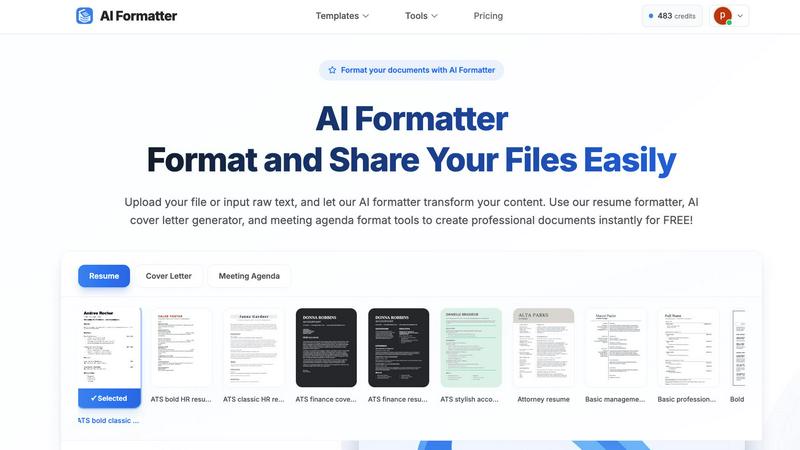
AI Formatter effortlessly converts raw text into professional documents using over 1000 customizable templates.
VisitPublished on:
October 14, 2025
Pricing:
About AI Formatter
AI Formatter, developed by Sun Sky LLC, is a revolutionary document formatting platform that leverages the power of artificial intelligence to streamline the creation and optimization of professional documents. This cloud-based Software as a Service (SaaS) tool is meticulously designed to save users valuable time—potentially up to two hours per document—by converting raw text and various file formats, including Word, PDF, and TXT, into polished, ATS-optimized documents in mere seconds. With an impressive ATS pass rate exceeding 95%, AI Formatter is indispensable for job seekers, professionals, businesses, and academics striving to enhance their documentation. The platform boasts an extensive library of over 100 industry-specific templates for resumes, cover letters, meeting agendas, and invoices, ensuring that outputs are visually appealing and tailored to individual needs. Users can utilize a real-time online editor for full customization regarding fonts, colors, and layouts, while multi-format export options and secure sharing capabilities enhance usability and accessibility, making AI Formatter a comprehensive solution for anyone in need of high-quality document formatting.
Features of AI Formatter
AI-Powered Formatting
AI Formatter employs advanced artificial intelligence algorithms to automatically format documents based on user input. This feature ensures that your content adheres to professional standards, making it easier for you to create visually appealing documents without manual input.
Extensive Template Library
The platform offers an impressive collection of over 100 industry-specific templates, including resumes, cover letters, meeting agendas, and invoices. These templates are designed to be ATS-compliant, ensuring that your documents can pass automated screening systems and reach potential employers or clients.
Real-Time Customization
Users have access to a real-time online editor that allows for extensive customization of their documents. This feature gives users control over fonts, colors, layouts, and other formatting elements, enabling them to tailor documents to their specific needs and preferences.
Multi-Format Export Options
AI Formatter supports a variety of output formats, including PDF, Word, and more. This flexibility allows users to download their finished documents in the format that best suits their needs, whether for online applications or physical submissions.
Use Cases of AI Formatter
Job Seekers
Job seekers can utilize AI Formatter to create polished resumes and cover letters that are tailored to specific job applications. By using ATS-optimized templates, users increase their chances of passing automated resume screenings, making them more visible to potential employers.
Professionals
For professionals in various fields, AI Formatter serves as a valuable tool for creating meeting agendas and professional reports. The platform's ability to format content quickly and accurately enables users to focus more on the substance of their documents rather than the design.
Businesses
Businesses can benefit from AI Formatter by generating invoices and other essential documents efficiently. The tool helps ensure that all business correspondence maintains a professional appearance, enhancing brand image and communication effectiveness.
Academics
Academics can use AI Formatter to produce well-structured research papers, theses, and presentations. The platform's templates cater to various academic formatting styles, ensuring that students and researchers can present their work in the best light.
Frequently Asked Questions
What types of documents can I create with AI Formatter?
AI Formatter allows users to create a variety of documents, including resumes, cover letters, meeting agendas, invoices, and research papers. The platform supports multiple file formats such as PDF, DOC, DOCX, and TXT.
Is AI Formatter free to use?
Yes, AI Formatter offers free access to its basic features, allowing users to format documents and utilize the available templates without any cost. Advanced features may vary based on subscription options.
How does the AI formatting process work?
Users can upload their existing documents or input raw text into the platform. The AI analyzes the content and applies the selected template's formatting, ensuring that the final document is polished and professional.
Can I customize the templates provided by AI Formatter?
Absolutely! AI Formatter features a real-time online editor that allows users to customize various aspects of the templates, including fonts, colors, and layouts, to meet their specific preferences and branding needs.
Similar to AI Formatter

SideKik helps small businesses turn more enquiries into customers with simple CRM, follow-ups, task management and daily growth tasks.

AI humanizer and AI detection platform that rewrites AI text to bypass detectors like GPTZero, Turnitin & Originality.ai, powered by Ghost-1.

Secure, auditable time tracking for compliance.


AgencyFlo is the AI-native operating system for agencies - one platform for projects, time, CRM, proposals, contracts and invoicing.

AI-powered Upwork job feed. Every new job is scored against your profile and strategy in real time, and you get an instant notification

