
Imgezy
Imgezy is an AI photo editor that simplifies enhancing images, removing objects, and changing backgrounds effortlessly.
Visit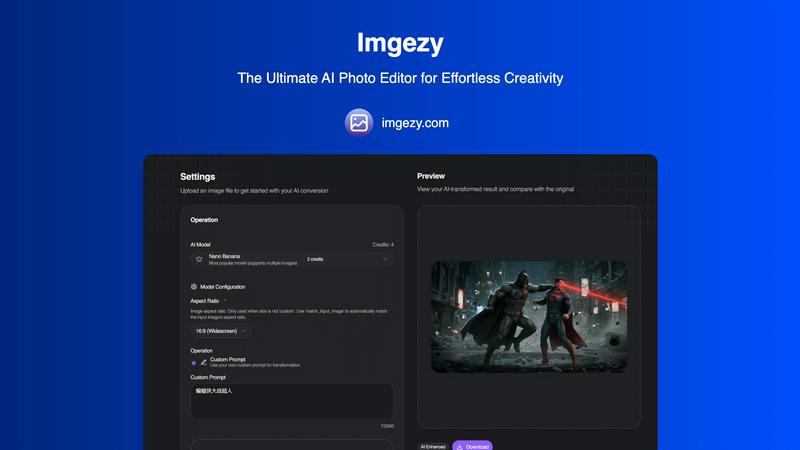
About Imgezy
Imgezy is an advanced AI-powered photo editing tool that revolutionizes the way users enhance their images. Designed for both casual users and professionals, Imgezy allows individuals to achieve professional-quality photo edits without needing extensive technical skills. This innovative platform enables users to transform their photographs by simply describing the desired edits in plain language, making it accessible to a broad audience, including photographers, content creators, and social media enthusiasts. With features like object removal, background replacement, and automatic image enhancement, Imgezy streamlines the photo editing process, delivering instant results. Users can enjoy the freedom to unleash their creativity and achieve stunning visual results with minimal effort, all while benefiting from the platform's robust artificial intelligence capabilities.
Features of Imgezy
AI-Powered Editing
Imgezy employs advanced artificial intelligence to automate the photo editing process. Users can easily remove objects, change backgrounds, and enhance image quality without needing any design experience. This feature significantly reduces the time and effort typically required for manual editing, allowing users to focus on their creativity.
Object Removal
The object removal feature intelligently identifies unwanted elements in a photo, such as people or distractions, and eliminates them seamlessly. Imgezy reconstructs the background with pixel-perfect accuracy, ensuring that the final image appears natural and unaltered, making it ideal for creating flawless shots.
Background Replacement
Users can change the backgrounds of their photos instantly, selecting from a variety of options ranging from solid colors to stunning landscapes. This feature allows for creative freedom, enabling users to set the perfect scene for their images quickly and effortlessly.
Photo Enhancement
Imgezy automatically enhances colors, lighting, and sharpness in images, ensuring that photos pop with vibrancy and clarity. This feature is perfect for users looking to improve the overall quality of their images without investing significant time in manual adjustments.
Use Cases of Imgezy
Personal Photography
Imgezy is perfect for personal use, allowing individuals to enhance their family photos, vacation snapshots, or any cherished moments effortlessly. With just a few simple prompts, users can transform ordinary images into stunning visual memories.
E-Commerce
For online sellers and businesses, Imgezy serves as an invaluable tool for creating eye-catching product images. Users can quickly remove distracting backgrounds or enhance product photos to attract potential customers and boost sales.
Social Media Content Creation
Content creators and social media influencers benefit from Imgezy's ability to produce high-quality images rapidly. By easily editing photos to fit their brand aesthetic, users can maintain a cohesive and professional social media presence without extensive editing skills.
Professional Photography
Professional photographers can use Imgezy to streamline their workflow, enabling them to focus on creative aspects rather than tedious editing tasks. With the ability to process multiple images at once, Imgezy saves time while maintaining high-quality results.
Frequently Asked Questions
How does Imgezy work?
Imgezy utilizes advanced artificial intelligence to interpret user instructions written in plain language. Users upload an image, describe the desired edits, and the AI processes the request to deliver professional-quality results in seconds.
What types of images can I edit with Imgezy?
Imgezy supports all major image formats, including JPG, PNG, and WebP. This versatility allows users to edit a wide variety of photographs, ensuring compatibility with their preferred image types.
Is there a limit to the number of images I can edit?
Imgezy offers various pricing plans that include a set number of credits, which determine how many images you can edit per month. Users can choose a plan that best suits their editing needs and volume.
Can I use Imgezy for commercial purposes?
Yes, Imgezy offers plans that include a commercial license, allowing users to utilize edited images for business purposes, such as marketing, e-commerce, and promotional materials.
Similar to Imgezy

Easy Watermark Remover is a free online tool that eliminates Google Gemini watermarks and SynthID from images using Quick Crop or AI Smart Removal.

Art & See Custom Oil Painting Portraits transforms your cherished photos into stunning, handcrafted oil portraits, perfect for any occasion.

Nano Banana AI is an intuitive platform for generating and editing images using natural language, streamlining your creative workflow effortlessly.

PicSpeak is an AI web app that provides instant professional photography critiques on composition, lighting, and color.

Nano Banana empowers you to effortlessly create and edit stunning images through simple chat interactions with its advanced AI technology.

SparkPix is a professional AI photo editor that transforms images through text commands for restoration, enhancement, and style conversion.

RemoveTexts is a free AI-powered online tool that instantly removes text and watermarks from images without requiring any design skills.

Create stunning, photorealistic images from text or existing photos effortlessly with our fast and user-friendly AI Photo Generator.