
JustPDF
JustPDF is a privacy-first, browser-based toolkit offering 17 essential tools to edit, convert, and manage PDFs completely offline and for free.
Visit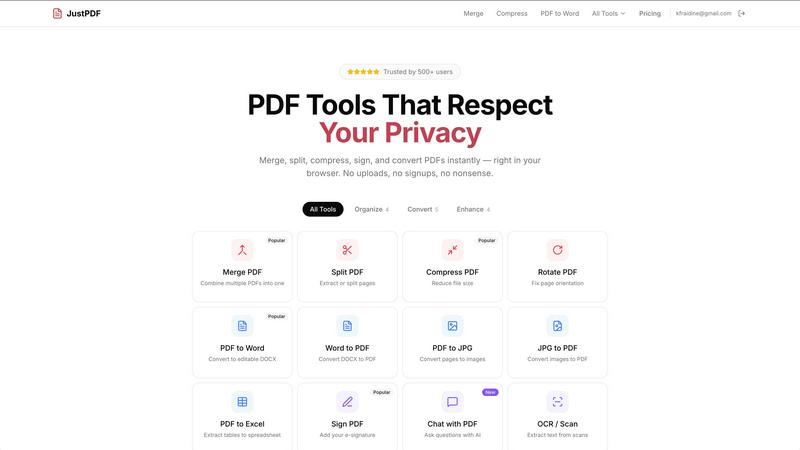
About JustPDF
JustPDF is a comprehensive, privacy-centric suite of PDF utilities that operates entirely within a user's web browser. It provides 17 distinct, professional-grade tools for manipulating, converting, and managing PDF documents. The platform's foundational and most significant value proposition is its commitment to data security and privacy. Unlike mainstream competitors such as Smallpdf and iLovePDF, which require file uploads to remote servers for processing, JustPDF leverages advanced web technologies like JavaScript and WebAssembly to execute all operations locally on the user's device. This means files are never transmitted over the internet during processing, a fact users can independently verify by monitoring the Network tab in their browser's developer tools. This architecture makes it an ideal solution for individuals and organizations handling sensitive documents, including those in FERPA-compliant educational environments. The toolset caters to a wide audience, from students and professionals needing quick, ad-hoc edits to businesses requiring reliable, secure document workflows without the overhead of software installation. With a generous free tier offering three operations per day and a straightforward, affordable Pro subscription, JustPDF delivers enterprise-grade functionality with an uncompromising focus on user privacy and convenience.
Features of JustPDF
100% Browser-Based Processing
This is the cornerstone feature of JustPDF. All PDF operations—from merging and compressing to advanced AI chat and OCR—are performed directly within the user's browser using client-side JavaScript and WebAssembly. No file data is ever sent to an external server for processing. This ensures maximum privacy and security, as documents containing sensitive personal, financial, or proprietary information remain entirely on the user's local machine. This feature also allows the tools to function effectively in offline or low-connectivity environments once the web page is loaded.
Comprehensive PDF Tool Suite
JustPDF offers a robust collection of 17 specialized tools covering the vast majority of common and advanced PDF needs. The suite is organized into categories for organization (Merge, Split, Compress, Rotate, Unlock, Sign), conversion (PDF to Word, Word to PDF, PDF to JPG, JPG to PDF, PDF to Excel, WebP/HEIC to PDF, PDF to Grayscale), and intelligent features (OCR/Scan and Chat with PDF AI). This eliminates the need to juggle multiple websites or software for different tasks, providing a one-stop, cohesive workflow for all PDF manipulations.
Chat with PDF (AI-Powered Analysis)
This advanced feature integrates artificial intelligence to interact dynamically with PDF content. Users can upload a document and ask questions in natural language, enabling the AI to summarize long reports, extract specific data points, explain complex concepts, or find information based on contextual queries. This transforms static PDFs into interactive documents, significantly boosting productivity for researchers, students, and analysts who need to quickly understand and retrieve information from lengthy files without manual searching.
No-Account Free Tier & Offline Capability
JustPDF prioritizes accessibility and immediacy. Users can immediately access all 17 tools without creating an account, receiving three free operations per day. The platform is designed to work offline after the initial page load, as all processing logic resides on the client side. This combination of no mandatory sign-up, local processing, and offline functionality ensures that users can perform critical PDF tasks anytime, anywhere, without privacy concerns or dependency on a stable internet connection during the actual file processing.
Use Cases of JustPDF
Handling Sensitive Legal or Business Documents
Law firms, HR departments, and financial advisors regularly process contracts, confidential reports, and personal identification documents. Using JustPDF ensures that these sensitive files are never exposed to third-party servers during compression, merging, or conversion. For instance, an attorney can combine multiple witness statements into a single PDF, compress it for email, and add a digital signature—all without the file ever leaving their computer, maintaining attorney-client privilege and data sovereignty.
Academic and Student Workflows
Students and educators can safely use JustPDF for FERPA-compliant handling of academic records, research papers, and assignments. A student can convert lecture slides (JPG) into a PDF, merge them with their notes, and then compress the file for submission. A researcher can use the Chat with PDF AI to quickly analyze multiple academic papers, asking for summaries or key findings, all while ensuring their unpublished research data remains completely private and local.
Efficient Document Preparation for Publishing
Authors, graphic designers, and office administrators can streamline document preparation. A designer can flatten a PDF with interactive elements to ensure consistent printing, convert images from WebP or HEIC formats into a PDF portfolio, or rotate incorrectly scanned pages. An author can convert their manuscript from Word to a print-ready PDF and then compress it without quality loss for easy digital distribution, all in a seamless, browser-based workflow.
On-the-Go Document Management
Professionals traveling or working from locations with unreliable internet can rely on JustPDF's offline capability. A consultant at a client site can split a large proposal PDF to share only relevant sections, unlock a password-protected document they have the password for, or sign a contract digitally without needing to find a secure Wi-Fi connection to upload files to a cloud service, ensuring productivity and security are maintained.
Frequently Asked Questions
Is JustPDF really free, and what are the limits?
Yes, JustPDF offers a completely free tier that requires no account creation. Users can perform up to three total operations per day across all 17 tools. Each tool use (e.g., merging one set of files, compressing one PDF) counts as one operation. This free tier includes full functionality without watermarks. For unlimited daily operations, users can subscribe to the Pro plan.
How does JustPDF protect my privacy compared to other online tools?
JustPDF's privacy protection is fundamentally different. While most online tools upload your file to their servers for processing, JustPDF performs all work locally in your browser using WebAssembly. You can confirm this by opening your browser's Developer Tools (F12), going to the Network tab, and observing that no file data is transmitted to any server when you process a document. Your files never leave your device.
What is the "Chat with PDF" feature, and how does it work?
The Chat with PDF feature is an AI-powered tool that allows you to interact with your document conversationally. After uploading a PDF, you can ask questions in plain English, such as "Summarize this report," "What are the main points in chapter 3?" or "Extract all dates mentioned." The AI analyzes the text content of your PDF locally and provides immediate answers, making it a powerful tool for research and data extraction.
Can I use JustPDF on any device or browser?
JustPDF is a web application and is designed to work on any modern desktop or mobile browser that supports JavaScript and WebAssembly, including Chrome, Firefox, Safari, and Edge. Because the processing happens in the browser, it works across operating systems like Windows, macOS, Linux, iOS, and Android without requiring any software installation.
Pricing of JustPDF
JustPDF operates on a freemium model. The free plan provides full access to all 17 tools with a limit of three operations per day, with no account required. For users requiring unlimited access, the Pro subscription is available starting at $4 per month. The Pro plan removes the daily operation limit, allowing for unrestricted use of all features, including Merge, Split, Compress, AI Chat, OCR, and all conversion tools. This pricing structure is designed to be simple and affordable for both casual users and power users who require frequent, high-volume PDF processing.
Explore more in this category:
Similar to JustPDF

SideKik helps small businesses turn more enquiries into customers with simple CRM, follow-ups, task management and daily growth tasks.

Secure, auditable time tracking for compliance.


AgencyFlo is the AI-native operating system for agencies - one platform for projects, time, CRM, proposals, contracts and invoicing.

AI-powered Upwork job feed. Every new job is scored against your profile and strategy in real time, and you get an instant notification


