
QuickSigner
QuickSigner simplifies the eSigning process with secure, legally binding signatures for any document, all within a user-friendly online platform.
Visit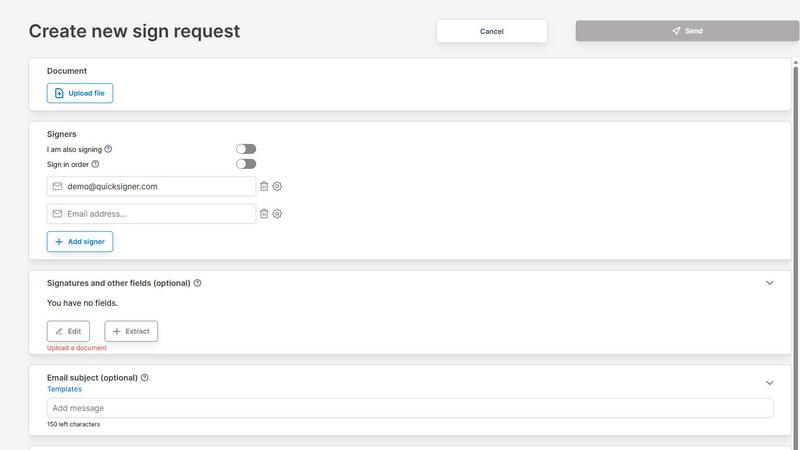
About QuickSigner
QuickSigner is a revolutionary electronic signature platform designed to expedite the process of signing, sending, and finalizing documents. It transforms what traditionally takes days of back-and-forth communication into mere minutes, making it an essential tool for businesses and individuals alike. QuickSigner is particularly beneficial for small to medium-sized teams that require a seamless and efficient document signing process. With features that include Adobe Approved Trust List (AATL) electronic signatures, QuickSigner ensures legal validity and security in every transaction. Furthermore, it is ISO 27001 certified, underscoring its commitment to data privacy and security. By integrating QuickSigner into daily workflows, users can streamline operations, reduce costs, and enhance overall productivity, making it a valuable addition to any organization looking to improve their document management processes.
Features of QuickSigner
Easy Document Upload
QuickSigner allows you to upload documents effortlessly using a simple drag-and-drop interface. It supports popular formats such as PDF and Word, ensuring that you can quickly prepare any contract, agreement, or legal document for signing. This feature simplifies the initial step of the signing process, making it accessible for users of all tech-savviness levels.
Customizable Signing Fields
With QuickSigner, you can personalize documents by adding signature, date, and text fields precisely where needed. This customization ensures that all necessary information is captured accurately, providing clarity and reducing the likelihood of errors during the signing process. You can also specify the order in which recipients will sign, streamlining the workflow.
Secure Online Signing
Recipients can sign documents securely from any device without needing to create an account or install software. QuickSigner generates a secure link that allows for easy access and ensures that the signing process is both convenient and safe. This feature enhances user experience while maintaining the integrity of each transaction.
Real-Time Tracking and Notifications
QuickSigner provides real-time tracking of document status, allowing users to monitor the signing progress at any time. Notifications are sent when documents are signed or completed, ensuring that all parties stay informed throughout the process. This transparency fosters better communication and reduces uncertainty, ultimately leading to quicker finalizations.
Use Cases of QuickSigner
Small Business Agreements
Small businesses can utilize QuickSigner to streamline their agreement processes, from vendor contracts to employee onboarding documents. By reducing the time spent on paperwork, organizations can focus more on growth and customer service.
Remote Work Collaboration
In today’s remote work environment, QuickSigner enables teams to collaborate effectively by allowing multiple users to sign documents from different locations. This facilitates smoother operations, especially for businesses that rely heavily on digital communication.
Client Contracts in Service Industries
Service-oriented businesses, such as consulting or real estate, can leverage QuickSigner to expedite contract signings with clients. The quick turnaround time allows them to finalize deals faster, enhancing customer satisfaction and retention.
Educational Institutions
Educational institutions can adopt QuickSigner for managing enrollment forms, consent documents, and other administrative paperwork. The platform's efficiency can significantly reduce the administrative burden on staff, allowing them to focus on student engagement and educational quality.
Frequently Asked Questions
What types of documents can I upload to QuickSigner?
QuickSigner supports various document formats, including PDF and Word. This flexibility allows users to upload contracts, agreements, and other essential documents with ease.
Is QuickSigner secure for sensitive documents?
Yes, QuickSigner is ISO 27001 certified, ensuring that it adheres to stringent data security standards. Additionally, it employs encryption and secure links for all document transactions, safeguarding sensitive information.
How many signers can I include in a document?
The number of signers varies by pricing plan. The Free Plan allows up to 3 signers per request, while the Business Plan permits up to 10 signers, facilitating collaboration for larger teams or more complex documents.
Can I customize the signing fields in my documents?
Absolutely! QuickSigner allows for the customization of signature, date, and text fields. You can place them exactly where needed, ensuring that all necessary information is captured accurately and efficiently.
Explore more in this category:
Similar to QuickSigner

Managed remote build cache for Nx, Lerna, Turbo, Gradle, and Bazel. Reuse artifacts across CI and developer machines.

SideKik is a simple CRM that organizes customer enquiries, follow-ups, daily tasks, and provides a mini website and growth tasks to help small.

mojegodzinki.pl provides secure, auditable time tracking for compliance, supporting R&D tax relief and NGO grant reporting for both employees and.

Browser Notes is a Chrome extension for local-first note-taking, brainstorming with sticky notes, and mind mapping without requiring signup or cloud.

AgencyFlo is an AI-native operating system that unifies projects, time, CRM, proposals, contracts, and invoicing into one automated platform for.

Vibeworker is an AI-powered tool that scores every new Upwork job against your profile and strategy in real time, instantly notifying you of only the.

UPCgen is a free, trusted barcode generator that creates GS1-valid UPC, EAN, ISBN, and other codes for Amazon FBA, Shopify, and over 50 platforms.

OnlineShortcuts.com provides a comprehensive, cross-platform encyclopedia of essential keyboard shortcuts for Windows, macOS, and Linux to enhance.