
CheckoutReceipt
CheckoutReceipt is a free receipt generator offering over 100 realistic templates, instant PNG and PDF downloads, and no signup required for.
Visit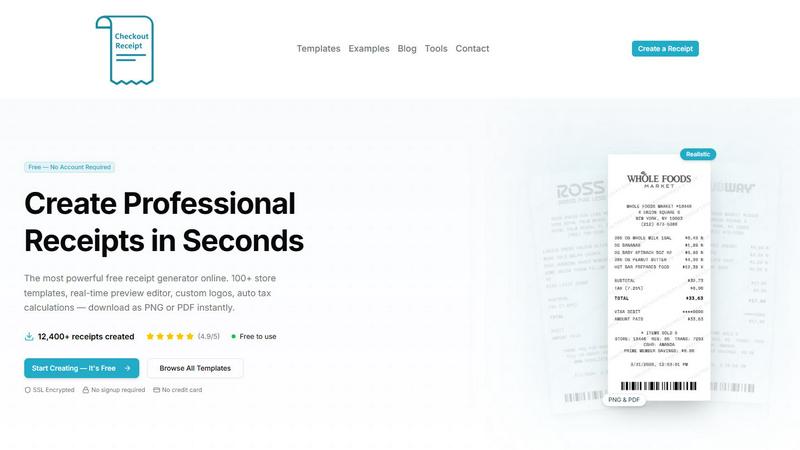
About CheckoutReceipt
CheckoutReceipt is a comprehensive, free online receipt generator and maker designed for legitimate business, creative, and educational purposes. It provides users with the ability to create professional, realistic receipts instantly without requiring any account creation or software installation. The platform offers over 100 customizable templates spanning multiple industries, including retail, restaurants, services, automotive, healthcare, hospitality, and financial services. With over 12,400 receipts created and a user rating of 4.9 out of 5, CheckoutReceipt has established itself as a trusted tool for professionals needing documentation. The core value proposition lies in its combination of power, speed, and accessibility. Users can select from store-specific templates for major retailers like Target, Walmart, Home Depot, Whole Foods, and Subway, or choose from specialized receipt types such as medical receipts, rent receipts, donation receipts, and utility bills. The editor features real-time live preview, drag-and-drop functionality, auto barcode generation, custom logo uploads, and multiple font and paper texture options. All processing occurs within the user's browser, ensuring data privacy and security with SSL encryption. Downloads are available in both PNG and PDF formats, optimized for print and digital use. CheckoutReceipt explicitly prohibits fraudulent use, emphasizing its role in supporting legitimate business operations, expense tracking, educational exercises, and creative projects.
Features of CheckoutReceipt
100+ Store-Specific Receipt Templates
CheckoutReceipt offers an extensive library of over 100 templates designed to match the exact formatting and layout of receipts from major retailers, restaurants, and service providers. Templates are available for Target (including REDcard formats), Walmart (Supercenter and Neighborhood), Home Depot, Whole Foods, Subway, Publix, Ross, Dunkin, and dozens more. Additionally, the platform categorizes templates by receipt type, including automotive (oil change, mechanic, gas station), hospitality (hotel, taxi, airline), food and dining (restaurant, fast food, cafe, bar), health and personal care (medical, doctor, veterinary, salon), financial (rent, donation, sales, expense), retail (grocery, pharmacy, electronics, clothing), professional services (plumbing, electrician, cleaning), and utilities (phone bill, internet bill). This breadth ensures users can find the precise format needed for any scenario.
Real-Time Live Preview Editor
The editor provides instant visual feedback as users make changes, displaying exactly what the downloaded receipt will look like. Every modification, whether it is editing store names, addresses, line items, prices, tax rates, payment methods, dates, or custom messages, appears immediately in the live preview. This eliminates guesswork and reduces the need for repeated downloads. Users can see how font choices, paper textures, and logo placements affect the final appearance before committing to a download. The real-time preview is particularly valuable for ensuring alignment, spacing, and overall realism, making the receipt creation process efficient and error-free.
Fully Customizable with Drag-and-Drop Interface
Every element of a receipt is editable, providing complete control over the final output. Users can enter specific store information, add or remove line items, set individual prices and quantities, configure tax rates, select payment methods, and include custom headers or footers. The drag-and-drop functionality allows users to reorder sections, add new components, or remove unnecessary elements with simple mouse movements. This modular approach means users are not locked into a rigid template structure; they can create receipts that perfectly match their specific requirements, whether for a small business, a freelance service, or an educational project.
Auto Barcode Generation and Custom Logo Upload
CheckoutReceipt automatically generates realistic barcodes that appear on receipts, with customizable numbers for authentic-looking documentation. Users can choose to upload their own business logos or select from a library of built-in store logos, with adjustable sizing and positioning to ensure proper integration into the receipt layout. This combination of automated and manual customization features enhances the realism and professionalism of the final output. The barcode generation adds an extra layer of authenticity, while logo uploads allow businesses to brand their receipts consistently. Both features are accessible without any technical expertise, making professional-grade receipt creation available to everyone.
Use Cases of CheckoutReceipt
Small Business Expense Documentation
Small business owners and freelancers can use CheckoutReceipt to create professional receipts for client transactions, service payments, and expense tracking. For example, a freelance graphic designer can generate a service receipt for a completed project, including itemized costs, tax calculations, and payment terms. Similarly, a plumber or electrician can create a detailed receipt for a service call, documenting labor hours, parts used, and total charges. These receipts serve as official documentation for accounting purposes, tax filings, and client communication. The ability to customize logos and store information ensures brand consistency across all documentation, while the instant download feature allows for immediate delivery to clients.
Educational and Training Simulations
Educators and trainers can utilize CheckoutReceipt to create realistic receipts for classroom exercises, business simulations, and financial literacy programs. For instance, a high school business teacher can generate mock receipts for a student-run store simulation, teaching students about pricing, sales tax, and profit calculations. A university accounting professor can create sample receipts for students to practice bookkeeping and reconciliation tasks. The variety of templates allows instructors to cover multiple industries and scenarios within a single lesson plan. Since all processing occurs in the browser, there are no privacy concerns, and students can access the tool from any device without creating accounts.
Personal Financial Management and Record Keeping
Individuals can use CheckoutReceipt to create receipts for personal transactions where official documentation is missing or needed for clarity. This includes generating rent receipts for landlords or tenants, creating donation receipts for charitable contributions, or documenting cash transactions for expense tracking. For example, a person who pays rent in cash can generate a professional rent receipt to maintain a clear payment history. Someone making a charitable donation can create a receipt for tax deduction purposes. The tool is also useful for creating receipts for items sold through online marketplaces or garage sales, providing both buyer and seller with transaction documentation.
Creative Projects and Content Creation
Content creators, designers, and artists can incorporate CheckoutReceipt into creative projects such as photography props, video productions, social media content, and artistic installations. A photographer staging a lifestyle shoot can generate realistic receipts to include in scene compositions. A filmmaker creating a retail or restaurant scene can produce authentic-looking receipts as props. Social media influencers creating content about budgeting, shopping, or financial topics can use generated receipts to illustrate their points visually. The high-resolution PNG and PDF downloads ensure that receipts look crisp and professional in any medium, whether digital or print.
Frequently Asked Questions
Is CheckoutReceipt really free to use with no signup required?
Yes, CheckoutReceipt is completely free to use and does not require any account creation or signup. Users can access all 100+ templates, the full editor with all customization features, and download receipts in PNG or PDF format without providing any personal information. There are no hidden fees, subscription requirements, or credit card demands. The platform is supported by its commitment to providing legitimate business, creative, and educational tools. All processing occurs within the user's browser, so no data is stored on external servers, ensuring complete privacy and security.
Can I use CheckoutReceipt for fraudulent purposes or to deceive others?
No, CheckoutReceipt is explicitly intended for legitimate business, creative, and educational use only. The platform's terms of service strictly prohibit generating receipts to commit fraud, deceive others, or create false documentation. This includes using the tool to create fake receipts for insurance claims, tax evasion, refund scams, or any other illegal or unethical activities. Users who violate these terms may face account restrictions or legal consequences. The tool is designed to support honest business operations, educational exercises, and creative projects, not to facilitate deception or illegal behavior.
What file formats are available for downloading receipts?
CheckoutReceipt offers two primary download formats: PNG and PDF. PNG files are ideal for digital use, including sharing via email, embedding in websites, or using in social media content. They provide high-resolution images with crisp text and graphics. PDF files are optimized for both print and digital distribution, maintaining formatting across different devices and platforms. Both formats are generated with high resolution to ensure text remains readable at any size. Users can choose the format that best suits their specific needs, whether for professional documentation, creative projects, or educational materials.
How does CheckoutReceipt ensure the privacy and security of my data?
CheckoutReceipt processes all receipt creation entirely within the user's browser using client-side technology. This means that no receipt data, personal information, or uploaded logos are ever transmitted to or stored on external servers. The platform uses SSL encryption to protect the connection between the user's device and the website. Since no account is required, there is no user profile or personal data to compromise. This approach ensures that sensitive business information, transaction details, and custom content remain private and secure. Users can confidently create receipts for any purpose without worrying about data breaches or unauthorized access.
Pricing of CheckoutReceipt
CheckoutReceipt is completely free to use with no pricing tiers, subscription plans, or paid features. There are no costs associated with accessing any of the 100+ templates, using the full editor with all customization options, or downloading receipts in PNG or PDF format. No account creation, signup, credit card, or payment information is required at any point. The platform generates revenue through other means, allowing it to offer its receipt creation services at no charge to users. This free pricing model makes professional receipt creation accessible to everyone, from individual users to small businesses and educational institutions.
Explore more in this category:
Similar to CheckoutReceipt

AgencyFlo is the AI-native operating system for agencies - one platform for projects, time, CRM, proposals, contracts and invoicing.

AI-powered Upwork job feed. Every new job is scored against your profile and strategy in real time, and you get an instant notification


Back up Zoom cloud recordings to Google Drive automatically. Optional auto-delete frees Zoom storage. 60-second setup, then forget it.

Bg Eraser quickly removes backgrounds from photos in batches, creating clean transparent images with no signup and automatic privacy protection.

SiteSpin is an AI-driven website builder that creates a custom site in minutes, tailored to your needs without templates or complex editors.