
ProcessSpy
ProcessSpy is an advanced macOS process monitor offering in-depth tree views, JavaScript filters, and native performance for professional system.
Visit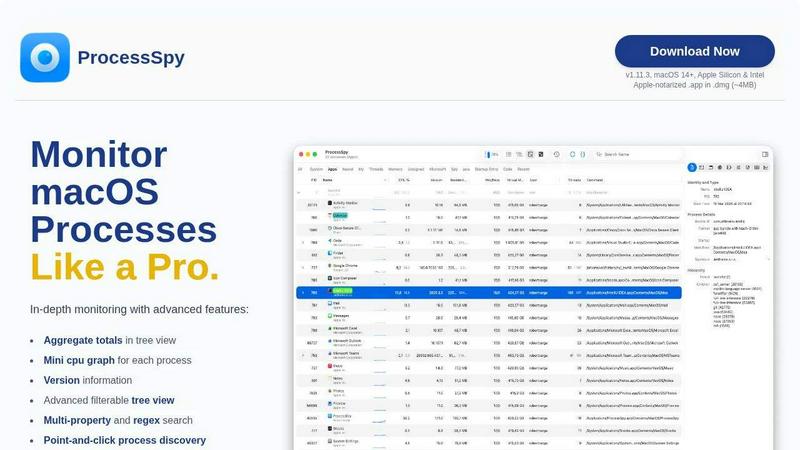
About ProcessSpy
ProcessSpy is a professional-grade process exploration and system monitoring utility designed exclusively for macOS. It serves as a powerful, native alternative to tools like Sysinternals Process Explorer for Windows, providing macOS users—particularly developers, system administrators, and power users—with unprecedented visibility into their system's inner workings. The core value proposition of ProcessSpy lies in its ability to reveal critical information that the built-in Activity Monitor deliberately hides or obscures. It transforms opaque system processes into transparent, inspectable objects, allowing users to visualize detailed process hierarchies, inspect open files and network connections, view environment variables, and forcefully terminate unresponsive applications. Built with a developer-first mindset, it addresses common pain points, such as distinguishing between multiple instances of similarly named processes (e.g., different Java versions) by displaying full command-line paths and version information. ProcessSpy is engineered as a native macOS application, utilizing Apple's APIs and UI frameworks to ensure a fast, responsive, and seamlessly integrated experience without the performance overhead of cross-platform toolkits.
Features of ProcessSpy
Advanced Hierarchical Process Tree
ProcessSpy presents all running processes in a detailed, collapsible tree view that accurately reflects parent-child relationships. This hierarchy is not just visual; it provides aggregate totals for key metrics like CPU usage, memory consumption, and thread count for entire process groups. This allows users to instantly understand the total resource impact of an application and all its sub-processes, a capability absent from the standard Activity Monitor. The tree view is fully integrated with the tool's powerful real-time filtering and search system.
Multi-Property and Regex Search
The tool features a sophisticated quick-search bar that supports searching across multiple process properties simultaneously using regular expressions. For instance, a user can search for processes with "node" in the name AND a specific port number in the command-line arguments. This granular search capability, detailed further in the documentation, enables precise targeting of processes, making system debugging and analysis significantly more efficient than the basic search offered by native macOS utilities.
JavaScript-Based Filtering
For ultimate control, ProcessSpy allows users to define custom filters using JavaScript. This advanced feature enables the creation of complex, multi-condition filters that can evaluate any property of a process. The filter context even includes dynamic data like process start time, allowing for filters that can, for example, highlight all processes started within the last minute. This programmability offers a level of customization and power typically found only in scripting environments or professional diagnostic suites.
Comprehensive Process Inspection & Context Actions
Beyond listing processes, ProcessSpy acts as a deep inspection tool. Right-clicking on any process provides a context menu with numerous actionable items. Users can instantly kill processes, view open files and network connections, examine loaded dynamic libraries (Dylibs), and more. The paid version unlocks even deeper inspection, including viewing environment variables, code signatures, entitlements, Info.plist contents, and identifying launch daemons or agents.
Use Cases of ProcessSpy
Debugging and Development
Developers can use ProcessSpy to debug application launches, inspect environment variables passed to a process, verify which dependencies (Dylibs) are loaded, and check for port conflicts by viewing open network connections. The ability to see the full command line and path is invaluable for confirming the correct binary or script version is being executed, especially in complex environments with multiple installed versions of runtimes like Python, Java, or Node.js.
System Performance Analysis and Troubleshooting
When a Mac becomes slow or unresponsive, ProcessSpy helps identify the culprit. The hierarchical tree view with aggregate CPU/Memory totals quickly shows which application family is consuming resources. The mini CPU graph per process provides a real-time visual indicator of activity. Users can then drill down to inspect specific problematic processes, view their history (paid feature), and force-quit them if necessary, providing a more informed approach to system troubleshooting than force-quitting via Activity Monitor.
Security and Malware Investigation
Security-conscious users and IT professionals can utilize ProcessSpy to audit running processes. Features like viewing code signatures, entitlements, and identifying hidden startup items (launch daemons/agents) are crucial for spotting suspicious activity. The ability to flag newly discovered processes and remember finished processes (paid features) creates an audit trail, helping to identify stealthy or short-lived executables that might otherwise go unnoticed.
Clean Uninstallation and Conflict Resolution
When uninstalling software, leftover processes can cause conflicts or errors. ProcessSpy helps identify all processes related to an application via its tree view and search. Furthermore, by inspecting "Open Files," a user can see which files a stubborn process is locking, preventing deletion or modification. This makes it an essential tool for ensuring clean software removal and resolving file-locking issues.
Frequently Asked Questions
Is ProcessSpy safe to install on my Mac?
Yes, ProcessSpy is completely safe. The application is Apple-notarized, meaning it has been scanned and approved by Apple for malicious content. It is distributed as a signed .app file inside a .dmg disk image, a standard and secure distribution method for macOS software. It runs natively on both Intel-based Macs and Apple Silicon Macs without requiring any kernel extensions or system modifications that could compromise stability.
What versions of macOS does ProcessSpy support?
ProcessSpy is designed for modern versions of macOS, specifically macOS 14 (Sonoma) and newer. The developer also notes support for the upcoming macOS 26 (Tahoe), indicating a commitment to supporting future OS releases. It is not intended for use on older, legacy versions of macOS.
What is the difference between the free and paid versions?
The free version of ProcessSpy offers extensive core functionality, including the advanced process tree, multi-property search, JavaScript filters, basic process inspection, and killing capabilities. The paid license unlocks advanced features such as viewing environment variables, process entitlements, Info.plist data, signature info, startup entry identification, CPU/Memory history recording, CSV export, and the ability to remember finished processes for later review.
What is the license model for the paid version?
The paid license is a one-time purchase of $24.99. This is a lifetime license that includes all future updates and new features at no additional cost. The license is per user and can be used on an unlimited number of personal devices, making it a cost-effective solution for developers and professionals who use multiple Macs.
Similar to ProcessSpy

The launch platform for indie makers — schedule your launch, get in front of buyers, and blast across directories.


MCPize is a marketplace where developers can discover, install, and manage 1,000+ premium MCP servers while publishers keep 80% of revenue.

Agyn is an open-source, Kubernetes-native platform that enables teams to securely deploy and manage AI agents with enterprise-grade access control.

JustHunt is a comprehensive startup launchpad offering guaranteed visibility, powerful SEO benefits, and community feedback to boost your domain.

act101 is an AI-powered development tool that enables agents to refactor and port code across 163 programming languages with ease.
