
retroshelf
Retroshelf is a platform that automatically logs your retro handheld gaming sessions and lets you discover trends by comparing your playtime with.
Visit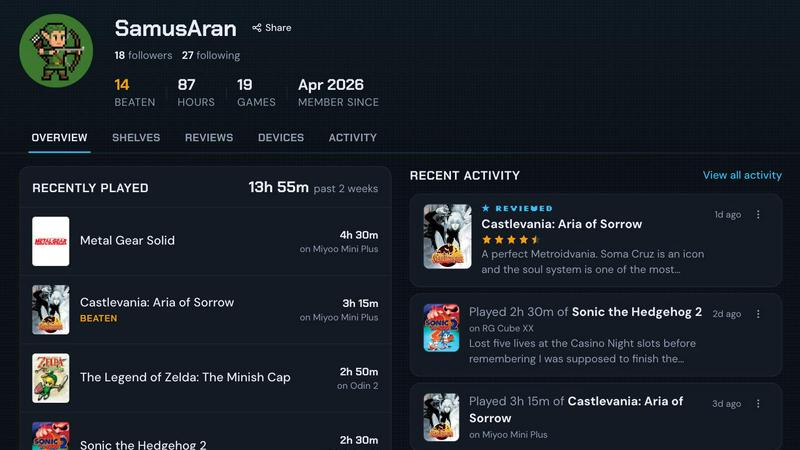
About retroshelf
retroshelf is a specialized play-tracking and discovery application designed explicitly for the retro handheld gaming community. Unlike generic game tracking solutions that require manual data entry or lack device-specific context, retroshelf offers an automated, integrated approach to logging and organizing gaming sessions across a variety of retro handheld devices. The core value proposition of retroshelf lies in its ability to eliminate the friction of remembering or manually recording what, when, and on which device a game was played. By deploying a tiny, lightweight plugin directly onto a handheld device's SD card, retroshelf automatically captures every gaming session, including the game title, playtime duration, and the specific handheld model used. This data is then aggregated into a user's public "shelf," a browsable and shareable timeline that displays games currently being played, those that have been finished, titles under review, and games being replayed. The platform is built for retro handheld enthusiasts who own devices running custom firmware systems like muOS and OnionOS, and who value a detailed, contextual record of their gaming habits. Beyond personal logging, retroshelf serves as a social discovery tool, allowing users to browse the shelves of other players, see what games are popular on specific devices, and read reviews that include the handheld context in which the game was played. This dual functionality of automatic tracking and community-driven discovery positions retroshelf as a comprehensive hub for the retro handheld gaming ecosystem, transforming scattered gaming sessions into a coherent, shareable history.
Features of retroshelf
Automatic Session Logging
The cornerstone of retroshelf is its ability to log gaming sessions automatically without any user intervention beyond initial setup. A tiny plugin is installed on the handheld device's SD card, and once the device is linked to the user's retroshelf account, every game launched is tracked. The plugin captures critical metadata including the game title, the precise playtime of each session, and the specific handheld model being used. This eliminates the need for manual spreadsheets, notes, or reliance on memory, providing a seamless and accurate record of all gaming activity. The data is synced to the user's shelf in real time, allowing the shelf to update even while the user is still playing.
Public Shelf with Device Context
Each user maintains a public shelf that serves as a curated display of their gaming history. The shelf is organized into distinct categories: games currently being played, completed titles, games under review, and replays. A defining characteristic of this shelf is its device context. Every entry on the shelf is associated with the specific handheld on which it was played. This means that a game played on a Miyoo Mini is clearly distinguished from the same game played on an Anbernic RG35XX, providing a granular level of detail that is invaluable for collectors and enthusiasts who use multiple devices. This contextual information is also visible to other users, making the shelf a rich source of discovery.
Community Discovery and Browsing
retroshelf transforms individual play logs into a community resource. Users can browse the shelves of other players to discover new games and see how titles are being played across the ecosystem. The platform highlights popular games on a weekly basis, showing which titles are being picked up, finished, and replayed by the community. A dedicated "Browse by Device" feature allows users to filter shelves and game data by specific handheld manufacturers such as Miyoo, Anbernic, and Odin. This device-centric browsing provides unique insights into which games perform best or are most popular on particular hardware, aiding in purchasing and play decisions.
Contextual Reviews and Playtime Insights
The review system on retroshelf is inherently tied to the device context. Star ratings and written reviews are not isolated numbers; they are accompanied by information about the handheld on which the game was played. This provides a more meaningful evaluation, as a game's performance, controls, and overall experience can vary significantly between devices. Additionally, every game page displays aggregate data showing who is playing it, on what handheld, and for how long. This playtime insight allows users to gauge a game's depth and community engagement, moving beyond simple ratings to understand real-world usage patterns.
Use Cases of retroshelf
Personal Gaming History Archiving
For the dedicated retro handheld collector who owns multiple devices, retroshelf serves as the ultimate personal archive. Instead of maintaining disparate notes or spreadsheets for each device, the user can rely on automatic logging to build a unified timeline of their entire gaming year. They can easily look back to see what they played in a specific month, on which device they completed a particular RPG, or how much total time they have invested in a classic title across different handhelds. This creates a legible and comprehensive record of a hobby that is often fragmented across hardware.
Discovering Games Through Real Play Patterns
A user looking for a new game to play on their Anbernic device can use retroshelf to see what other Anbernic owners are actually playing and enjoying. Instead of relying on generic review aggregators or forums, they can browse the "Popular this week" section filtered by device. They can see which games are being finished most frequently on that hardware, indicating a satisfying and complete experience. This use case leverages real, verified play data from the community, providing a more authentic discovery mechanism than traditional recommendation algorithms.
Comparing Game Performance Across Handhelds
An enthusiast considering purchasing a new handheld, such as an Odin 2, can use retroshelf to research how their favorite games run on it. By looking at the shelf of a user who owns both a Miyoo Mini and an Odin 2, they can see the same game logged on both devices. The contextual reviews and playtime data for that game on each device can reveal differences in performance, control comfort, and overall enjoyment. This provides a data-driven approach to hardware evaluation, helping users make informed purchasing decisions based on the actual experiences of the community.
Community Building and Social Validation
retroshelf provides a platform for retro handheld enthusiasts to connect and share their gaming journey. Users can follow other players with similar tastes, see what they are currently playing, and engage with their reviews. The public shelf acts as a digital identity for a collector, showcasing their hardware collection and gaming accomplishments. This fosters a sense of community and shared interest, where users can celebrate finishing a difficult retro game, discover a hidden gem through a friend's shelf, or simply feel validated in their hobby by seeing their playtime and collection recognized in a dedicated space.
Frequently Asked Questions
Which handheld operating systems are currently supported by retroshelf?
As of the closed beta phase, retroshelf officially supports devices running muOS and OnionOS. These are two of the most popular custom firmware options for retro handhelds, covering a wide range of devices from manufacturers like Miyoo, Anbernic, and others. The development team is likely to expand support to other operating systems based on community demand and beta feedback. Users with devices on other firmware may need to wait for future updates or check the official help center for the latest compatibility information.
How does the automatic session logging plugin work?
The process is designed to be simple and requires only three steps. First, the user downloads the retroshelf plugin and drops it onto the SD card of their handheld device. Second, they link that specific device to their retroshelf account through the app or website. Once linked, the plugin runs silently in the background on the handheld. Every time a game is launched, the plugin captures the session data, including the game title, the duration of the play session, and the device identifier. This data is then transmitted to the user's retroshelf shelf, updating it in near real-time.
Is my gaming shelf public, and can I control what others see?
Yes, by default, the shelf on retroshelf is designed to be public, which is a core feature of the community discovery aspect of the platform. The intention is to allow users to share their gaming history and discover others. However, the platform may introduce privacy settings in the future to allow users to control the visibility of their shelf or specific entries. Users should review the privacy policy and any future updates to the app for granular control over their data. During the closed beta, the focus is on building a public, shared community.
What is the difference between a game being "Playing," "Finished," "Reviewing," and "Replaying"?
These are the four primary status categories that organize a user's shelf. "Playing" indicates the game is currently in the user's active rotation. "Finished" means the user has completed the main content of the game. "Reviewing" is a status for games the user is actively evaluating and plans to leave a review for, often before marking them as finished or shelved. "Replaying" is a dedicated status for games that the user has previously finished but has started playing again. This categorization provides a nuanced view of a user's engagement with their game library.
Explore more in this category:
Similar to retroshelf

Planning a relocation or long-term stay abroad? Compare places on sunshine, cost, tax, visa and stay duration, then ask AI about your shortlist.

SlabCalc is a free suite of 34 concrete calculators plus AI tools for crack diagnosis and quote analysis. Instant answers for your concrete project.

Free AI tools to analyze your face attractiveness, find your celebrity look-alike, and calculate your body shape — instant results, no signup.


GetFIT App is an online fitness membership with workout programs, nutrition tools, recipes, and progress tracking for fat loss and muscle gain.

On Music AI turns your text, lyrics, or ideas into complete AI-generated songs with vocals, beats, and instrumentals.

Your AI plant expert: diagnose, plan, and water.

Toon Tone Fun is a daily browser game where you recreate cartoon characters' colors from memory using hue, saturation, and brightness sliders.