
TaleHug AI Story Generator for Kids
TaleHug transforms a child's voice, drawing, or idea into a customizable, safe AI-powered picture storybook for co-reading.
Visit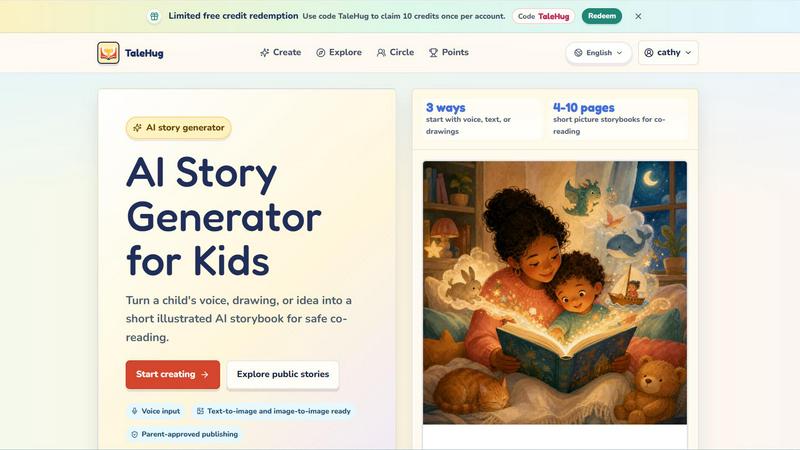
About TaleHug AI Story Generator for Kids
TaleHug is an AI-powered storytelling platform purpose-built for children, enabling them to craft their own illustrated storybooks using a combination of voice, text, drawings, and imagination. Designed for preschool and kindergarten-aged children (ages 3 to 6), TaleHug transforms a child's simple idea into a short, illustrated picture storybook that is safe for co-reading between parents and children. The platform emphasizes kid-friendly interaction, colorful illustrations, and a frictionless creative process that makes story creation engaging and approachable for young writers and readers alike. TaleHug offers three distinct input methods: voice input, text prompts, and drawing uploads, allowing children to start their story journey in the way that feels most natural to them. Each generated storybook ranges from 4 to 10 pages, providing a manageable length for early readers. Safety is a core pillar of the product: all drafts are private by default, parent approval is required before any public publishing, and the platform avoids collecting personal data such as full names, school names, addresses, or contact details. Public comments are not available in the MVP, ensuring a controlled, parent-guided sharing environment. TaleHug also includes a public gallery where approved examples from young creators are showcased, along with pre-built story ideas and scene templates that serve as creative springboards. The platform is operated by Vava AI Labs LLC and offers limited free credits with a redemption code, making it accessible for families to explore the AI story generator experience.
Features of TaleHug AI Story Generator for Kids
Voice, Text, and Drawing Input
TaleHug offers three distinct ways for children to begin their story creation journey. A child can speak their idea aloud using voice input, type a simple text prompt, or upload a drawing they have created. This multimodal approach ensures that even pre-literate children can participate fully by using their voice or artwork as the starting point for an AI-generated storybook. Each input method is designed to be intuitive and requires no technical skill, empowering young creators to express their imagination in the format they prefer.
AI-Generated Picture Storybooks
The platform transforms a child's input into a complete illustrated storybook ranging from 4 to 10 pages. Each page features a strong, colorful image generated by AI, accompanied by one short sentence of text that is appropriate for early readers. The system also stores the underlying prompt for each page, allowing parents or children to regenerate images if desired. This feature ensures that every story is visually engaging and developmentally appropriate for preschool and kindergarten ages.
Parent-Approved Publishing and Visibility Controls
TaleHug provides three distinct visibility modes for published stories: private, circle, and public. All drafts are private by default, ensuring that no story is shared without explicit adult consent. Before a story can be published to a circle of trusted family and friends or made public in the gallery, a parent must review and approve the content. This safety-first approach minimizes exposure risks while still allowing children to share their creations in a controlled manner.
Safety-First Design and Privacy Protections
The platform is built with comprehensive safety defaults designed for parent-guided sharing. TaleHug uses safe display names instead of full child names, does not collect school names, addresses, or child contact details, and has no public comments feature in the MVP. The public gallery exclusively uses approved examples, and the platform's privacy policy emphasizes essential cookies only, with optional analytics. These protections create a secure digital environment where children can explore their creativity without compromising their privacy.
Use Cases of TaleHug AI Story Generator for Kids
Bedtime Story Creation
Parents can use TaleHug to generate personalized bedtime stories for their children. By having a child describe their favorite characters, places, or dreams using voice input, the platform creates a unique 4 to 10 page storybook that can be read together at bedtime. This turns the nightly routine into an interactive creative experience, where the child becomes both the author and the protagonist of their own bedtime tale. Pre-built scene templates like "Moon rabbit bedtime" and "Cloud hopping" provide gentle, calming story starters.
Classroom Social Story Development
Teachers and early childhood educators can use TaleHug to create social stories that help children navigate common classroom situations. For example, the pre-built scene "Sharing the red truck" addresses taking turns, while "First school morning" helps ease separation anxiety for nervous kindergarten students. These AI-generated stories can be tailored to individual children's needs, making abstract social concepts concrete and relatable through personalized illustrations and simple text.
Art-to-Story Transformation
Children who enjoy drawing can upload their artwork to TaleHug and watch as the AI transforms their picture into a full storybook. The platform's image-to-image capability analyzes the uploaded drawing and generates a coherent narrative around the visual elements. This use case is particularly powerful for encouraging artistic expression while simultaneously developing literacy skills, as children see their own creations become part of a larger story with text and additional illustrations.
Family Storytelling and Shared Reading
Families can use TaleHug as a collaborative activity where multiple children contribute ideas, voice lines, or drawings to create a group storybook. The resulting 4 to 10 page picture book can be shared privately within a family circle, creating a keepsake that captures family inside jokes, favorite characters, and shared experiences. This use case strengthens family bonds, encourages turn-taking and collaboration among siblings, and provides a meaningful artifact that can be revisited and read together repeatedly.
Frequently Asked Questions
How does TaleHug ensure the safety of my child's stories and personal information?
TaleHug implements multiple layers of safety and privacy protection. All story drafts are private by default and cannot be shared without adult approval. The platform uses safe display names instead of real child names, does not collect school names, addresses, or contact details, and has no public comments feature in the MVP. Before any story can be published to a circle or the public gallery, a parent must review and approve the content. The public gallery exclusively uses approved examples, and the platform only uses essential cookies by default with optional analytics.
What age group is TaleHug designed for?
TaleHug is specifically designed for preschool and kindergarten-aged children, typically ages 3 to 6. The generated storybooks are 4 to 10 pages long with one short sentence per page, making them ideal for co-reading with parents or early readers. The platform's three input methods (voice, text, and drawing) accommodate children at different developmental stages, allowing pre-literate children to participate using voice or drawings while older children can type their own prompts.
Can I try TaleHug for free before committing to a paid plan?
Yes, TaleHug offers limited free credits that allow new users to explore the platform and generate stories without an initial purchase. New accounts can redeem a code (such as "TaleHug") to claim 10 free credits once per account. These credits enable families to test the voice input, drawing upload, and story generation features before deciding whether to purchase additional credits or explore any premium offerings that may become available.
How do the voice input and drawing upload features work for young children?
Voice input allows a child to simply speak their story idea aloud, and the AI processes the spoken words to generate the narrative and illustrations. This feature is particularly useful for children who cannot yet write or type. For drawing uploads, children can create a picture on paper or using a digital drawing tool, then upload the image to TaleHug. The platform uses image-to-image technology to analyze the drawing and generate a storybook that incorporates the visual elements into a coherent narrative with matching illustrations.
Pricing of TaleHug AI Story Generator for Kids
TaleHug operates on a credit-based system where users can redeem a code to claim 10 free credits once per account. The platform offers limited free credit redemption using the code "TaleHug" for new accounts. Specific paid pricing tiers, subscription plans, or additional credit packages are not detailed in the available content. Users are encouraged to start with the free credits to explore the platform's features, including voice input, drawing upload, story generation, and publishing controls. For the most current pricing information, users should visit the TaleHug website or contact Vava AI Labs LLC directly.
Explore more in this category:
Similar to TaleHug AI Story Generator for Kids


EinbuergerungstestFragen offers a comprehensive, free online platform with 300 general and 16 state-specific questions to practice for the German.

AudiobookHub delivers daily free audiobook summaries, AI text-to-speech for any content, and original theme songs, all without requiring an account.

Studeum transforms your PDFs into AI-powered study guides, flashcards, and adaptive quizzes to help you ace any exam in half the time.

Convinco provides real-time AI guidance during live sales calls to instantly overcome objections and close more deals.

Registrant Prep provides an AI-powered, affordable subscription covering all nine CIRO exams with cited rules and personalized mock exams.

Calm Sea provides visual, stress-free tools for planning financial futures with clear charts and privacy-focused design.

Frizzle transforms handwritten math work into real-time insights, identifying student misconceptions with 97% accuracy for improved teaching.