
Best Face Swap
Best Face Swap delivers frame-consistent AI face replacement for photos and videos, with dedicated workflows for free trials, NSFW intent, and a.
Visit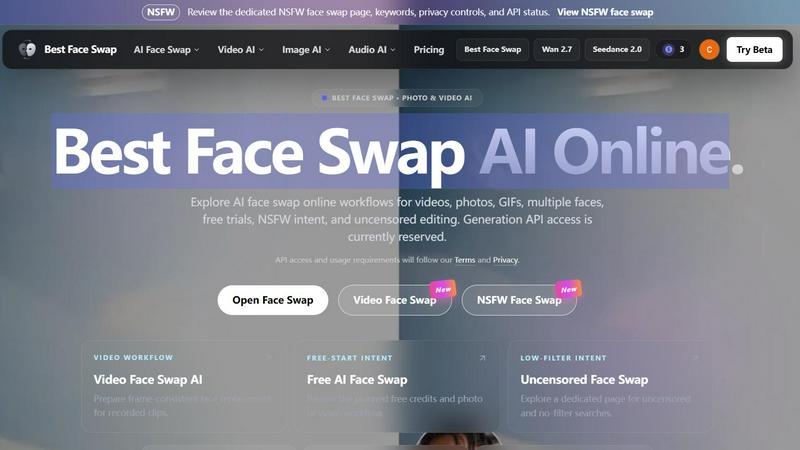
About Best Face Swap
Best Face Swap is a sophisticated AI-powered platform designed to facilitate the seamless swapping of faces across a wide variety of media types, including photos, videos, and GIFs. The tool is engineered to make creative content editing accessible to individuals who may not possess extensive technical expertise or advanced software skills. By leveraging advanced artificial intelligence algorithms, Best Face Swap automates the complex processes of facial recognition, mapping, and replacement, delivering results that maintain high levels of realism and consistency. The platform is structured around a comprehensive keyword hub that allows users to navigate dedicated workflows based on their specific intent, such as video face swap, free face swap, multiple face swap, and NSFW face swap. This organization ensures that users can quickly find the appropriate tool for their project, whether they are looking to create humorous social media content, professional video edits, or experimental artistic pieces. Best Face Swap is currently in a pre-launch phase where its landing pages and interface are live, but the actual upload and generation capabilities are reserved pending the completion of API integration. The platform emphasizes transparency about its development status, clearly marking which features are planned and which are available, thereby setting accurate expectations for its user base.
Features of Best Face Swap
Comprehensive Workflow Organization
The platform is meticulously organized around eight focused face swap landing pages, each tailored to a specific media type or user intent. This includes dedicated pages for video, photo, GIF, multiple-face, free-start, best-tool comparison, NSFW, and uncensored face swap workflows. This structure allows users to bypass generic search results and directly access the most relevant tool for their needs, whether they are editing a single image or a complex multi-person video scene.
Frame-Consistent Video Face Swap
For video content, Best Face Swap is designed to prepare frame-consistent face replacement for recorded clips. This feature addresses the technical challenge of maintaining identity coherence across motion, changing facial expressions, scene cuts, and varying camera angles. The AI is engineered to track and map the target face throughout the entire video sequence, ensuring that the swapped face behaves naturally and realistically within the dynamic environment of a moving picture.
Multi-Face and Batch Workflow Support
The platform includes a dedicated multiple face swap page that plans for face mapping in group photos and multi-person video scenes. This feature is intended to handle complex scenarios where different source faces need to be mapped to specific individuals within a single media file. Additionally, batch face swap workflows are planned, allowing users to process multiple files in a systematic manner, which is particularly useful for content creators working with large volumes of material.
Planned Free and Uncensored Access
Best Face Swap acknowledges the demand for both free and unrestricted content creation by planning dedicated workflows for these intents. A free-start workflow is anticipated, which will include specific credits and limits for photo and video editing. Separately, a dedicated page for uncensored and no-filter searches is prepared, targeting users who require adult face swap capabilities. Both of these workflows are clearly marked as planned, with their exact parameters to be published upon the API launch.
Use Cases of Best Face Swap
Social Media Content Creation
Individuals can use Best Face Swap to generate humorous and engaging content for platforms like TikTok, Instagram, and YouTube. By swapping faces in short videos or GIFs, users can create viral-worthy memes, parody clips, or entertaining skits without needing advanced video editing skills. The frame-consistent video workflow ensures that the resulting content looks polished and professional, even when the original footage involves rapid movement or complex expressions.
Professional Video Editing and Post-Production
Video editors and filmmakers can leverage the tool for more serious applications, such as replacing an actor's face in a scene for continuity reasons or creating digital doubles for stunt work. The planned frame-consistent identity mapping is crucial for these professional use cases, as it maintains realism across cuts and camera movements. This can save significant time and resources compared to traditional manual compositing techniques.
Creative and Artistic Experimentation
Artists and digital creators can explore new forms of visual expression by combining faces from different sources into single compositions. This could involve creating surreal portraits, blending historical figures into modern settings, or generating unique character designs for digital art projects. The support for both photos and videos provides a versatile canvas for experimentation, while the multiple face swap feature allows for complex group compositions.
Group Photo and Video Enhancement
Users who work with group media, such as event photographers or family videographers, can utilize the multiple face swap workflow to correct or enhance specific individuals within a crowd. For example, if one person in a group photo has their eyes closed, their face can be swapped with a better expression from another frame. This use case is particularly valuable for creating flawless group portraits and videos without the need for extensive retakes.
Frequently Asked Questions
What is Best Face Swap?
Best Face Swap is an AI-powered face swap site organized around specific search intents including photo, video, GIF, multiple-face, free, NSFW, and uncensored workflows. It is designed to help users swap faces in various media types without requiring extensive technical expertise. The platform is currently in a pre-launch state with live landing pages but disabled upload and generation capabilities pending API integration.
Is Best Face Swap free to use?
A free-start workflow is planned for Best Face Swap. The exact details regarding the number of free credits, any login requirements, and usage limits will be published when the face swap API officially launches. Currently, no free usage is available as the generation features are not yet active.
Can I swap faces in both photos and videos?
Yes, Best Face Swap plans to support both photo and video workflows. Dedicated pages for each media type are already live, outlining the planned capabilities. The photo workflow will focus on natural portrait and image swaps with pose, lighting, and skin-tone matching, while the video workflow will target frame-consistent identity replacement across motion and cuts.
Is the face swap API available now?
No, the face swap API is not currently available. The landing pages and user interface are live for informational purposes, but all upload and generation functions remain disabled. API access and usage requirements will follow the platform's Terms and Privacy policy, and the API is clearly marked as reserved until the integration is complete.
Explore more in this category:
Similar to Best Face Swap

VideoAny is an all-in-one AI creation studio for generating videos, images, and audio from text or photos with advanced models like Seedance 2.0 and.

Craft cinematic AI videos with Gemini Omni, the unified omni-model. Generate, edit, and remix your clips in native 4K with built-in audio and Director

AI motion graphics and map animation generator for content creators, editors, founders and marketers.


Easy Watermark Remover is a free online tool that eliminates Google Gemini watermarks and SynthID from images using Quick Crop or AI Smart Removal.

Art & See Custom Oil Painting Portraits transforms your cherished photos into stunning, handcrafted oil portraits, perfect for any occasion.

Nano Banana AI is an intuitive platform for generating and editing images using natural language, streamlining your creative workflow effortlessly.

Veo 4 is an AI video generator that transforms text, images, or existing footage into ultra-realistic, studio-grade clips with cinematic detail and.