
ButterKit
ButterKit is a comprehensive macOS tool that streamlines app development by enabling the creation of polished, translated App Store screenshots and.
Visit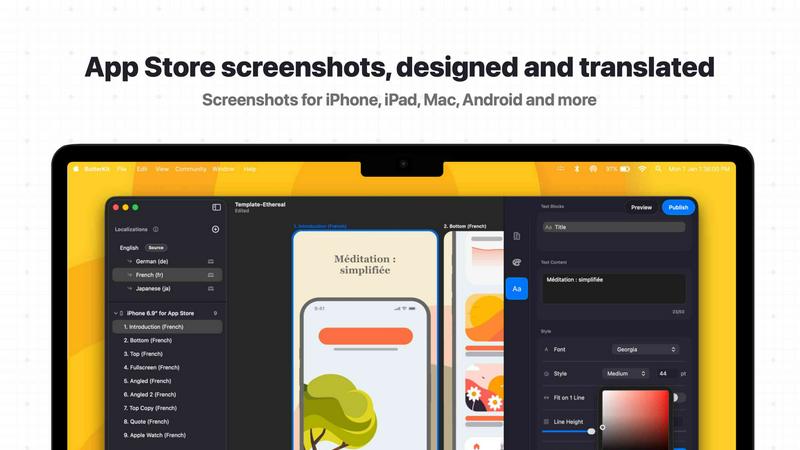
About ButterKit
ButterKit is a native macOS application designed specifically for Apple developers to simplify and automate the entire App Store publishing workflow. The product addresses a critical pain point for developers who need to create polished, localized App Store listings that drive conversions and reach global audiences. At its core, ButterKit enables users to capture screenshots directly from the Xcode Simulator and place them into stunning photorealistic 3D device frames, eliminating the need for complex design software or manual compositing. The application goes far beyond simple screenshot framing by offering professional design tools, AI-powered translation into all 50 App Store Connect languages, and direct API integration for one-click uploading of assets and metadata. ButterKit is built for efficiency, supporting folder-based input and output that integrates seamlessly with CI/CD pipelines and Fastlane workflows. Created by a solo developer with deep understanding of the Apple development ecosystem, the product targets indie developers, design studios, and marketing agencies who need to maintain high-quality App Store presentations across multiple languages and device formats. The application leverages Metal for fast rendering up to 120fps, supports drag-and-drop image handling, and provides a growing marketplace of templates and add-ons. Thousands of developers worldwide rely on ButterKit to streamline their publishing process and reach users in all 50 App Store languages, with users reporting substantially improved conversion rates and workflow speeds increased by up to 100 times.
Features of ButterKit
Capture Screenshots Directly from Xcode Simulator
ButterKit integrates directly with Xcode and the iOS Simulator to capture screenshots without the need for external tools or manual file management. Unlike web-based alternatives that require uploading images or using workarounds, ButterKit allows developers to capture directly from the simulator environment, saving significant time during the iterative design process. This direct integration enables rapid iteration to get the exact design and layout desired, as developers can make changes in their app, capture new screenshots, and see them instantly placed into 3D device frames. The capture tool is designed for speed and precision, supporting multiple device configurations and screen sizes simultaneously.
Drag and Drop Image Handling
Users can drag and drop PNG or JPG screenshot images directly onto the 3D device frames, and ButterKit automatically handles the placement, scaling, and alignment. This intuitive interaction model eliminates complex import processes and makes the tool accessible even to developers without design backgrounds. The drag-and-drop functionality extends to entire folders of images, allowing users to link directories containing pre-generated screenshots from Fastlane, Xcode UI tests, or other automation tools. ButterKit processes all images in the linked folder, maintaining correct ordering and association with the appropriate device frames.
Real 3D Device Rendering Engine
ButterKit features a powerful 3D rendering engine built on Apple's Metal framework, providing photorealistic device frames that can be adjusted in real time. The 3D devices are high-resolution and fully interactive, allowing users to rotate, scale, and position devices to achieve the perfect look for their screenshots. The Metal-based rendering ensures smooth performance up to 120fps, making design edits feel responsive and fluid. Users can span 3D devices across multiple artboards and create seamless panoramic backgrounds that tie all screenshots together into a cohesive visual story for their app listing.
AI-Powered Translation and App Store Connect Upload
ButterKit leverages advanced AI models to translate app metadata and screenshot text into all 50 App Store Connect localizations in seconds. The translation maintains design consistency across languages, ensuring that text fits within the same layout constraints and visual design. Once translations are complete, users can batch export images or upload designs directly to App Store Connect with a single click through seamless API integration. The upload process preserves correct ordering, language associations, and device specifications, making the entire localization and publishing workflow fully automated from start to finish.
Use Cases of ButterKit
Indie Developer App Launches
Independent developers launching new apps on the App Store can use ButterKit to create professional-looking App Store listings without hiring designers or learning complex design software. By capturing screenshots directly from Xcode Simulator and applying photorealistic 3D device frames, indie developers can produce high-quality assets that compete with larger studios. The AI translation feature enables these developers to localize their app for all 50 App Store languages instantly, dramatically expanding their potential user base without additional cost or effort. The one-click upload to App Store Connect further reduces the time from development completion to publication.
Design Studio Client Deliverables
Design studios and agencies managing multiple client apps can leverage ButterKit to maintain consistent quality across all their App Store presentations. The template system allows studios to create branded templates that can be applied across different client projects, ensuring visual consistency while allowing customization. The folder linking feature integrates with existing CI/CD pipelines, enabling studios to automate screenshot generation from client development workflows. The ability to preview how an app's story will look on every device and in every language before publishing helps studios present polished concepts to clients for approval.
Marketing Agency Localization Campaigns
Marketing agencies handling international app promotion campaigns can use ButterKit to efficiently manage localization across multiple languages and regions. The AI translation engine ensures that marketing messages are accurately translated while maintaining visual design integrity across all 50 supported locales. Agencies can batch process entire campaigns, generating localized screenshots and metadata for all target markets simultaneously. The direct upload to App Store Connect eliminates manual file management and reduces the risk of errors when publishing updates across multiple language versions of client apps.
Enterprise CI/CD Automation
Enterprise development teams with established CI/CD pipelines can integrate ButterKit into their automated build and release workflows. The folder-based input and output system allows ButterKit to process screenshots generated by automated UI testing frameworks like Fastlane and Xcode UI tests. Teams can configure ButterKit to automatically capture new screenshots, apply device frames, generate translations, and upload to App Store Connect as part of their release pipeline. This automation ensures that App Store listings are always up to date with the latest app version, reducing manual intervention and the potential for human error in the release process.
Frequently Asked Questions
Does ButterKit require an internet connection to function?
ButterKit operates primarily as a native macOS application and does not require a constant internet connection for core functionality such as screenshot capture, 3D device rendering, and design editing. However, an internet connection is required for the AI-powered translation feature, which communicates with cloud-based AI models to process translations into all 50 App Store Connect languages. Additionally, the direct upload to App Store Connect feature requires network access to communicate with Apple's API. The template marketplace and add-on downloads also require internet connectivity.
Can ButterKit integrate with existing Fastlane workflows?
Yes, ButterKit is designed specifically to integrate with Fastlane and other CI/CD workflows. The application supports linking entire folders of images as input, which means screenshots generated by Fastlane or Xcode UI tests can be processed automatically. Users can configure ButterKit to watch specific folders for new images, apply device frames and designs, and then output the finished assets to a designated folder for further processing or direct upload. This integration makes ButterKit a natural fit for automated release pipelines.
What file formats and image resolutions does ButterKit support?
ButterKit supports PNG and JPG image formats for screenshot input, which covers the standard output formats from Xcode Simulator and most testing frameworks. The application handles images at any resolution and automatically scales them to fit the selected 3D device frames while maintaining aspect ratio and image quality. For output, ButterKit generates high-resolution images suitable for App Store Connect requirements, including all required device-specific sizes and resolutions. The 3D rendering engine produces images at retina quality for optimal display on all Apple devices.
Is ButterKit suitable for non-technical users or only developers?
While ButterKit is built by a developer for developers and integrates deeply with Xcode and development workflows, the application is designed with an intuitive interface that makes it accessible to non-technical users as well. The drag-and-drop functionality, template system, and one-click upload features allow marketing professionals, designers, and product managers to create professional App Store assets without programming knowledge. The application provides both simple workflows for quick tasks and advanced features for power users, making it suitable for the entire range of users involved in app publishing.
Similar to ButterKit


MCPize is a marketplace where developers can discover, install, and manage 1,000+ premium MCP servers while publishers keep 80% of revenue.

Agyn is an open-source, Kubernetes-native platform that enables teams to securely deploy and manage AI agents with enterprise-grade access control.

JustHunt is a comprehensive startup launchpad offering guaranteed visibility, powerful SEO benefits, and community feedback to boost your domain.

act101 is an AI-powered development tool that enables agents to refactor and port code across 163 programming languages with ease.

BoltShot provides a fast API for capturing high-quality screenshots from any URL without browser operations, perfect for developers and marketers.

Headless Domains provides AI agents with secure, verifiable identities to build trust and facilitate interactions across platforms and marketplaces.